I approved a cut on my laptop with the sound on, then watched it again on my phone with the sound off. Within a few seconds, I struggled to identify the product. The design looked polished, but the message depended too heavily on the audio.
A 2019 survey by Verizon Media and Publicis Media found that 69% of U.S. respondents aged 18 to 54 watched videos without sound in public places. That's one reason I consider accessibility a production priority. An ad should remain understandable regardless of how or where someone experiences it.
In this guide, I'll walk you through the production checks that make advertising more accessible, covering captions, color contrast, audio, and comprehension.
P.S. If you're reviewing your creative production process, inBeat's performance creative agency can help you develop and test accessible ad variations.
TL;DR
- Captions need every spoken line and meaningful sound, a person's review, and a spot clear of platform buttons.
- Aim for 4.5:1 text contrast, or 3:1 for large text, across the entire clip.
- The voiceover should name the product and read the call to action, so a listener with no screen still gets the offer.
- Each ad gets one message and enough on-screen time to read it.
- Five quick tests on the final export can catch common problems before launch.
I treat accessibility as a production spec that belongs in the brief before the shoot. When the writer, editor and media buyer agree on the requirements early, a caption correction may be a quick edit. Once the cut has been approved, however, that same correction can mean another revision round.
For that reason, my starting point is a minimum accessibility standard. The creative determines who can understand the offer; performance testing can then tell you which accessible execution works best.
What Is Accessible Advertising, and Do ADA, WCAG, and the EAA Apply to Ads?
Accessible advertising is ad creative that people with different hearing, vision, motor or cognitive abilities can understand and act on. It also helps people watching in everyday conditions, such as on a muted phone or in bright sunlight.
About 1 in 12 men have color vision deficiency, so a promotion conveyed through color alone may exclude part of your audience.
My focus here is the creative itself, since the landing page deserves its own accessibility audit. Legal obligations depend on the advertiser, market and placement; consult counsel for those questions.
Here's how the relevant standards fit into production.
| Standard | What it covers | Does it govern ad creative? |
|---|---|---|
| WCAG 2.2 | Technical success criteria for web content and media, at levels A, AA, and AAA | A technical benchmark for relevant creative elements; legal obligations depend on context. |
| ADA (US) | Federal civil rights law prohibiting disability discrimination in many areas of life. | Ask counsel about applicability to your ad and landing page. |
| European Accessibility Act | Services such as e-commerce and consumer banking, from 28 June 2025 | Ads are not a named category in the EUR-Lex summary; check whether a covered service is involved. |
| Platform ad specs | Formats, captions, contrast and safe-zone guidance from Meta, TikTok and YouTube | They set delivery formats and give accessibility guidance |
Build these checks into the pre-launch compliance review, with a named owner and the same sign-off.
Accessible Ad Production Checklist: 12 Checks Before Launch
These 12 checks adapt accessibility guidance for paid social and video. Use the table as a production checklist, then consult the relevant section for the method and exceptions.
| Check | Pass test | WCAG reference | Section |
|---|---|---|---|
| Captions present and accurate | Every spoken line and meaningful sound appears as text | 1.2.2 (A) | Captions |
| Captions inside safe zones | No caption is covered by platform buttons | Platform spec | Captions |
| Auto-captions reviewed | A person read every line against the audio | 1.2.2 (A) | Captions |
| Text contrast | 4.5:1 for text, 3:1 for large text | 1.4.3 (AA) | Contrast |
| Text over video | Meets the ratio throughout the time the text is visible | 1.4.3 (AA) | Contrast |
| CTA contrast | Aim for 3:1 on visual cues needed to identify the CTA; check its text separately | Adapted from 1.4.11 (AA) | Contrast |
| Color is never the only cue | A word or shape carries every color-coded meaning | 1.4.1 (A) | Contrast |
| Voiceover names product and CTA | A listener with eyes closed can say what is offered | Supports 1.2.5 | Audio |
| Audio description or audio-complete script | Every important visual fact is spoken or described | 1.2.5 (AA) | Audio |
| One message per ad | A viewer can state the single claim after one watch | Best practice | Comprehension |
| On-screen text timing | Each card stays up long enough to read aloud twice | Best practice | Comprehension |
| Flash limit | Avoid rapid flashes; use no more than three per second as a conservative production rule | 2.3.1 (A) | Comprehension |
If I could run only one quick creative review, it would be the sound-off watch: a missing offer can be obvious within seconds. The full checklist is still necessary.
How to Add Captions to Video Ads
Add captions to a video ad by transcribing the final cut, choosing a format the placement supports and reviewing the result against the audio.
A missing or inaccurate caption can make the offer impossible to follow, and it's often straightforward to fix before export.
Write Captions That Include Speech and Meaningful Sounds
Good captions capture the dialogue and meaningful sounds, with timing that follows the audio. WCAG 1.2.2 requires captions for prerecorded synchronized media at Level A. For a video ad, that means checking the following:
- Include every spoken line and identify who is speaking when it isn't obvious.
- Include meaningful non-speech audio, such as a doorbell the story depends on.
- Keep captions in sync and break lines at natural points.
- Keep captions from covering the product, the price, or the call to action.
I'd assign a caption owner to each ad. Even a small revision can invalidate a transcript or shift its timing, so someone needs to sign off on the updated file.
Choose Burned-In Captions or Platform Caption Files
Burned-in captions are part of the video image and remain visible wherever the full frame is displayed. Separate caption tracks depend on placement support and viewer settings.
This applies to dubbed ads too: the differences between burned-in and platform caption tracks affect which files you deliver. Check the current requirements for each placement before handing off the creative.
| Method | How captions attach | Gotcha |
|---|---|---|
| Meta caption file | Upload a language-coded SRT, such as ice_cream_ad.en_US.srt, or use automatic generation where available. Verify language and placement support in Ads Manager. | Captions attach to the video, so an edit changes every ad that uses that video |
| TikTok Spark Ads auto-captions | TikTok generates captions for viewers in the US and EU on the For You, Profile and Following feeds | TikTok filters duplicate captions when they match the existing text; Translate and Dub disables this feature. |
| Burned-in captions | Edited into the video file | They collide with platform buttons if placed carelessly |
Keep Captions Inside Platform Safe Zones
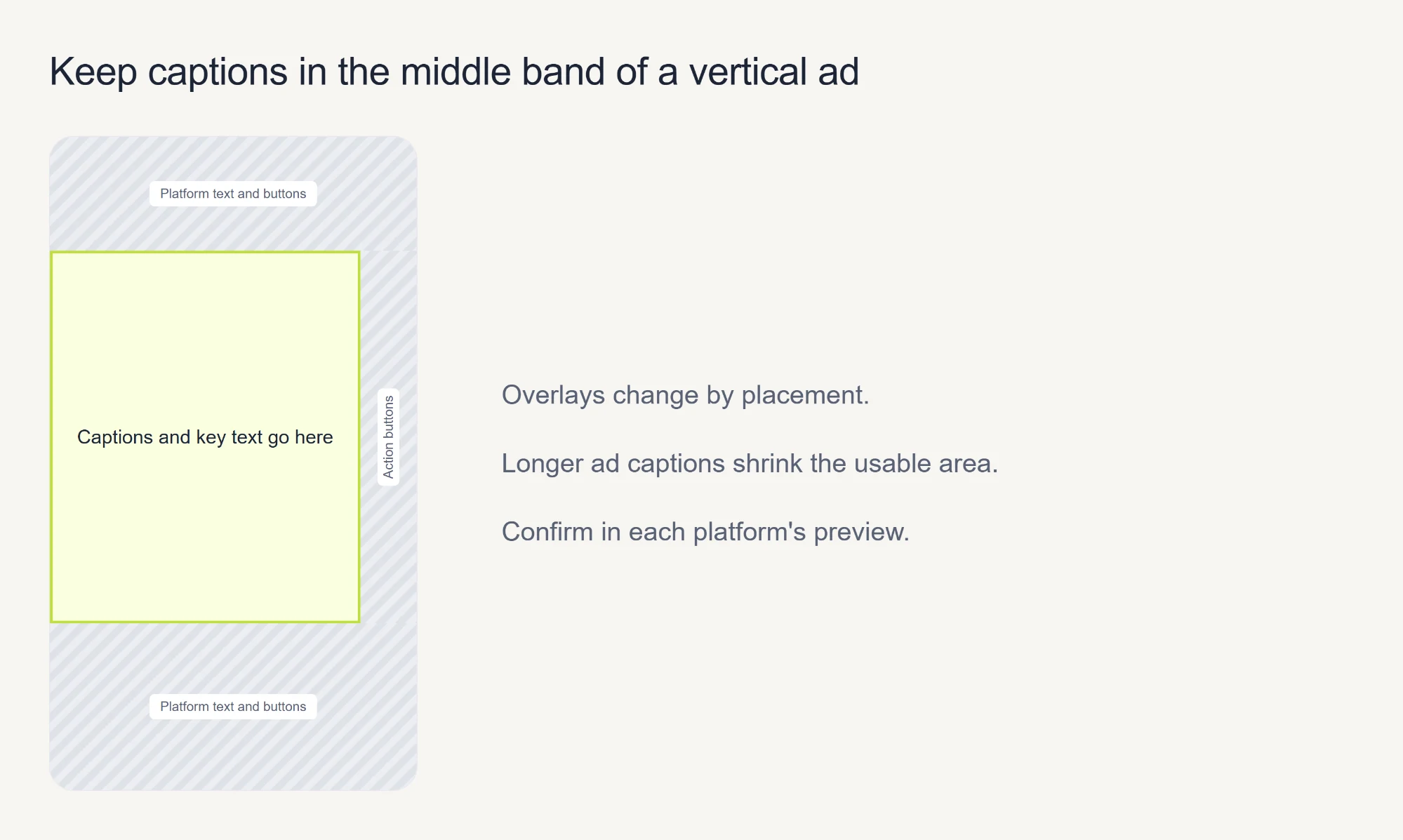
Keep captions and key text away from the edges of a vertical frame, where platform controls and descriptions can obscure them.
Meta recommends keeping key creative elements out of these areas for 9:16 ads. Its guidance for Reels ads with disclaimers specifies leaving the bottom 40% clear, so check the safe-zone overlay in Ads Manager before approval.
On TikTok, the usable space also depends on the video dimensions, caption length and additional formats. The safe-zone templates help you plan the layout, but allow room for the longest planned caption and check each placement preview.
Review Auto-Captions Before Launch
Once the captions are in place, treat any automatically generated text as a first draft and review it as part of your creative production workflow.
The product name and price are my first priorities, since a transcription error there can change the offer.
- Play the ad with sound and read the captions at the same time.
- Fix names, product terms, and numbers.
- Recheck timing and line breaks after a re-edit.
- Have a fluent reviewer verify translated captions in localized variants.
Color Contrast Requirements for Ad Creative
For ad creative, use a minimum contrast ratio of 4.5:1 for normal text and 3:1 for large text, following WCAG 1.4.3, which Meta also cites for ads.
WCAG defines large text as at least 18 pt regular or 14 pt bold in web rendering. A font size in a video editor may appear smaller on a phone, so favor the higher ratio when in doubt.
Try reading a pale gray map label on your phone outdoors at midday. Even when the type looks clear on a desktop, glare can make it hard to read. That's why I consider the viewing conditions when evaluating a design.
Text Contrast Ratio for Ads
Use the WebAIM Contrast Checker with the foreground and background hex values. The table below shows which threshold to apply.
| Element | Minimum ratio | How to check |
|---|---|---|
| Normal text | 4.5:1 | Sample both colors, enter the hex values |
| Large text (18 pt regular or 14 pt bold, web equivalent) | 3:1 | Same method, large-text result |
| Visual CTA cue or boundary | 3:1 as a production target where needed for identification | Sample the cue and adjacent color |
| Logos | Exempt | Exempt for logotype text only; keep it legible |
When designing ads for older audiences, give the text enough room to increase its size without covering the product or offer.
Contrast for Text Over Video
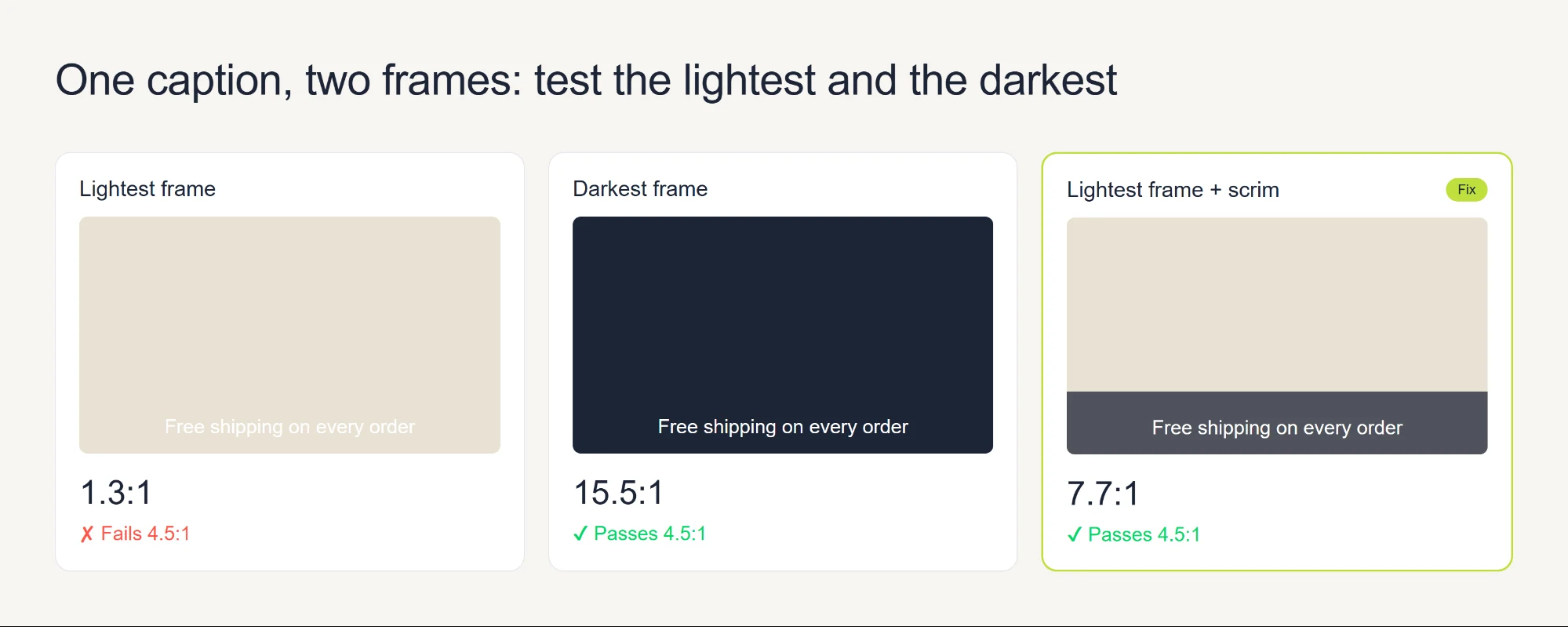
Test text throughout the section of video where it appears, since the background can change from one frame to the next.
The lowest contrast may occur on a bright or dark frame, a midtone or even a small patch behind a letter.
- Scrub through the clip and identify the lowest-contrast areas behind the type, including light and dark frames.
- Sample the foreground and background colors in those areas.
- Enter each pair into the checker.
- Add a scrim or text box, or adjust the type color, and retest the full span.
I'd add a scrim before changing the brand color. It makes the background easier to control, provided the lowest-contrast areas still pass.
CTA Button Contrast
Check the CTA label against its fill first. WCAG 1.4.11 specifies 3:1 for visual cues needed to identify a web control or meaningful graphic.
For a decorative button drawn into a video, I use the same ratio as a practical target when the outline or fill is needed to identify the CTA. The WCAG criterion applies to interactive controls and relevant graphics; the label itself should meet the relevant text threshold.
Do Not Use Color Alone to Carry Meaning
Color alone can't communicate a price, status or restriction. WCAG 1.4.1 requires an additional cue, and Meta advises against instructions based solely on sensory characteristics.
For a red-and-green promotion, label the current price and the original price explicitly, so the meaning survives in grayscale.
Audio Accessibility: Audio Description and Voiceover for Ads
For video advertising, accessible audio means a person can understand the offer without seeing the screen. Just as captions help a viewer follow the message on mute, the voiceover needs to carry the essential information for someone who is listening.
Write Voiceover That Names the Product and Reads the CTA
Name the product and read the call to action aloud. In Google's research with Kantar and Eye Square, more than 90% of the ads in the study conveyed information exclusively through visuals.
I'd write the brand, product and offer into the voiceover before approving the storyboard, while the timing is still flexible.
When Video Ads Need Audio Description
Provide audio description when important visual information is missing from the soundtrack. WCAG 1.2.5 is a Level AA criterion for prerecorded synchronized media; no extra description is necessary if the existing audio communicates all essential visual information. Planning that information into the script can reduce the need for a separate narration track.
Google's 2024 Super Bowl ad for the Pixel 8, "Javier in Frame," shows how an audio-described spot can identify the product and its features.
That example illustrates why it's worth taking the time to plan integrated description before filming. My advice for the creative brief is to mark the essential visual facts alongside the dialogue so the writer can work them into the script.
How to Upload Descriptive Audio on YouTube
Upload descriptive audio on YouTube as a separate audio track in YouTube Studio.
- Ensure the original or dubbed audio track for the intended language is already uploaded.
- Open YouTube Studio and choose Languages.
- Select the video and the language.
- Next to Descriptive audio, choose Add, select an audio-only file roughly the length of the video, and click Publish.
The feature is available to channels with advanced features. YouTube's instructions cover uploaded videos; verify support for the paid placement before promising a separate track. If it is unavailable, prepare a version with the description integrated into the primary audio.
Balance Music and Voice
Keep the music low enough for the voice to remain intelligible, including on a phone speaker. Confirm the loudness targets for ad deliverables before export. I'd rather lose a music swell than lose the offer.
Cognitive Accessibility: How to Make Ad Messages Easier to Understand
Make an ad easy to understand by centering it on a single claim, supported by a clear proof point and CTA. Even when the text is legible and the audio is clear, the message itself can still be difficult to understand. Give viewers time to process what the product does and what to do next.
One Message per Ad
Give each ad a claim a viewer could repeat after one watch. A second, unrelated message deserves its own creative variant.
Reading Time for On-Screen Text
Once the claim is clear, give viewers enough time to read it. As a production rule of thumb, allow enough time to read each text card aloud twice at a normal pace. Check each UGC video length independently: a 15-second cut may need shorter copy than a 30-second version.
Plain Language in Copy and Voiceover
Use short sentences, expand unfamiliar abbreviations and replace jargon with everyday terms. An eighth-grade reading level is a useful practical target.
WCAG 3.1.5, a Level AAA criterion, calls for simpler or supplemental content when the reading difficulty exceeds lower secondary education. I treat that as a guide for writing clear ad copy.
Pacing and Flashing Limits
Avoid flashing effects in ad production. WCAG 2.3.1, at Level A, allows no more than three flashes in any one-second period or flashing below defined general and red-flash thresholds. TikTok also warns creators about effects that can trigger photosensitive epilepsy.
I'd cut strobing transitions altogether unless there is a compelling reason and the footage passes a proper safety check.
How to Brief Creators on Accessibility for UGC and Spark Ads
Include accessibility requirements in the TikTok UGC brief before creators record. Specify the required files, readable text placement and essential narration alongside the hook and offer.
This gives the editor options without forcing the creator to reshoot.
| Brief field | What to ask the creator | Why |
|---|---|---|
| Clean video plus caption file | The video without burned-in text, plus an SRT | Allows placement-specific caption tracks where supported |
| Burned-in version | A second cut with captions in the safe zone | Keeps captions visible when separate tracks are unavailable |
| Text placement | Follow the placement template and leave room for overlays | Reduces the risk of obscured key information |
| Voiceover line | Say the product name and the offer out loud | Keeps the product and offer clear without visuals |
| Hook frame contrast | Check the hook text with a contrast checker | Improves legibility at the first point of contact |
Creators can edit TikTok's auto-generated captions, and viewers can turn them off. Check the paid version, since organic caption settings alone cannot tell you what every viewer will see.
For whitelisted Spark Ads, burned-in subtitles remain part of the video. TikTok's advertising caption and translation feature is separate from the original post's settings and has an opt-out process.
Before approving a creator delivery, my focus is on three checks:
- The supplied SRT matches the final audio and timing.
- Both the clean and captioned versions fit the intended placements.
- The actual product and offer are understandable from the recorded narration.
For teams outsourcing creator production, an agency specializing in UGC can help coordinate these requirements across creators and placements.
How to Test an Ad for Accessibility Before Launch
Once the final assets are ready, run five quick checks before uploading them to the ad account. These practical screening tests complement the technical checks for contrast, flashing and audio description.
For the first review, a fresh pair of eyes is particularly useful. An editor already knows the offer and can fill in information a new viewer might miss, so choose someone outside the editing team.
- Sound-off watch. Pass if a viewer can name the offer with the sound off.
- Audio-only listen. Pass if the voiceover carries the product and the call to action.
- Grayscale view. Pass if every color-coded meaning survives without color.
- Phone at arm's length. Pass if every text card is readable on a real handset.
- Caption read-through. Pass if the captions match the final cut line by line.
Give the accessibility review a named owner and use a clear pass-or-fail decision as part of the approval workflow.
When possible, involve people with relevant disabilities in evaluating comprehension and usability. These checks complement their feedback; they cannot reproduce every viewing experience.
How Much Does Accessible Ad Production Cost?
For paid social, the extra cost depends on the number of deliverables and how much additional editing, narration and review each requires.
A caption correction on an existing asset is a different production job from recording a descriptive voiceover or reshooting an inaccessible scene. I'd price these tasks separately.
To put the production effort into perspective, consider the published UK figures below. ISBA's Reframe framework excludes digital and cognitive accessibility; the Responsible Marketing guide also provides a UK estimate. Treat these as context for broadcast production, and estimate paid-social work separately.
| Item | Typical add | Source |
|---|---|---|
| Subtitles | A few hundred pounds and 2+ hours per advert | ISBA, UK TV |
| Audio description | 3 to 4 days in post-production | ISBA, UK TV |
| Sign language | About 1 week | ISBA, UK TV |
| All accessibility work per asset | About 1 extra week and £300 | Responsible Marketing, UK, Dec 2024 |
Separate concepts, variants and files when estimating the work. Ask your editor to quote the incremental caption edits, extra audio recordings, layout changes and final QA.
One captioned master may cover multiple placements if the safe zones match, so check how many genuinely distinct exports the campaign needs.
How to Test Whether Accessible Creative Improves Ad Performance
To test whether an accessibility improvement affects ad performance, compare your current accessible creative with a version that adds a specific improvement, such as a more readable caption layout or clearer product narration.
Both versions should meet the minimum accessibility criteria.
This isolates the effect of the individual improvement, so the result cannot establish the impact of accessibility as a whole. Use the platform's A/B testing tool to randomly assign viewers to nonoverlapping groups.
- Keep the offer, duration and other creative elements constant in a single-variable creative test.
- Choose the primary metric for the campaign objective, such as cost per acquisition for a conversion campaign. Use completion rate and comprehension as secondary diagnostics.
- Set the sample-size target, budget, duration and stopping rule before launch.
- Call an underpowered test inconclusive.
I'd work with the paid media team to interpret the results alongside feedback from viewers. If clearer captions improve comprehension but CPA remains flat, that is still useful evidence for the creative team.
With that in mind, keep the baseline accessibility features and use the performance data to choose the next variation.
Build Accessible Ads That Convert with inBeat Agency
If there's one thing I'd settle before a shoot, it's which information the audience needs to understand the offer through either the visuals or the audio.
That decision gives the writer and designer a shared starting point and can save the editor a round of revisions.
If your team needs help applying this approach across campaigns, book a strategy call with inBeat to discuss your production process.
FAQs
Does Spark Ads auto-captioning replace captions I add myself?
No. TikTok filters duplicate captions in supported Spark Ads, and the auto-caption feature is limited to eligible US and EU placements. Translate and Dub disables it. Supply reviewed captions and confirm how the final placement displays them.
Does an ad whose voiceover already describes everything still need audio description?
A separate description track is unnecessary under WCAG 1.2.5 if the existing audio conveys all important visual information. Check the actual script and soundtrack before deciding.
Which contrast ratio applies to text over video?
Use 4.5:1 for standard text or 3:1 for qualifying large text. Check the lowest-contrast portions of the clip across the full time the type is visible.
Do whitelisted creator ads inherit the creator's captions?
Burned-in subtitles remain part of the source video. The post description and auto-generated caption tracks are different features; verify the final Spark Ad preview and any caption or translation settings.
Which WCAG level should I target for ad creative?
Use the relevant WCAG Level A and AA criteria as a production benchmark, including 1.2.2 for captions, 1.4.3 for contrast and 1.2.5 for audio description. Level AAA criteria can guide further improvements. Legal obligations depend on the advertiser and context, so consult counsel.