

What if your marketing approval process is slowing down the very campaigns it's supposed to protect?
It's a question worth asking when Adobe reports that 89% of marketers send content through at least three approval stages. Every additional review can catch a costly mistake, but it can also introduce conflicting feedback, delayed launches, and another round of revisions.
The solution isn't simply fewer approvals. It's knowing which decisions matter, who should make them, and when an asset is ready to move forward.
Let's break it down.
TL;DR
- Definition: a marketing approval workflow is the route an asset takes from draft to launch, with named reviewers and a final sign-off.
- Cost: slow approvals show up as revision rounds, waiting days, and launches that slip.
- Build: map the current process, sort assets by risk, set gates, name approvers, centralize feedback, set turnaround times, and document everything.
- Speed: match review depth to risk, so a low-risk post never waits in the same queue as a regulated claim.
- Creators and video: clear the content first, then authorize paid use when needed; aim for two routine revision rounds while keeping mandatory checks intact.
What Is a Marketing Approval Workflow and What Does It Include?
A marketing approval workflow, also called a content approval workflow, is the defined route a marketing asset takes from draft to launch, with named reviewers, approval statuses, and a final sign-off. It covers ads, social posts, landing pages, emails, video, and creator content.
Three terms get mixed up, so here is the split we use:
- Approval process: the rules, meaning who reviews what and what they check.
- Workflow: the route, meaning the order of stages and the handoffs between them.
- Tool: the place where the route runs, whether that's a spreadsheet or a proofing platform.
Fix the process first, then the route, then pick the tool. In our experience, teams that start with software often automate a route nobody agreed on.
What Does a Slow Marketing Approval Process Cost a Team?
Slow approvals consume reviewer hours and leave finished assets waiting. In Adobe's 2025 study, 58% of marketers said more than 40% of their time went to managing reviews and approvals.
Three failure points show up again and again:
- Unclear approvers: two people think they own the final call, or nobody does.
- Scattered feedback: edits arrive through email, chat, and meeting notes, and nobody merges them. In Litmus's 2023 State of Email Workflows report, 35% of email marketers named collecting feedback as a production bottleneck.
- Approvals that never arrive: the asset sits in someone's inbox while the launch date gets closer.
Run the cost on your own numbers with this table:
| Cost driver | How to measure it | Where it shows up |
|---|---|---|
| Revision rounds | Rounds per asset, averaged over a month | Designer and video team hours |
| Reviewers per asset | Names on the review list | Reviewer hours and conflicting edits |
| Monthly reviewer hours | Assets per month × reviewers per asset × revision rounds per asset × minutes per round ÷ 60 | Capacity of the whole team |
| Days waiting | Days between submission and each response | Launch dates and test velocity |
| Launch slip | Actual launch date minus planned launch date | Lost campaign days and missed windows |
Here is an illustrative example (our own arithmetic, so swap in your numbers). A team ships 20 assets a month, and each asset gets 3 revision rounds from 4 reviewers who spend 30 minutes per round. That is 20 × 3 × 4 × 0.5 = 120 reviewer-hours a month.
Aim for 2 revision rounds and route each asset to an average of 2 reviewers, and the same month costs 20 × 2 × 2 × 0.5 = 40 hours. The 80 hours you get back equal two working weeks. Waiting adds more: if each round sits for two days, three rounds add six days before the asset can go live. Approval time also sets the pace of creative testing. A team that produces new concepts every week learns less quickly if finished assets sit in review for days before launch.
How to Build a Marketing Approval Workflow in 7 Steps
Build a marketing approval workflow by mapping the current route, sorting assets by risk, setting gates, naming approvers, centralizing feedback, fixing turnaround times, and documenting the result. Do the steps in this order, because each one depends on the one before it.
- Map the current process and time every handoff. Follow three recent assets from request to launch and note who touched them and how long each handoff took. The slowest handoff is your first fix, and the timings become your baseline for the metrics section.
- List your asset types and sort them into risk tiers. A social caption and a health claim shouldn't share a queue. Three tiers cover most teams, and the next section shows how to set them.
- Define workflow stages and approval gates. A gate is a point where someone answers a yes-or-no question about the asset. Keep each gate to one yes-or-no decision, such as "does this follow the brand guidelines?" A short checklist can support the decision.
- Name one sign-off authority per gate, plus a backup. A backup keeps a vacation from freezing a campaign launch.
- Centralize feedback and version tracking in one place. A shared folder with a naming rule is the minimum. An online proofing tool is the upgrade, and the software section covers when it pays off.
- Set turnaround times and approval statuses for every stage. Statuses such as "in review", "changes requested", and "approved" tell everyone where an asset sits without a status meeting.
- Document the route and review it every quarter. Keep a one-page map and an audit trail of who approved what and when. Compare each quarter's cycle times with your baseline.
For step 1, a simple audit table does the job. Fill one row per handoff for each of the three assets you follow:
| Handoff | From and to | Days waiting | What caused the wait |
|---|---|---|---|
| Draft to peer check | Designer to teammate | 1 | Reviewer didn't know the asset was ready |
| Peer check to brand review | Teammate to brand owner | 3 | Feedback sat in an email thread |
| Brand review to sign-off | Brand owner to approver | 2 | No backup approver while the approver was out |
The example rows are illustrative. Look for waits that cluster around handoffs without a named owner.
The table below shows what the map looks like once it's written down. The turnaround targets are starting points, so adjust them to your team's size and volume.
| Stage | Owner | Gate question | Starting target |
|---|---|---|---|
| Request and brief | Requester | Are the goal, audience, and claims clear? | 1 day |
| Draft | Designer, creator, or video team | Does the draft match the brief? | Set in the brief |
| Peer check | A second teammate | Are facts, links, and specs right? | 4 hours |
| Brand review | Brand owner | Does it follow the brand guidelines? | 1 working day |
| Legal review | Legal team (tier 3 and any asset with a mandatory check) | Are claims and disclosures defensible? | 2 working days |
| Final sign-off | Named approver | Is it ready for campaign launch? | 1 working day |
| Launch and archive | Producer | Is the approved version the one going live? | Same day |
The same logic sits behind any scalable creative production system: the review step only stays fast when its rules are written down before the volume arrives.
How Many Approval Gates Does Each Asset Need?
For routine assets, this model uses one core review gate for tier 1, three for tier 2, and four for tier 3. Those are starting paths, not a ceiling: required regulatory approvals and paid-media permissions still apply, whatever tier an asset initially receives.
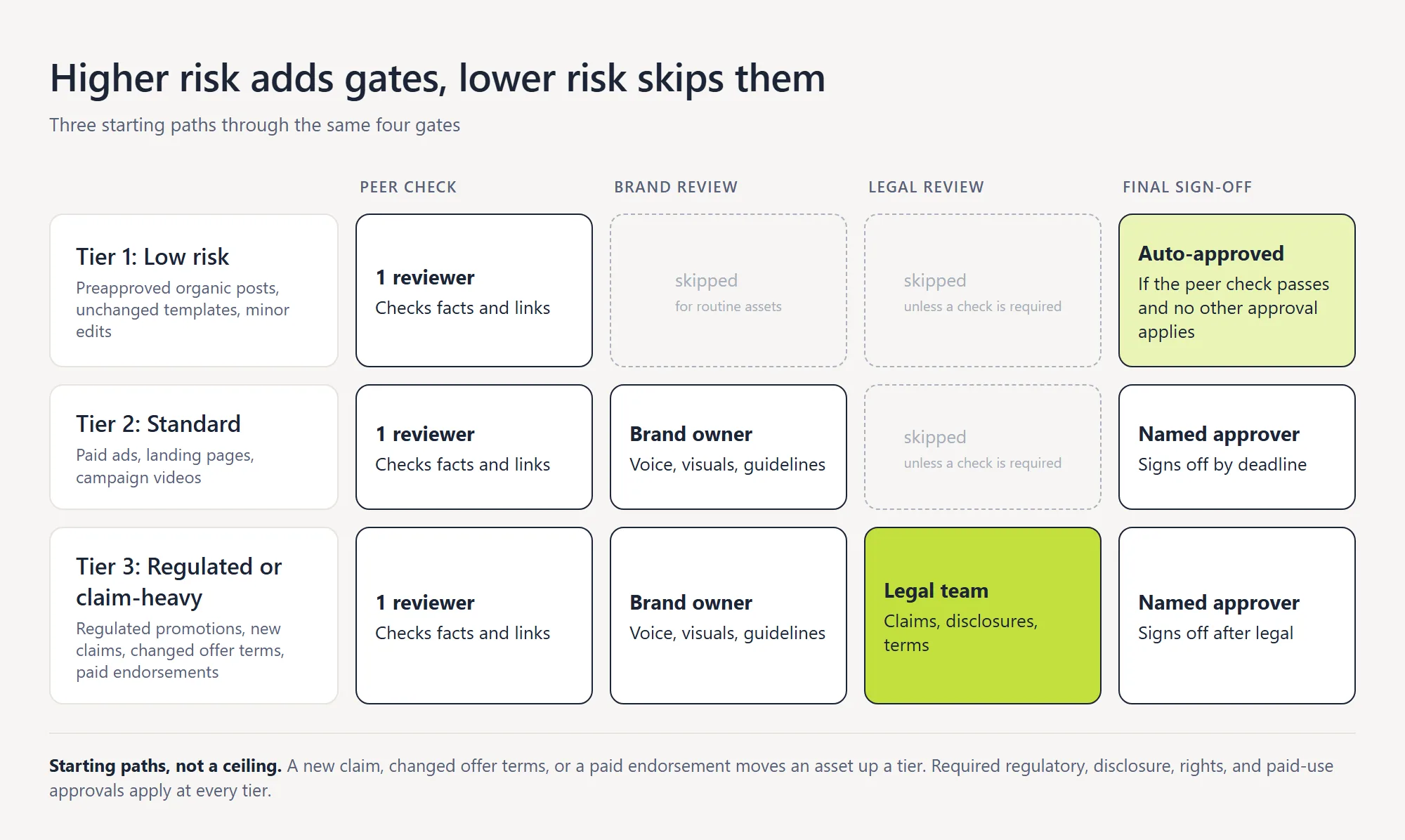
Only routine assets with no new claims or mandatory checks use the shortest route. Regulated or materially changed content follows the approvals required by applicable rules and the brand's written policy.
| Tier | Asset examples | Reviewers | Starting target |
|---|---|---|---|
| Tier 1: Low risk | Preapproved organic posts, unchanged email templates, minor copy edits | One peer, then auto-approval if no other approval applies | Same day |
| Tier 2: Standard | Paid social ads, landing pages, campaign videos | Peer, brand owner, final approver | 3 working days |
| Tier 3: Regulated or claim-heavy | Regulated promotions, new claims, changed offer terms, paid endorsements | Adds the legal team | 5 working days |
When to Move an Asset to a Higher Risk Tier
An asset's first tier is only a starting point. Recheck its route when a draft adds an unapproved product claim, changes an offer's eligibility or discount, introduces a paid endorsement, or moves into a regulated use case. A minor copy correction to an already cleared template may stay on the light path; a changed promise needs the relevant specialist's review. Record the tier and version together, such as T2_paid-social_spring-offer_v3, so the next reviewer can see why the asset followed that route.
Assign Sign-Off Authority and Role-Based Access Control
Sign-off authority belongs to one named person per gate, and everyone else on the review list is an adviser. An approval hierarchy spells out who can approve, who can only comment, and who can see the asset at all.
Role-based access control keeps that hierarchy honest inside your tools. A typical role set looks like this:
- Requester: submits the brief and receives the finished asset.
- Creator or designer: graphic designers, the video team, or outside content creators who make the draft.
- Brand reviewer: checks voice, visuals, and brand guidelines.
- Legal reviewer: checks claims, terms, and disclosures.
- Final approver: the only role that can mark a tier 2 or tier 3 asset "approved". Tier 1 assets auto-approve after the peer check only when no other approval is required.
When Legal Compliance Review Is Required
Route assets for legal or compliance review when they introduce or materially change regulated claims, endorsements, required disclosures, or offer terms that need specialist sign-off. An unchanged price or disclaimer taken from an approved template may qualify for a lighter review, provided the brand's written policy and applicable rules allow it. Treat the tier label as a routing aid, not an exemption from required checks.
Some categories have the gate written into the rule. For FINRA member firms, FINRA Rule 2210 generally requires an appropriately qualified registered principal to approve retail communications before the earlier of use or filing with FINRA. The rule also provides specific exceptions and alternative review arrangements, so the exact sign-off route must follow the firm's supervisory procedures rather than a generic marketing-tier chart.
How to Approve Creator and UGC Content for Organic and Paid Use
Creator content needs two distinct decisions: whether the content itself is cleared, and whether the brand is authorized to use it in paid media. An organic post can go live after the first decision; paid-only UGC moves directly toward the second without needing an organic publication step. Claims, disclosures, brand checks, usage rights, and platform permissions still apply to the intended placement. The table below maps both paths.
| Path | What happens | When it applies |
|---|---|---|
| Content clearance | The brief, any required script or talking points, and draft are checked for claims, disclosure, brand fit, and production quality. | Every creator asset, whatever its final placement |
| Organic publication (optional) | Once the content is cleared, the post goes live on the creator's or the brand's channel. | Only when the post is meant to run organically |
| Paid-use clearance | Contract rights, applicable platform permissions, and ad policy are confirmed, then the ad launches. | Whenever the asset will run as an ad, with or without an organic post |
Approve the Brief and Key Claims Before Filming
Review the creator's brief before production to catch factual, legal, and brand issues while they're still easy to fix. A full script may be necessary for regulated or claim-heavy content, but an approved concept and talking points are often enough for creator-led videos.
Lock these in the brief:
- Claims: approved product statements and any wording that must remain exact.
- Disclosure wording: required language and where it needs to appear.
- Must-show shots: essential product moments or demonstrations.
Pro tip: Ask for a full script when specific spoken claims or disclosures require line-by-line approval. Otherwise, review the concept and key messages while leaving room for the creator's natural delivery.
Send the approved brief and any required script to the creator as one reference. Changes to locked claims, disclosures, or essential requirements should return for approval.
Routine wording adjustments can stay flexible as long as they preserve the approved meaning. Assign one contact for production questions so informal feedback never changes a cleared claim.
Our influencer brief templates cover the brief fields in detail.
What to Check When Reviewing a Creator Draft
Review a creator draft against a short checklist, and have the reviewer tick each line.
The brand shares responsibility for disclosure with the creator. The FTC says that responsibility rests with the influencer and the brand, and advertisers need reasonable programs to train and monitor the influencers they pay and direct.
Use this checklist on every creator draft:
- Does the disclosure appear clearly and early, in the format the brief specified?
- Does every product claim match the approved claim list?
- Does the content follow the brand guidelines for tone and visuals?
- Are music, logos, and other third-party material cleared?
- Does the creator's own audience context fit the product?
Sign Off Paid Usage and Whitelisting Separately
Treat paid usage as a separate clearance decision. Confirm that the term in your UGC usage rights covers the channel, planned run, duration, and permitted edits.
Platform authorization depends on the ad format. For TikTok Spark Ads using a creator's post, TikTok lets creators provide a code to authorize that post for a defined period. Other supported authorization methods may also apply.
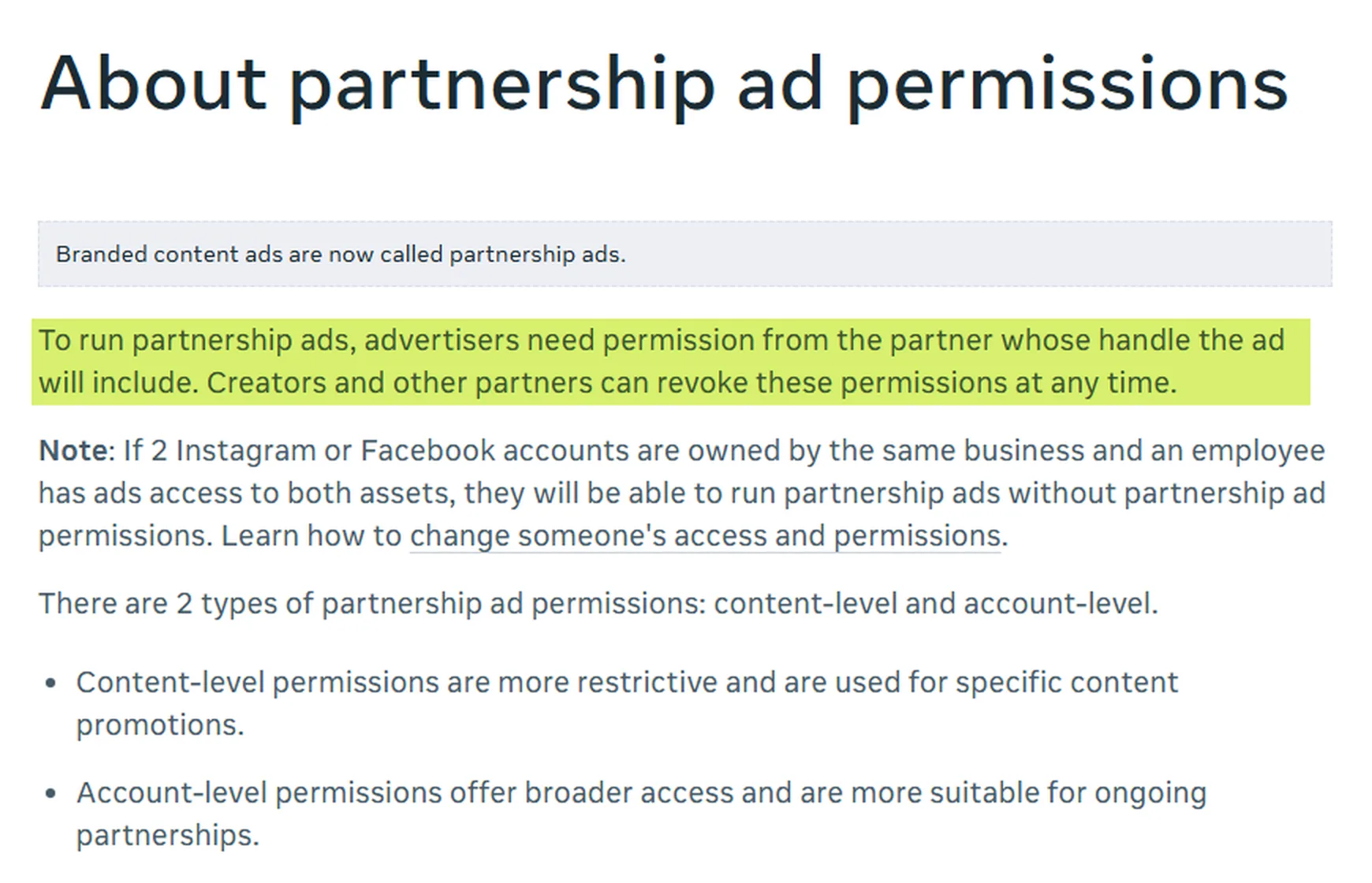
Meta partnership ads have their own permission requirements. Advertisers need the partner's authorization to run these ads, and creators can revoke that permission at any time.
Standard ads running from a brand's own account with properly licensed UGC follow a different setup and may not require creator-post authorization. For paid-only UGC, content clearance and paid-use clearance can both be completed before any organic post exists.
Two practical rules follow from that:
- Match the term to the plan. Check that the usage-rights period covers the planned ad run before spend starts, and keep the start and end dates in writing next to the approved asset.
- Gate the test budget. Put a short approval step before any dark post test, so spend only attaches to content with cleared usage.
How to Collect Feedback and Limit Revision Rounds on Video and Design Assets
Keep all feedback in one place per asset and aim for no more than two routine revision rounds. If material issues remain, escalate to decide the next correction and owner; the asset stays blocked until any required legal, disclosure, rights, and brand checks pass.
| Feedback method | Works for | Breaks when |
|---|---|---|
| Email threads | One reviewer, one short text asset | Three reviewers send conflicting edits |
| Comments in a shared folder or cloud folders | Small teams, static files | Nobody can tell which version a comment refers to |
| Online proofing tool | Design files, PDFs, multi-reviewer rounds | Reviewers don't have access or never log in |
| Video collaboration tool with timestamped comments | Video review | Feedback arrives outside the tool in a call |
Four rules keep video review and design review tight:
- One review link per asset. Every reviewer comments in the same place, so nobody works from a stale file.
- One consolidated list per team. A named lead per department merges their team's notes before the designer sees them.
- Two routine rounds, then escalate. Use the first to fix substance and the second to verify. The final approver decides the next action for unresolved items, but cannot waive a mandatory claim, disclosure, compliance, or usage-rights check.
- Export the record. Keep review exports of comments and decisions with the final file, so the audit trail survives the project.
Name versions in the file itself (v1, v2, v3_final-approved) so version control doesn't depend on anyone's memory. Version tracking is only useful when the approved version is also the one that gets uploaded.
Pro tip: ask reviewers to mark each comment as "must fix" or "nice to have". Revision rounds shrink once the designer knows which notes block approval.
For a worked example of review criteria on remote shoots, see our guide to directing an overseas ad shoot.
How to Approve Offers, Promotions, and Segmented Campaigns
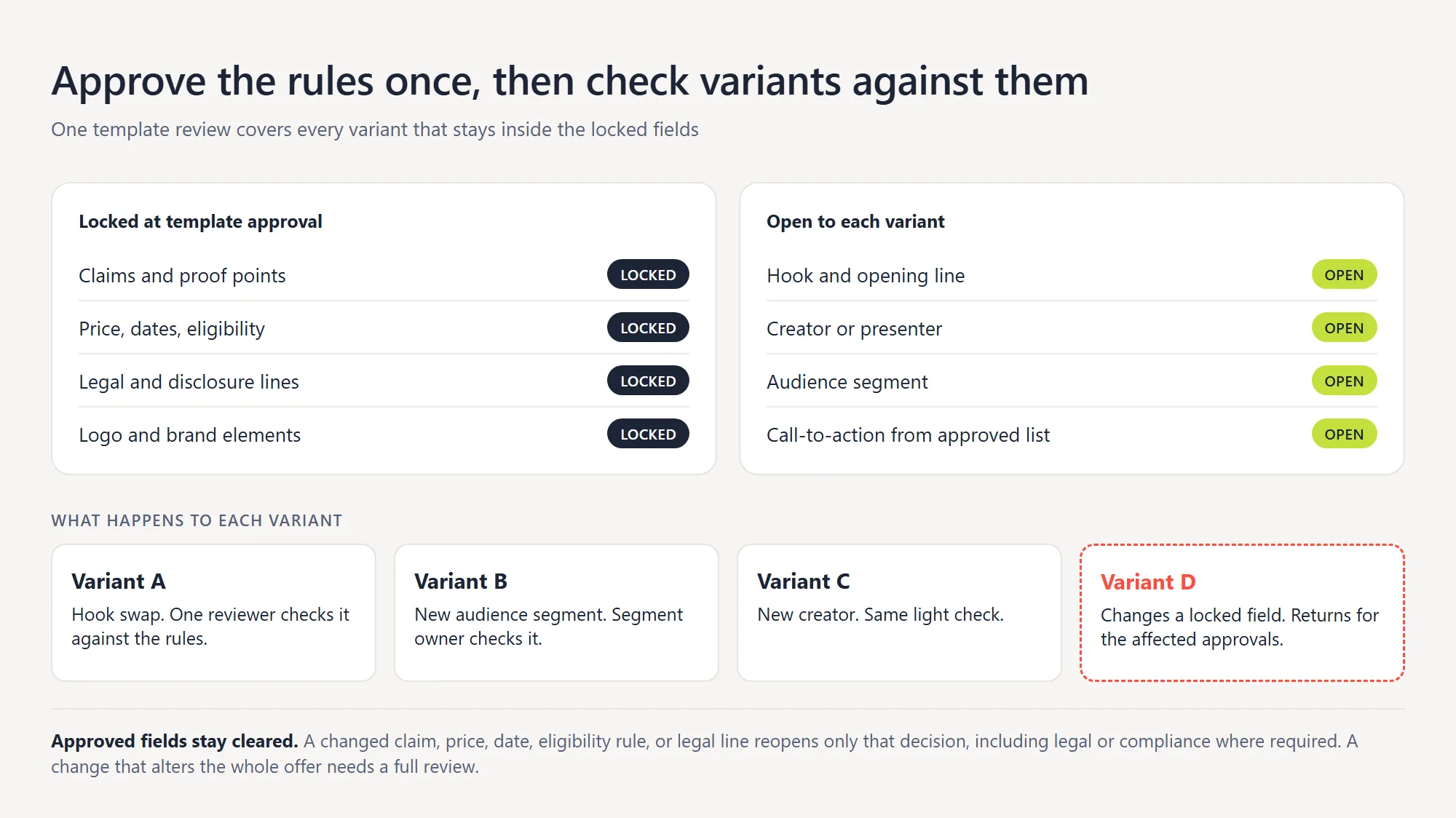
Approve offers and promotions by checking the terms once at template level, then letting variants run inside those locked rules. One campaign can spawn dozens of variants, and a full review of each one doesn't scale.
Approve the Template Once, Then the Variants
Start with a template that locks approved claims, prices, dates, eligibility, and required legal language. Send new or materially changed claims and offer terms through the specialist checks required by your policy and applicable rules. Once the template is cleared, variants that preserve those locked fields can take a lighter route, provided a new hook or audience context does not change what the offer promises.
Use this checklist at template level:
- Price and discount: the exact amounts and how they're displayed.
- Dates: start, end, and time zone.
- Eligibility: who qualifies, and who doesn't.
- Terms: the fine print the offer requires.
A variant that changes a locked field returns to the appropriate owner for that change, including legal or compliance where required. Approved fields can stay cleared; only the affected decision needs reopening unless the change alters the full offer. The pressure comes from volume, and our piece on how many ad creatives you need per month shows how fast the variant count climbs.
How Does a Segmentation Approval Workflow Work?
A segmentation approval workflow gives each audience segment its own owner, who checks that the variant fits that audience. The same offer can read differently to a new customer and a returning one.
Say a limited-time offer runs to three segments. The segment owner confirms the message and eligibility for their group, and the campaign's final approver signs once the three owners have checked.
That keeps the approval load proportional to the real risk in each segment, and the final approver never rereads the same offer three times.
How to Choose Approval Workflow Software for Your Team
A spreadsheet plus a shared folder is enough for a small team with one approver and low asset volume. Dedicated approval software starts to pay off when several reviewers, video files, or regulated content enter the process.
| Setup | Best for | Limits | Audit trail |
|---|---|---|---|
| Spreadsheet plus shared folder | Low volume, one approver | Manual statuses, version mix-ups | Only if someone logs it |
| Project management system (Asana, Wrike, or Workfront, for example) | Recurring campaigns and task routing | Markup and proofing are often thin | Task history |
| Online proofing and approval platform (Filestage, PageProof, Ziflow, or Frame.io, for example) | Many reviewers, video, design, regulated work | Another tool and another seat cost | Built in |
Use this checklist when you compare approval workflow tools:
- Version control: every upload becomes a numbered version, and comments stay attached to it.
- Audit trail: a time-stamped record of who approved what.
- Automated approvals: reminders, escalation, and auto-approval rules for low-risk assets.
- Role-based access control: reviewers see and do only what their role allows.
- Integrations: a connection to your content management system, your file sharing systems, and your project management system.
- Video review: timestamped comments on the file.
How to Automate Approvals Without Losing Control
A useful automation starts with a checkable trigger. When a tier 2 ad moves to "Ready for review", the system assigns a peer reviewer, records the submission time, and starts the agreed turnaround window.
A missed deadline sends a reminder; a second miss alerts the named backup. After the peer check passes, the current version moves to the brand owner and then the final approver.
Each decision records the reviewer, timestamp, result, and version. If a substantive edit arrives after sign-off, reopen the affected gate before launch. Tier 1 can auto-close after its peer check only when no additional approval is required.
Tier 2 and tier 3 still need their human sign-offs, and automation never overrides legal, disclosure, or paid-use requirements. Before publishing, verify that the live asset matches the approved version.
How to Measure Approval Workflow Efficiency
Measure approval efficiency with five numbers: cycle time, first-pass approval rate, revision rounds per asset, time in each status, and overdue approvals. Use the baseline from step 1 as your starting line.
| KPI | Formula | Healthy signal |
|---|---|---|
| Approval cycle time | Days from submission to final sign-off, per tier | Falls after tiering, tier 1 under one day |
| First-pass approval rate | Assets approved on first review ÷ assets with a completed first review decision | Rises as briefs improve |
| Revision rounds per asset | Total rounds ÷ assets | At or under the two-round target |
| Time in status | Days each asset sits in each approval status | No status exceeds its turnaround target |
| Overdue approvals | Approvals past deadline ÷ approvals requested | Trends down month over month |
Read the numbers by stage. A long cycle time with a high first-pass rate points to slow reviewers, while a short wait with many revision rounds points to weak briefs.
Run the quarterly review in four moves:
- Pull the five KPIs for each tier and compare them with the previous quarter and with your step 1 baseline.
- Find the slowest stage and read its time-in-status data before changing anything.
- Check the tier mix. If tier 3 dominates, review the reasons: the asset mix may genuinely be high risk, or the rules may be over-routing routine changes. Keep every legally required check in place.
- Change one rule at a time, so you know which change moved the numbers.
Build a Faster Creative Approval System with inBeat
A good approval workflow protects the brand and speeds up testing, because both depend on the same thing: clear rules that everyone follows. At inBeat, creators, creative production, and paid social run as one system, which means approval gates are designed together with the testing plan that follows them.
If you're building or fixing a workflow for creator content, UGC, or paid social variants, book a strategy call. We'll review your current route, your asset tiers, and where the waiting time sits.
FAQs
How many reviewers should a social media post get when the brand is regulated?
A regulated social media post usually needs a peer check, a brand review, a legal review, and one named approver. Keep the list to those roles, because adding more voices slows the post without improving the decision. An organic post may take a lighter path only when it adds no unapproved claim or required disclosure and the firm's supervisory rules allow that route.
Should a creator's draft pass the same approval gates as in-house content?
A creator's draft should pass the same claim, disclosure, and brand checks, and content intended for ads also needs paid-use authorization, whether or not the creator publishes it organically. In-house content already sits inside your tools, and creator content arrives from outside, so it needs a clear intake step and a clear authorization record.
How do you set approval deadlines for a client who is always late?
Set a turnaround time in the workflow, and state what happens when it passes. A common rule is a reminder at the deadline and a handoff to the backup approver after a second missed deadline. Agree it in writing before the project starts, so the escalation is part of the process.
When does moving from a shared folder to approval software pay off?
Move when the cost of confusion exceeds the cost of a seat. Common signals are more than two reviewers per asset, video files that need timestamped comments, and a requirement to prove who approved what. If your monthly review hours keep climbing, run the cost example above and compare the hours saved with the price of a seat.