

The right ad reaches the right market when six facts travel with every file: market, language, approved status for that market, a link to the source file, a named owner role and the rights window.
Store those as structured metadata, write down the handoff rules, and a media buyer in Toronto or Mexico City can find the one approved variant in seconds without asking anyone. Keep them in someone's head, or in a folder name only the agency understands, and the library breaks the first time country or language counts grow.
This guide covers how to organize, retrieve and hand off creative assets across countries.
P.S. If your variant count is outrunning your library, our performance creative team produces creator-led ad variants tagged for market, persona and platform from the first cut.
What Is Creative Asset Management for Multi-Market Ad Teams?
Creative asset management is the system a team uses to organize, version, approve and retrieve the files that become ads.
For a team running paid media in several countries, it also records which market and language each variant belongs to, whether it's approved in that market, and how long the rights to run it last.
The goal is simple: any buyer in any market can find the one file they're allowed to run, and nobody else's.
How Is Creative Asset Management Different From Digital Asset Management?
Digital asset management and creative asset management are two layers, and multi-market teams need both. The DAM stores finished, approved files; the CAM layer is where those files are made and versioned. What matters is where the boundary sits and which layer owns the market and language tags.
What a DAM Manages: Finished, Approved Assets
The DAM is the system of record for approved, rights-cleared files. Once an asset crosses into it with approved status for a market, that flag is read-only downstream. Media buyers, local approvers and agencies read from here and nowhere else.
What Creative Asset Management Manages: Work in Progress and Its Variants
The CAM layer is where briefs, cuts, versions and localizations are produced and tracked. It is messy by design. For teams running paid media in more than three markets, our view is that the DAM boundary is the single source of truth and the CAM tool is replaceable: you can swap editing and review tools without harm, as long as every promoted asset lands in the DAM with its metadata intact.
Where Market and Language Data Belongs
Market and language must be assigned in the CAM layer at creation and inherited by the DAM record. If they're added at upload, localization loses its lineage and nobody can tell which brief produced the French re-cut.
Example: a French version lives as an in-progress cut in the CAM tool, then is promoted to the DAM carrying market=FR, language=fr-FR and approved=true, all inherited from the brief.
| Function | CAM layer | DAM layer | Who owns it in a multi-market setup |
|---|---|---|---|
| Briefing and versioning | Yes | No | Creative ops lead |
| Assigning market and language | Set at creation | Inherited, locked | Creative ops lead |
| Approved status per market | Proposed | Set once, read-only | Market approver role |
| Rights window | Entered from contract | Enforced at retrieval | Creator partnerships role |
| Retrieval for media buying | Never | Always | Paid social lead per market |
| Performance join | No | Stores asset ID | Performance analyst |
Write down which system in your stack is the DAM boundary and who may flip the approved flag.
Which Creative Assets a Multi-Market Ad Library Stores
A creative asset is any file or fragment that goes into a paid placement or can be re-cut into one. Five categories cover almost everything in a global library.
Adding a market rarely changes the visuals, but it almost always adds text and media variants: new subtitles, a re-voice, a caption file, a currency swap in an end card.
Organizing by language, region or audience from the first upload is the step Pics.io singles out for smoother localization, and it's the step most teams defer until the library is too big to retag.
Images and Design Files
Stills, logos, product renders and layered designs. These change least between markets, so one master usually serves several localized exports.
Ad Copy, Subtitles and Voiceover Scripts
Headlines, body copy, captions, subtitle files, voiceover scripts and the font licenses that go with them. This is the category that multiplies fastest with every language you add.
Video and Audio
Any video or audio file that can run in a placement or be cut into one: finished ads, creator deliverables, raw footage, b-roll, voiceover tracks, music beds and sound effects. A localization also produces new media pieces, such as a re-voiced audio track or a market-specific end card, and each one needs its own record with its own market and language tags.
Treating a localized track as a separate asset is what lets a buyer in one market find the version they're allowed to run.
Templates and End Cards
Templates, end cards, lower-third rigs and motion presets that other assets are built from. Tag them by market when they carry prices, currencies or legal lines.
Source Files and Project Files
The layered design, editing project or raw footage behind every export. The export is what gets uploaded to a platform; the source file is what makes the next market possible, because it can be re-captioned, re-voiced or re-framed in hours. An export alone forces a reshoot the moment on-screen text or framing has to change.
Why Creative Asset Management Breaks as Markets and Languages Grow
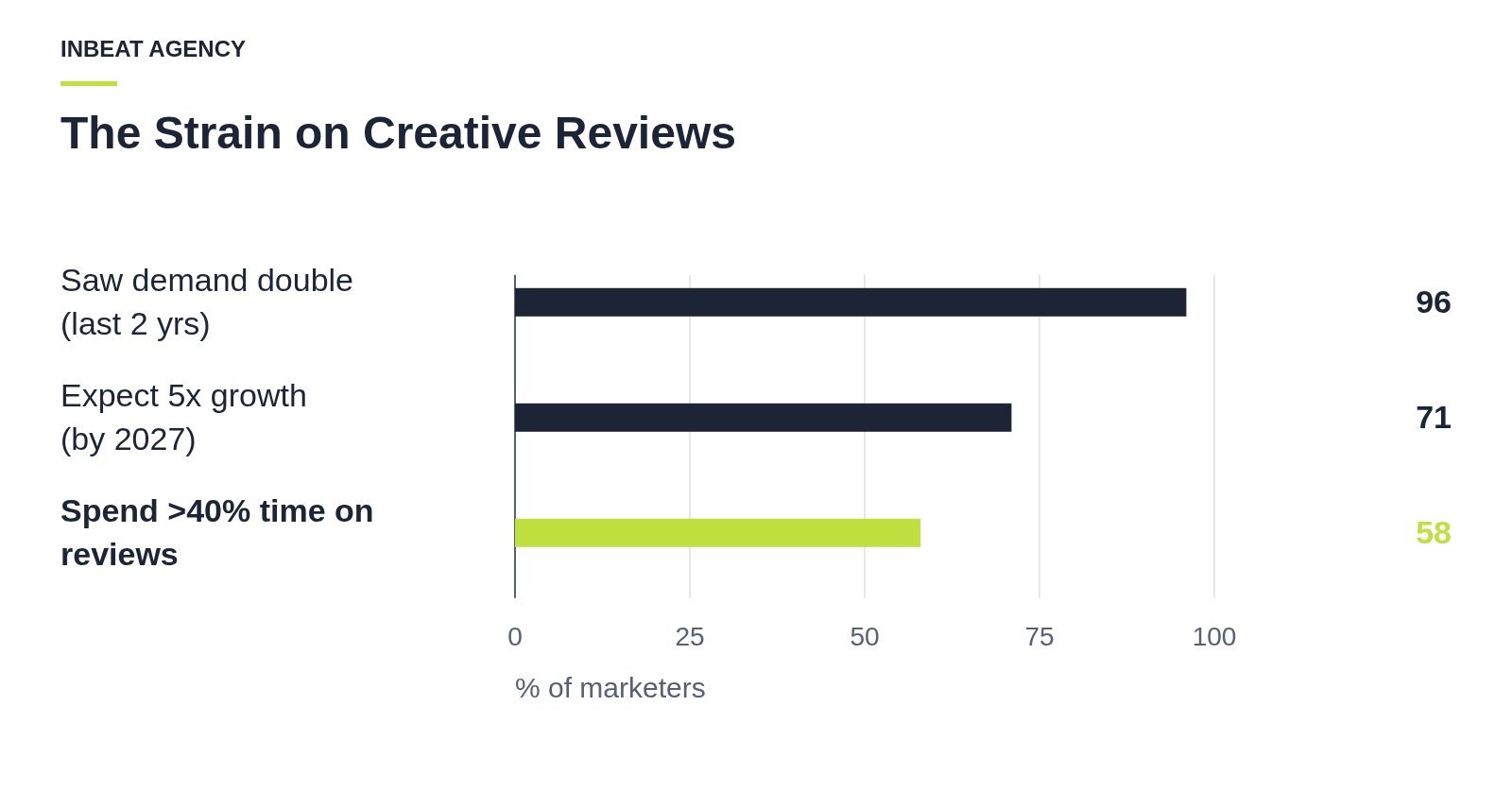
Libraries break because variant counts grow faster than the rules that track them. In Adobe's 2025 survey of more than 1,600 marketers, 96% saw content demand at least double over two years, 71% expect it to grow more than 5x by 2027, and 31% already use generative AI to translate content for global audiences.
The same survey found 58% of marketers spend more than 40% of their time managing reviews and approvals, so retrieval friction lands on teams that already have little time to spare.
Three failures follow, and each gets worse with every market added.
1. The Wrong Variant Goes Live in a Market
A superseded cut, or one tagged for Spain, runs in a Mexican placement because the buyer pulled it from a shared drive or a chat thread. Spend on a wrong-language or superseded creative buys impressions that teach you nothing about the concept you meant to test.
2. Creator Usage Rights Expire in One Market but Not Another
The expiry date lived in a contract PDF and never reached the asset, so the ad keeps spending in a market where the rights have lapsed. The fix is a forced pause mid-flight, which also resets the learning phase.
3. Source Files Get Lost Between Teams and Agencies
The agency that produced the original has moved on and only exports survive. A half-day re-cut for a new market turns into a production budget and a reshoot.
Metadata Fields Every Multi-Market Creative Asset Needs
Six fields are the floor for every asset: market, language, approval status per market, source file link, owner and rights window. Campaign, persona and platform fields turn the library into a test matrix. This schema is the core of multilingual asset management, and no general-purpose folder tree can carry it.
Market and Language
Market and language are separate fields. One language spans several regulatory markets, and one market can run in several languages: Spanish serves Spain, Mexico and Colombia under three sets of advertising rules, while Canada runs English and French under one.
Market takes a country code and language takes a language tag, so es-MX and es-ES are different values and a filter never conflates them.
The distinction matters for creative as much as compliance; Spanish-speaking audiences in the US respond to tone and cultural cues differently from audiences in Spain, which is why our guide to marketing to Hispanic consumers treats them as a distinct audience.
Approval Status per Market
An asset approved in Spain is a draft in Mexico until a Mexico approver sets it, even when the copy is word-for-word identical. Allowed values are draft, approved, superseded and blocked. Blocked is for assets that must not run anywhere, such as a creator whose contract is in dispute.
Source File Link
A link to the project file, layered design or editable caption file. Every export record carries it, and an asset with no source link gets flagged at upload.
Asset Owner
The owner field holds a role, never a person. Paid Social Lead PL survives a resignation; a name doesn't.
Usage Rights Window
A date pair, rights_start and rights_end, per market where the terms differ. It's a tracking field; what the rights cost is a contract question outside this guide.
Campaign, Persona and Platform
Campaign ID ties the asset to a brief and later to spend. Persona or angle code is the field that makes creative the targeting: when the media team filters the library by barber-owner, the way they filter ad sets by audience, the library turns into a test matrix. Platform and aspect ratio round it out, so a 9x16 cut never gets uploaded to a 1x1 placement.
| Field | Allowed values | Required? | Set by | Used for |
|---|---|---|---|---|
| market | ISO 3166 country code (MX, ES, CA) | Yes | Creative ops at brief | Filtering, compliance, folder level |
| language | BCP 47 tag (es-MX, es-ES, fr-CA) | Yes | Creative ops at brief | Placement geography check |
| status | draft, approved, superseded, blocked, one value per market | Yes | Market approver role | Retrieval gate |
| source_file | URL to project or layered file | Yes | Producer at upload | Re-cuts without reshoots |
| owner | Role from published list | Yes | Creative ops | Escalation and audit |
| rights_start, rights_end | Dates, per market | Yes for creator content | Creator partnerships role | Pre-flight against flight dates |
| campaign_id | Code from campaign register | Yes | Creative ops at brief | Spend join, folder level |
| persona | Code from persona list | Yes | Strategist at brief | Test matrix, media filtering |
| platform | meta, tiktok, youtube, display | Yes | Producer at export | Upload routing |
| ratio | 9x16, 1x1, 4x5, 16x9 | Yes | Producer at export | Placement fit |
| asset_id | System-generated | Yes | DAM | Join key to ad names |
Example record for a barber-app install video in Poland: market=PL, language=pl-PL, status=approved, owner=Paid Social Lead PL, rights_end=2027-03-31, campaign_id=Q4LAUNCH, persona=barber-owner, platform=meta, ratio=9x16.
A Polish buyer filtering for approved barber-owner 9x16 assets with rights ending after the flight finds exactly this file and nothing else.
How to Set Up a Multi-Market Creative Asset Library Step by Step
Build the field table in your DAM or a spreadsheet, migrate one live campaign to it, then run every handoff through the same checklist. The twelve steps below go from audit to performance reporting.
1. Audit Existing Assets, Markets and Languages
Pull last quarter's paid social placements for two markets and check whether each live creative matches the approved variant in your library. Count the misses; that count is your business case.
Then pick the campaign with the most live spend to migrate first. Retagging it is real work, but it's the campaign where a wrong-variant error costs most, and the exercise exposes every ambiguous value your vocabulary still allows.
2. Set Allowed Values and an Owner for Each Metadata Field
Every field is a dropdown or a validated code: ISO 3166 country codes for market and BCP 47 tags for language. Free text is how es-MX, ES-MX and Mexico-Spanish become three unfilterable values.
Publish the allowed values in one document with one owner.
- Creative ops owns the market, language, campaign and persona lists and sets them at brief stage.
- Market approver roles own status for their market only.
- The creator partnerships role owns rights dates because they hold the contracts.
- Producers set platform and ratio at export.
Nobody edits status or rights dates after the DAM boundary except the role that owns them, and every change is logged.
3. Write a File Naming Convention for International Ad Assets
Filenames carry the metadata when the file leaves the DAM, which it does every time someone uploads it to an ad platform. The pattern is campaignID_market_language_persona_platform_ratio_version, with each token drawn from the controlled vocabulary.
Example: Q4LAUNCH_MX_es-MX_barber-owner_meta_9x16_v03.mp4.
A buyer reading that name in a platform's asset list knows the campaign, market, language, persona, platform and ratio without opening the library. Keep the token order fixed and ban free-text suffixes like FINAL or client-approved; that information belongs in the status field.
4. Build Folders by Market, Then by Campaign
The folder tree goes /market/campaign/status/, so the example file sits in /MX/Q4LAUNCH/approved/.
Market comes first because media buyers and local approvers work inside one market across many campaigns.
A Mexican buyer should open one folder and see everything they're allowed to run.
Campaign-first trees force that buyer to open a dozen folders and pick out the MX files from each, which is where wrong-market uploads start. Folders mirror the market tag; the tag stays the source of truth.
5. Store the Source File With Every Export
Store exports in the retrieval layer and source files wherever producers work, linked to each other. Request project files or raw footage as a deliverable in every creator brief, so the next market's re-cut never depends on a file someone else holds.
6. Version Assets and Mark Superseded Files
A new version never overwrites an old one. When v04 is promoted, v03's status flips to superseded and the file moves to /MX/Q4LAUNCH/superseded/ while staying searchable.
That folder is your audit trail: if a regulator or a creator asks what ran in March, you can show the exact file.
Superseded variants keep their performance history attached.
Version numbers are two digits, zero-padded, and increment per market-language pair, so the Spanish v03 and the Mexican v03 are different files with different histories.
Run a weekly saved search for any file in an approved folder whose name doesn't parse into the seven tokens.
7. Approve Each Asset per Market
The market approver role sets status for their market only. Identical copy doesn't mean identical regulatory or cultural clearance, so a Spain approval never carries over to Mexico automatically.
8. Run Pre-Flight Checks Before Handoff
The metadata tells you the file is allowed. A human in the receiving market confirms it looks right. Before go-live, someone with native fluency checks:
- On-screen text and subtitles are in the placement language, including any burned-in end card.
- The legal disclaimer is the version required in that market.
- Currency symbols, prices and units match the market.
- Any date or offer window reads correctly in local format.
This is a visual pass and doesn't reopen approval. If anything fails, the approver role sets the asset to blocked for that market and the buyer picks another variant or waits for a fix.
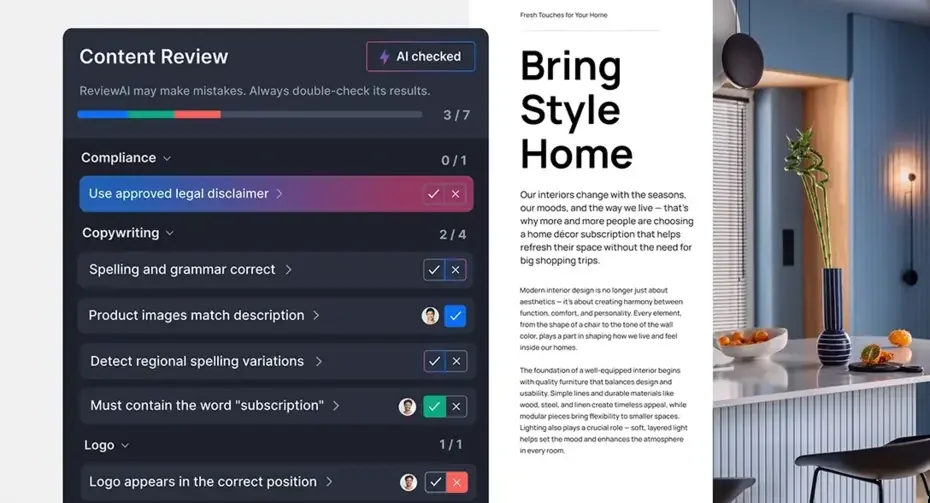
Review tools can now run a first automated pass on the same checklist, flagging a missing legal disclaimer, regional spelling variations or a misplaced logo before the native-fluency reviewer looks at the file. The human check still decides; the automated pass just means they start from a shorter list.
9. Hand Off the Approved Asset to the Market's Ad Account
- Filter the library by market and status=approved for that market, never by campaign name alone.
- Verify the language tag matches the placement geography. An es-ES file in a Mexico ad set is a mismatch even though both are Spanish.
- Confirm rights_end is after the planned flight end for that market. If it isn't, stop and escalate to the creator partnerships role.
- Download from the DAM link only. Copies from chat, email or an agency drive may be superseded.
Example: a Canadian buyer filters market=CA, language=fr-CA, status=approved, finds a creator video whose rights end two weeks before the flight ends, and escalates before launching. The check took thirty seconds and prevented a mid-flight pause.
10. Log Every Handoff
Every handoff writes one record with six fields: asset ID, market, requester role, date, destination platform and account ID. Store it next to the asset so a filter on asset ID shows everywhere that file has been sent.
Three months later, when the buyer who launched it has left and a creator asks whether their video ran in Colombia, the log answers in one query. Make the log entry a condition of launch.
11. Add the Asset ID to the Ad Name
Platform exports know ad names, spend and results. The library knows market, persona, language and version. The asset ID token in the ad name, in the same token order as the filename, is the only key linking the two. If uploads skip it, or someone renames an ad mid-flight, the join breaks and you're back to guessing which cut drove the result.
12. Feed Top-Performing Assets Into the Next Localization Batch
Once the join works, read creative-level CAC and MER by market and persona. One angle may travel across borders at similar efficiency; another may win in one market and stall the moment it crosses a language boundary.
Example: the same creator concept runs in Mexico, Spain and Colombia. The library report shows the Mexico variant at half the CAC of Spain's, so the next brief re-cuts the Mexico angle for Colombia and moves the Spain cut to superseded with its results attached. Every new brief then starts from evidence of what already traveled.
Creative Asset Management Rules for Multiple Agencies and Markets
Write a one-page library charter naming the field owners, the market approvers and the audit cadence, and attach it to every agency contract. Governance decides who may run the steps above and how compliance is checked.
Role-Based Permissions per Market
Agencies work inside the brand's library with write access scoped to their markets. Nothing lives only on an agency drive, because an agency drive leaves with the agency.
A LATAM partner can create and promote assets for MX, CO and AR and read everything else; they cannot flip status for ES. Because owner fields are roles, when a paid social lead leaves you change one role-to-person mapping and leave the records untouched.
Agency Onboarding Rules
Onboarding gives the agency the charter, the vocabulary document, the handoff checklist and market-scoped credentials.
Agency Offboarding Rules
Offboarding is a checklist run before the final invoice is paid:
- Every source file for every promoted asset is uploaded and linked.
- The handoff log is complete for every asset the agency launched.
- Rights fields are verified against the contracts the agency holds.
- Access is revoked and the role mapping is reassigned.
Example: a brand switches regional agencies in LATAM. Because owner fields are roles and source files sit in the DAM, the incoming agency re-cuts last quarter's winners in week one, without chasing the outgoing team for files.
Quarterly Library Audit
Sample 20 live ads per market from the platform and check each against the library's approved record and handoff log. Record the miss rate by market and by agency. A rising rate in one market points to governance before tooling, and it tells you which charter clause to enforce.
How to Choose a Creative Asset Management Platform for Global Teams
Score your current tool against the table below and run a three-market trial before you renew or switch. The platform market is crowded, so judge features against the field table you've already built.
Required Features for Multi-Market Teams
Per-market approval status is the first filter. Many tools offer one global approved flag, which makes the Spain-approved, Mexico-draft case impossible to represent.
Controlled vocabularies with validation are second; a tag field that accepts free text will drift within a month.
Date-based rights fields that block retrieval when rights_end precedes a flight date are third.
A tool missing any of the three can't enforce the handoff checklist.
Optional Features Worth Paying For
AI auto-tagging identifies content type, objects and sometimes language, and it saves producer time. It can't infer market approval or rights, so it supports the taxonomy while the roles that set status and dates stay in charge.
Performance connectors matter only if the platform stores your asset ID so the join in step 11 works. Localization automation, such as subtitle generation, is useful if outputs inherit the parent's market and language fields.
| Feature | Cross-border requirement it serves | Must-have or nice-to-have | How to test it in a trial |
|---|---|---|---|
| Per-market approval status | Spain approved, Mexico draft on the same file | Must-have | Approve one asset for MX only and try to retrieve it for ES |
| Controlled vocabularies with validation | Consistent market and language codes | Must-have | Try to enter ES-MX in a language field |
| Rights dates that gate retrieval | Expired rights block the handoff | Must-have | Set rights_end before flight end and attempt download |
| Source file linking | Re-cuts without reshoots | Must-have | Trace an export back to its project file |
| Role-based permissions by market | Agencies scoped to their markets | Must-have | Give a test user MX write access and attempt an ES edit |
| Handoff or download log | Audit trail across staff changes | Must-have | Export every download of one asset |
| AI auto-tagging | Faster content-type tagging | Nice-to-have | Upload a video and check which fields it fills |
| Performance connector | Join to CAC by market and persona | Nice-to-have | Confirm asset ID survives into the ad name |
| Localization automation | Subtitles inherit market fields | Nice-to-have | Generate subtitles and inspect the child record |
For the trial, load one real campaign across MX, ES and CO, including creator content with different rights dates per market. Tag everything using your vocabulary, then run the handoff steps for each market.
The tool passes if it blocks the variant whose rights end before flight end and refuses to surface the ES file for an MX filter.
If the platform question turns into a partner question, our guide on how to choose a performance creative agency includes a scorecard you can adapt for library and handoff requirements.
How inBeat Manages Creative Assets Across Markets
We treat the creative library as shared infrastructure for three teams that usually sit in different rooms: the people cutting the ads, the people buying the media and the people reading the numbers.
When all three work from one set of records, a market tag becomes a test variable.
Persona and angle codes on every asset let the media buyer pick audiences through the creative itself, which matters more every quarter as platform targeting narrows. Creator output becomes a continuous supply of testable variants, dark-posted by market, with results flowing back by asset ID into the next batch of briefs: make, launch, learn, repeat.
That discipline is what lets creative and media scale together.
That's why, in our Booksy partnership, cost per acquisition fell 60% while paid media scaled 6x.
If your program spans more than a handful of markets and languages, book a call to talk through how creator-led variants, media buying and performance reporting can run from one governed library.
FAQ
How should an asset be tagged when it is approved in Spain but not yet in Mexico?
As two status values on one asset record: status=approved for ES and status=draft for MX. The language tag es-ES also signals that a Mexico approver should check whether an es-MX re-voice or caption file is needed. The MX buyer's approved filter won't surface the file until that approver sets it.
What is the minimum metadata set for a team running fewer than five markets?
Market, language, per-market status, source file link, owner role, rights dates and asset ID. Campaign, persona, platform and ratio can start as filename tokens and become fields when you add the performance join. Keep per-market status even in a small library; it's the field that prevents the most expensive mistakes.
What do you do when a creator delivers only exports and no project files?
Record the asset with source_file empty and a flag, and request project files or raw footage as a deliverable in every future creator brief. The export can still be trimmed, re-captioned or re-voiced, but any change to on-screen text or framing will need the creator's involvement. Flag these assets in your inventory so nobody plans a multi-market rollout around a file that can't be rebuilt.