

I was reading Adapty's State of Onboarding 2026 report when one number stopped me: at just 65.1%, health and fitness apps had the lowest onboarding completion rate of any subscription app category studied.
For healthcare apps acquiring users through creators, there's an added complication. A creator video promises an outcome in 30 seconds, and the app asks for an account and an insurance card before it shows anything useful. The dashboard counts the install as a win, and the patient never reaches the first useful moment.
This article maps where creator-led installs stall between the tap and activation, and the fixes I'd make first, in order.
P.S. My team helps app brands improve post-install performance, starting with the creator brief and continuing through the first session.
TL;DR
- Define one activation event per app, such as a booked visit or a first logged reading. An install or account alone rarely proves that the user received value.
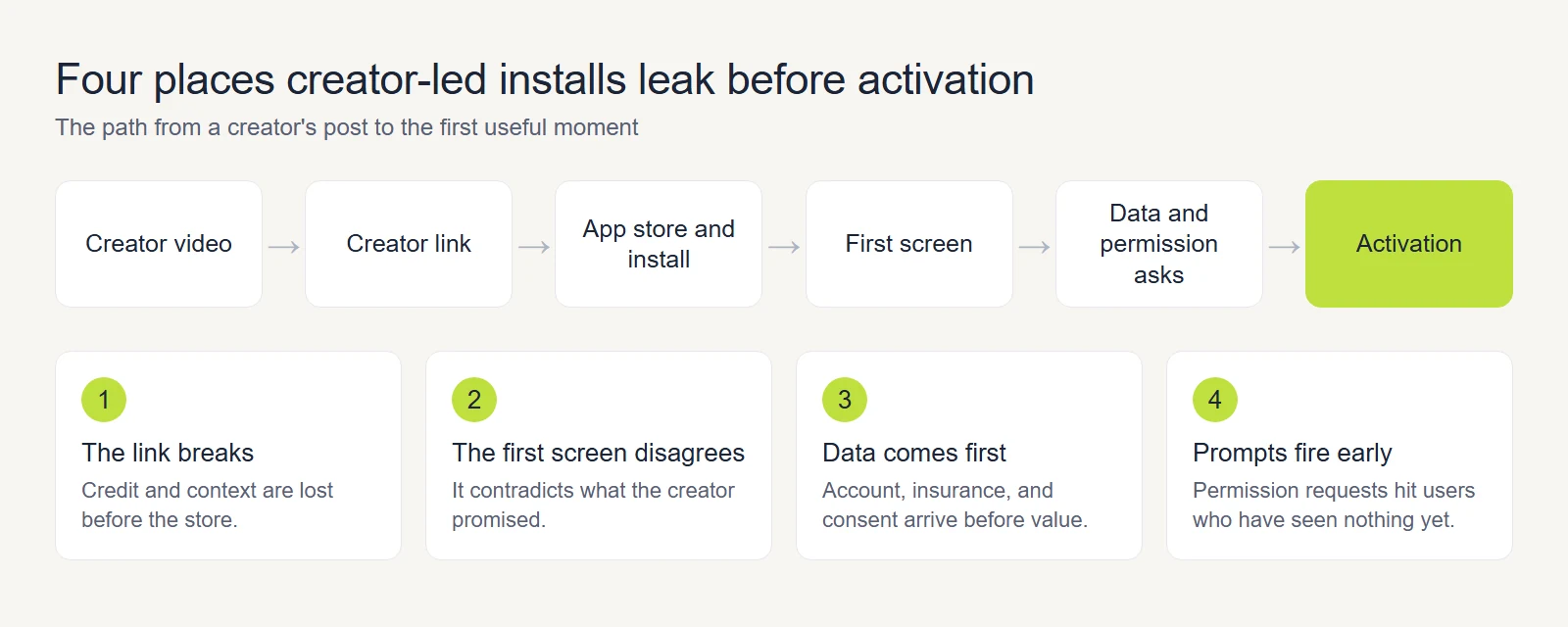
- Creator-led installs stall at four points: the link, the first screen, the data requests, and the permission prompts.
- Use deferred deep links to preserve non-sensitive campaign context and open a relevant screen when supported.
- Move optional registration, insurance requests, and permissions behind an initial useful interaction when legal, clinical, and technical requirements allow.
- Measure cost per activated user by creator, because cost per install hides the difference between creators.
- HIPAA coverage depends on the entity, and the FTC's health breach rule reaches many apps outside HIPAA. Counsel decides what applies to you.
The way I see it, onboarding starts with the creator's video.
The product and acquisition teams need to agree on what a successful visit to the app looks like before either team changes the campaign or the onboarding flow. That starts with activation.
What Counts as Activation in a Healthcare App?
Activation is the first action that indicates a user has begun to get the value the app offers.
In practice, I prefer a single primary event for each product: a downloaded app or a completed registration can be encouraging, but neither necessarily tells me whether the user made meaningful progress.
| App type | Activation event | Why it proves value |
|---|---|---|
| Telehealth | First visit booked (or completed, if that is the primary event) | Booking signals intent; a completed visit confirms care was delivered |
| Mental health | First guided session completed | The user received the core service |
| Chronic condition tracking | First valid reading logged | The app holds usable data |
| Fitness and wellness | First workout or habit logged | The user started the routine |
Treat these as starting points.
A telehealth team, for example, should decide whether its campaign is optimizing for a booking or a completed consultation before launch, since the two events can produce very different acquisition costs.
Retention is a separate measure.
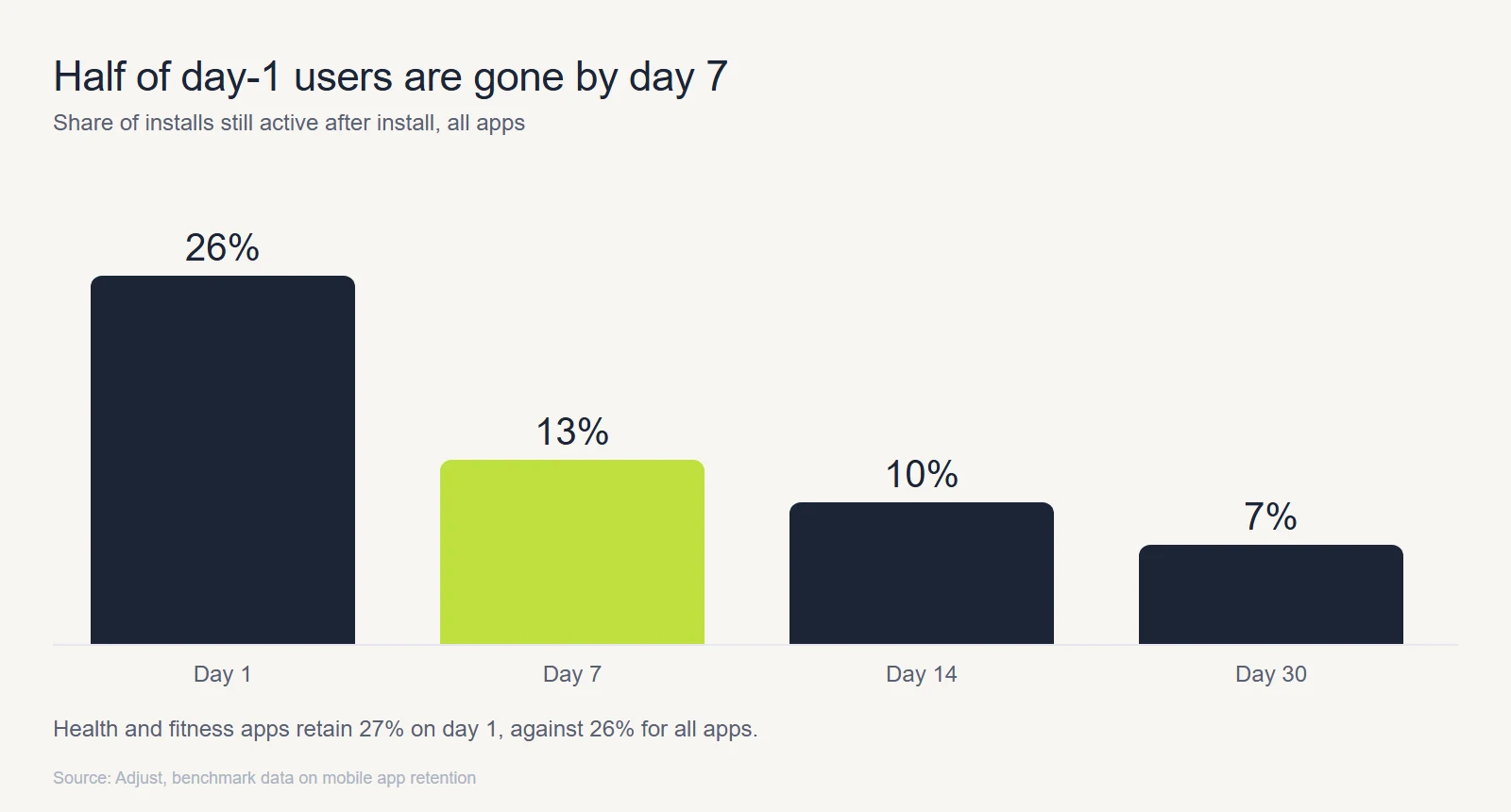
Adjust's benchmark data puts health and fitness day-1 retention at 27%, against 26% across all app categories. Its all-app figures fall to 13% on day 7 and 7% on day 30. I'd use these numbers as context for return visits, while using the activation event to assess whether the onboarding journey works.
For creator campaigns, I make one further distinction: a creator-led install describes where the user's interest originated, even if the attribution system classifies the download as organic.
The creator promise is the expectation set in the content. Those two details matter when we look at where new users leave.
Why Do Creator-Led Healthcare App Installs Stall Before Activation?
Creator-led installs stall when the experience advertised gives way to unexpected work or requests for personal information.
The problem can extend beyond the first session.
A 2020 JMIR mHealth study of a diabetes app found early drop-off in manual-entry features, including food, medication, and glucose tracking.
That helps explain why I pay attention to the effort each step demands, although it provides no creator-specific activation benchmark.
For an audience coming from a creator's post, that effort matters even more because the video has already set an expectation.
Telehealth brands can lose patients between click and consultation, and an app introduces another handoff: the download. I'd look for mismatches there before assuming the creative attracted the wrong people.
One technical detail in AppsFlyer's deep-linking documentation changed how I'd approach this audit: iOS Private Relay can interfere with routing after installation.
A user may have clicked the correct link and still land in the wrong place. That's why I start checking the journey before the app even opens.
Stall 1: The Creator Link Loses Context During Installation
A standard bio, Story, or DM link can lose campaign context, leaving some creator-driven installs classified as organic traffic.
AppsFlyer explains these limitations in its guide to Instagram deep links.
Before questioning a creator's performance, I'd test whether the link carries the intended information through the store.
Stall 2: The First Screen Contradicts the Creator Promise
Even with a functioning link, the opening screen can create a new problem.
Someone who came to book a visit, log a reading, or try a guided session may instead encounter a generic welcome carousel.
At that point, the person has to work out how to get to the feature they came for.
Stall 3: Account, Insurance, and Consent Requests Arrive Before Value
Once the viewer finds the right feature, the next obstacle can be the intake itself.
Healthcare apps have legitimate reasons to collect sensitive information, but optional fields can make an otherwise simple first interaction feel demanding.
I'd distinguish clinically necessary questions from fields that can wait.
Stall 4: Permission Prompts Fire Before Trust Exists
Permissions add a different kind of friction: people have to decide whether to share access before they understand the benefit.
Adjust reports that 35% of users shown the App Tracking Transparency prompt opted in during Q2 2025, across app categories.
Notification permission is a separate decision, but both deserve a place in the onboarding audit.
How Do Deferred Deep Links Send Creator Traffic to the Right First Screen?
A deferred deep link can carry destination context through an app-store install and open a relevant screen at first launch, subject to platform and measurement limitations.
I'd address this before redesigning onboarding.
For each creator or post, use a dedicated link containing approved, non-sensitive routing and campaign identifiers.
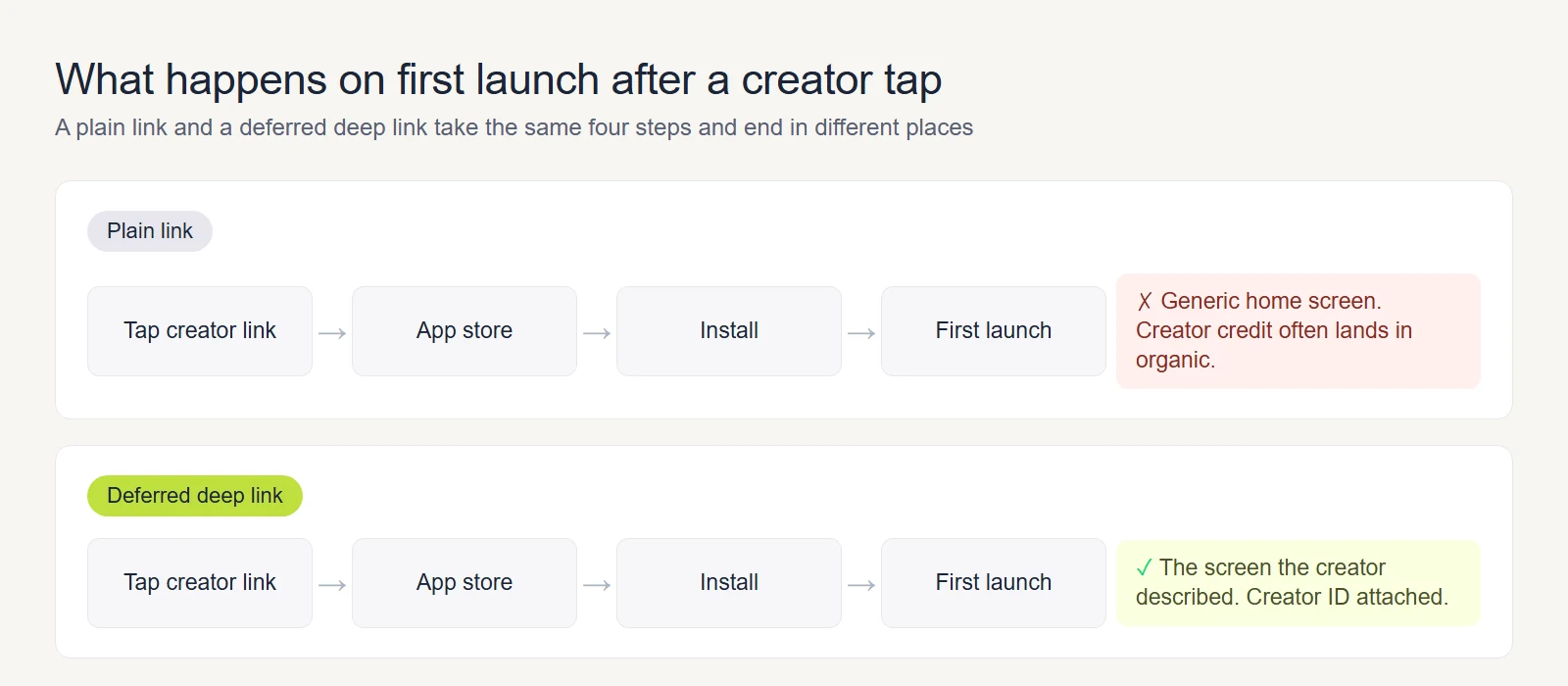
- Create a dedicated link for each creator or post, with a campaign identifier for the creative.
- Route by install state: open the app directly for existing users, and send new users to the store.
- Recover the permitted campaign context on first launch; allow for unattributed installs.
- Open the relevant screen or a safe default when the routing context is unavailable.
- Test on clean iOS and Android devices through the viewer's actual in-app browser.
| Link type | What happens on install | Typical creator credit | Best use |
|---|---|---|---|
| Plain bio URL | Opens the store, and context is lost | Often lands in organic | Quick tests |
| Store URL with campaign tags | Opens the store with a campaign label | Partial | Simple store traffic |
| Smart link | Routes by device and install state | Depends on the measurement partner | One destination per post |
| Deferred deep link | Attempts to preserve routing context through installation | May be preserved, subject to platform and measurement limits | Posts with a specific promise |
Four fields can help with routing and campaign measurement, provided none reveals a patient's health information:
- Creator ID: who gets credit.
- Post or video ID: which creative is being tested.
- Approved generic destination or offer code: where to open the app.
- Language of the post: which language that screen speaks.
Viewers on desktop need a fallback, so send them to a short page with a QR code and the store links.
These settings also help you credit creator installs under your attribution model.
Healthcare adds an important qualification: names, conditions, symptom selections, and other patient-level information belong outside tracking URLs.
Even a generic-looking code can reveal sensitive information if its meaning can be inferred. Have privacy and product teams approve both the identifiers and the fallback destination.
What Should the First Screen Show After a Creator Video?
Once the link routes correctly, the opening screen should offer a relevant action tied to the creator's message. I call the simplest way to check this a cold-open audit: watch the video, follow its link, and record the first three screens on a clean device.
During a telehealth onboarding review after a creator campaign, I followed a video promising a quick booking. Registration came first, followed by an insurance form.
Only then could I see available appointment times. Looking at that sequence, my first recommendation would be to show availability earlier and collect the required details at booking.
Repeat the Outcome the Creator Named
The first screen should reflect the creator's approved message and what the product can actually deliver.
If a video mentions an appointment tonight, show available times rather than a generic greeting, provided the service has capacity.
This is the healthcare version of message match: repeat the promise that earned the click without guaranteeing an unavailable service.
| Creator promise | What the first screen should show | What often opens instead |
|---|---|---|
| Book a visit fast | Next available times | An account form |
| Track your numbers easily | A first reading entry field | A long profile questionnaire |
| Try a ten-minute guided session | The start of a short guided session | A goals survey and a subscription offer |
Show the Aha Moment Within the First Session
Getting users to the right feature is only part of the job.
The aha moment is when someone first understands how the product can help; time to value measures how long it takes to get there.
A tracker might plot an initial reading, while a mental health app could offer a sample guided session. Where clinically safe, I'd offer that preview early, even if the activation event comes later.
Of course, there is only so much an onboarding team can repair after the video has gone live. Scripted creator content can set expectations the product cannot meet. Demonstrating the actual first step makes the message more accurate and helps the product team identify which requests stand between the user and that step.
What to Ask for at Each Step of Healthcare App Onboarding, and What Can Wait
Collect the minimum information necessary to deliver a useful, safe experience, then introduce additional questions when they become relevant.
My priority is to explain why a sensitive field is required. Clinical consent, identity verification, and any necessary intake must come before the activity that depends on them.
| Request | Can it wait until after first value? | What to show first |
|---|---|---|
| Account creation | Often | A sample result or the booking screen |
| Insurance details | Sometimes: a covered visit needs eligibility before booking | A plain explanation of what coverage changes |
| Identity verification | Rarely: safety checks come before care | Why the check protects the patient |
| Health history | Partly: ask only what changes the first result | The first result, then deeper questions |
| Notifications | Yes | A reminder offer after the first result |
| Tracking permission | Yes, if tracking is lawful and optional; it may be unnecessary | The product, then a plain reason to ask |
| HealthKit or Health Connect access | Often; access may be needed before the first synced result | The feature that needs the data |
| Location | Often; request it when nearby services require it | A nearby-care search |
Insurance deserves particular attention because eligibility can determine which appointments a person can actually book.
Where feasible, show the available service options and explain how coverage affects them before requesting plan details. If eligibility must be checked before booking, make that clear and avoid presenting a visit as covered until verification is complete.
Delay Registration and Use Progressive Disclosure
Progressive disclosure applies the same principle to the rest of mobile app onboarding: introduce fields and permissions when they serve a specific purpose. A sample result can sometimes come before registration. When verification or clinical consent is necessary, however, I would keep those steps in place.
Earlier in my career, I prioritized notification opt-ins and put the iOS prompt on the opening screen. Users had to decide before understanding the benefit, and a denial meant we could no longer show the same system dialog.
The lesson I'd take into a healthcare app is to wait until a reminder has a purpose the user can recognize.
There is research on the timing of tracking requests, too.
AppsFlyer's historical ATT analysis found that health and fitness apps saw opt-in peak around 30 minutes after launch.
I'd use that as a starting point for testing, subject to privacy requirements. In healthcare, permission to track is a separate question from whether health data may be used in advertising.
HIPAA Compliant App Onboarding: What Changes Before Value
HIPAA applicability depends on the entity and how protected health information is handled. HHS describes scenarios in which an app developer acts as a business associate.
When I read the FTC's updated Health Breach Notification Rule announcement, the part I found most relevant was its attention to apps outside HIPAA.
Certain vendors and related entities may have breach-notification obligations following unauthorized disclosure of identifiable health information.
Apple's guideline 5.1.3 of the App Review Guidelines also restricts the use or disclosure of health data for advertising and marketing. For a paid media team, my recommendation is to keep health details and care-seeking events out of advertising SDKs, even when someone accepts ATT.
Have counsel and the privacy team review event payloads, vendors, and any required patient authorization before launch.
The same caution carries over to creator testimonials, which need their own privacy, claim, and disclosure review. This is general information; counsel should determine the requirements for your app.
Brief Creators on the First Five Minutes After the Install
A healthcare app creator brief should specify the first action after installation, the expected setup time, and the approved claims. Now that the product team has mapped the onboarding sequence and cleared the relevant privacy requirements, the creator needs to understand that experience before filming. I include five things:
- First action: the exact step the creator will show or mention, matched to the first screen.
- Setup time: an honest estimate, so the viewer expects the right wait.
- Test build or account: so the creator has used the flow before filming.
- Claim limits: approved wording, and outcomes the creator may not promise.
- Disclosure: how the paid relationship appears on screen.
A creator once told me she had filmed a campaign without exploring the app beyond its install page.
She understood the feature list, yet struggled to explain what a viewer should do after downloading it.
A detailed brief is useful, but that example is why I'd also give creators a test build.
A short recording of the onboarding flow can complement the test build.
It is particularly useful for demonstrating a feature without exposing real patient information, and it gives reviewers a reference when they check the script.
| Creator type | What they can credibly promise | What the brief must add |
|---|---|---|
| Clinician | Clinical context and why a feature exists | Approved claim wording and relationship disclosure |
| Patient-voice creator | Their own routine with the app | Approved claims and authorization where legally required |
| Lifestyle creator | How the app fits into a day | The first action and an honest setup time |
For clinician creators, I'd go a step further and define the claim zones before filming.
A cross-study analysis in npj Digital Medicine found that clinician referrals were associated with roughly 40 additional days of median retention in two remote studies (mPower and ElevateMS).
This is research on participation rather than evidence of a creator campaign's performance.
Still, it gives me a reason to test whether relevant clinical context helps users understand the next action.
How to Measure Activation, Cost Per Activated User, and Retention by Creator
For creator-level measurement, I'd prioritize activated users and cost per activated user, with installs as a supporting metric.
The brief and onboarding flow should now point to the same outcome; the reporting needs to show how often people actually reach it.
- Define the activation event with the product team.
- Record the event in approved first-party analytics and associate it with permitted campaign data; use aggregate reporting where appropriate.
- Set an activation window suited to the service line, since booking a visit may take longer than logging a reading.
- Deduplicate users where lawful, technically feasible, and necessary.
- Build a cohort table with installs, activation rate, spend, and day-1 and day-7 retention measured from installation.
- Keep sensitive events out of ad networks and review permitted analytics with privacy and compliance teams.
| Metric | Formula | What it shows that cost per install hides |
|---|---|---|
| Activation rate | Activated users divided by installs | Which creator's audience reaches value |
| Cost per activated user | Defined creator campaign spend divided by activated users | The acquisition cost per user who reached the agreed milestone |
| Retention 7 days after activation | Users active 7 days after activation divided by activated users with 7 days of observation | Whether value repeats |
Here's how the economics can change, using illustrative numbers.
Two creators each generate 1,000 installs on $5,000 of spend, so both have a $5 CPI. Creator A converts 10% of installs into activated users and costs $50 per activation. Creator B converts 4%, bringing that cost to $125.
At first glance, those campaigns look equally efficient. But I'd need to know how long both cohorts have had to activate before deciding which creator gets more budget.
For longer booking journeys, track day-1 progress as an early signal and wait for the agreed window to close before comparing final acquisition costs.
I went looking for a creator-specific retention benchmark and found a useful qualification in AppsFlyer's influencer guide: ROI and retention vary widely between apps.
The guide also explains why many creator-driven conversions appear organic. So my preference is to establish an internal baseline from mature cohorts and run a holdout test on creator traffic to estimate incremental lift.
Test Creator Hooks Against Activation Before You Scale Spend
Test the creator hook and its destination screen together, then compare cost per activated user across equally mature cohorts. Once you have that baseline, you can use it to decide which creative concepts deserve more budget. Day-1 activation remains useful for spotting early issues, especially when the full booking cycle takes longer.
For each creative test, record the hook, destination screen, activation event, and cost per activated user. I'd keep the onboarding version consistent when comparing hooks, then test a different destination separately. This helps distinguish the effect of the message from the effect of the app experience.
My preference is to dark-post creator hooks as small paid tests, using approved, non-sensitive measurement. If one version earns inexpensive installs but few users reach the target action, I'd review the audience and message match before increasing spend. The findings then inform the next creative brief.
Onboarding Drop-Off Diagnostic: What You See, What It Means, What to Check
Start with the earliest observable drop in the journey, and verify that the underlying events are recorded correctly.
I've organized the checks below by the symptoms a paid media or product team might encounter, so you can use the table to plan the next audit.
| What you see | What it likely means | What to check next |
|---|---|---|
| Many attributed installs, few recorded first opens | Launch, tracking, or reporting friction | Event definitions, SDK initialization, and first-launch tests |
| First opens, few users reaching the next intended step | Possible message mismatch or an early registration barrier | Cold-open audit and screen order |
| Accounts, few activations (where registration is required) | Possible intake friction, technical issues, or an unclear next step | Intake length and where the first value appears |
| Day-1 retention below your own baseline (Adjust's 27% health and fitness average is a rough reference only) | Possible low first-session value or a longer natural usage cycle | First-session value, reminders, and cohort comparison |
| Creator cohorts diverge | Promises or audiences differ across creators | Briefs and first screens of the top and bottom creators |
Build a Creator-to-Activation Funnel With inBeat Agency
For me, the best time to bring the product team into a creator campaign is before the brief goes out.
That's when decisions about the onboarding journey can still influence which creative concepts get filmed and how they're evaluated. Through inBeat's healthcare marketing practice, my team brings creator strategy, paid social, and performance creative together.
The first conversation should focus on the experience you want patients to have and what the campaign needs to achieve.
If you'd like a second set of eyes on that journey, book a strategy call and let's work out where to start.
FAQs
How do I set an activation window for a telehealth app when the first booking takes days?
Use your historical install-to-booking distribution to choose a window that captures a meaningful share of first bookings. I would report day-1 progress separately and calculate final activation after that window. Make reminders optional and relevant to the user's chosen care journey.
Can a creator tracking link carry health information without creating a privacy problem?
Avoid health information in tracking URLs. Use approved generic campaign identifiers and a safe fallback. Even coded parameters or event names can reveal sensitive information if they identify the care sought, so review the complete data flow with your privacy team.
What changes about the first-screen brief when the creator is a clinician?
Give the clinician the approved clinical language, disclosure requirements, and any relevant safety qualifications. I'd also confirm that the destination offers the service or information described, without promising specific treatment outcomes.
How do I compare creator-sourced activation with paid social when Instagram links lose attribution?
Compare attributed cohorts on the same event, spend definition, and mature activation window. Report unattributed activity separately. Missing creator attribution can distort the comparison in either direction, so use a controlled lift test when direct attribution is incomplete.
Should I run a holdout test on creator traffic when most conversions already happen organically?
Yes. The AppsFlyer guide suggests aiming for a 25% increase over baseline daily organic installs as a campaign planning target. I would treat that figure as directional. A randomized or well-designed geographic holdout is more appropriate for estimating causal lift.
Can explaining insurance requirements upfront improve activation?
I'd test whether a short explanation of why insurance details are needed helps more users complete the onboarding process. Keep all mandatory eligibility checks in both versions and compare activation rates among eligible users. This way, you can isolate the effect of clearer communication without compromising compliance.