

The most important part of a pet UGC shoot is the part you can't script: the animal's reaction. A dog can ignore the treat. A cat can walk straight past the new bed. Suddenly, your carefully planned video has little to prove.
In Breaktime Media's 2025 shopper survey, 49% said their pet liking a product would make them loyal to the brand. That preference suggests why a real feeding moment can be persuasive, though the survey did not compare video formats or test ad performance.
This guide shows you how to brief creators, build shot lists for dogs and cats, and check the finished footage for quality, safety, and advertising readiness.
TL;DR: Pet UGC Brief, Shot List and Acceptance in Five Rules
- Cast the pet your buyer owns, and brief one objection per video.
- Ask for three hooks as separate takes so you can test openings without a reshoot.
- Film a 30-second, five-beat shot list, with a dog version and a cat version.
- Accept footage against a written pass, fix or reject table covering product truth, pet welfare, footage, claims, disclosure and rights.
- Use an illustrative six-creator budget of about $2,300, with usage rights and creator-handle ad permissions priced separately.
What Is Pet UGC for Pet Brands?
Pet UGC shows real pets and owners using products in everyday settings. It can be shared organically, but this guide focuses on commissioned UGC: footage a brand pays to produce and licenses for its own channels. The owner films or narrates while the animal's behavior stays unscripted. Creator fit, usable footage and rights usually matter more here than follower count.
By contrast, in a pet influencer partnership, you may pay for reach on the creator's own feed as well as production. With commissioned UGC, you primarily license assets to run as ads, use on product pages and edit into variants.
That makes existing customers worth considering when casting. Their pets may already use the product, and their homes often provide the everyday setting that prospective buyers recognize.
Which Pet UGC Content Style Fits Which Product?
Once you know what the video needs to show, choose a format that makes it easy to capture. Food suits reaction clips, toys suit play and durability tests, beds suit first-use footage, and supplements call for a label-accurate routine.
Trying to fit a reaction, review and story into 30 seconds usually leaves too little room for each.
Use the table to match each product category with useful on-camera evidence and the claims boundaries to include in the brief.
| Product category | Content style | What the camera must capture | Proof moment | Claim risk |
|---|---|---|---|---|
| Dry food and treats | Reaction video | Bowl or treat reveal, the pet's first approach | A voluntary approach or feeding moment, if it happens | Low; avoid "cures" or digestive-health promises |
| Wet food and toppers | Picky-eater test | Cat or dog approaching the bowl over several days | Observed acceptance over several days, if it occurs | Medium; keep the food-transition note on the label |
| Chews and dental products | Daily routine | The chew, the pet taking it, the routine around it | Day 7 check-in on the same shot | High; no disease or "replaces brushing" lines |
| Toys | Durability or play session | Real play across several days | The toy after use | Low |
| Beds, crates and furniture | Unboxing and first nap | Size next to the pet, the pet choosing it | The pet settles without prompting | Low |
| Grooming and bath | Before and after | Coat before, calm behavior during, coat after | Same angle, same light, both frames | Medium; no skin-condition claims |
| Supplements | Honest routine with a vet voice where relevant | The label, the serving, the daily moment | Label-accurate use without unverified outcome claims | High; the strictest claims rules apply |
| Litter and cleanup | Day in the life | Setup, a week of use, cleanup time | Owner's take on smell and mess | Low |
| Pet tech | Setup and app walkthrough | Unboxing, app on screen, the pet using it | The alert or feature firing on camera | Low; show real footage only |
The format is only part of the decision. Filming also needs to suit the individual animal: some dogs respond to familiar cues, while cats may need more time in a quiet setting.
The shot lists below adapt the same sequence to both.
For more format options by objective, see our guide to choosing UGC video types.
Pet UGC Production Brief: A One-Page Template
With the format chosen, give the creator a brief they can follow while filming. Keep the working page focused on five essentials:
- The single objection
- The casting spec
- Three hook takes
- A say list with a do-not-say list
- Deliverables with usage terms
Put longer legal and licensing details in a separate attachment so the shot instructions stay easy to find.
To see how the fields fit together, consider a hypothetical wet-food topper for picky adult cats. It calls for patient filming and consistent observations over several days.
Write the Single Objection the Video Answers
State the one doubt the video must resolve, in the buyer's words. For the cat topper it is "my cat ignores every new food after day two." Other pet objections are "it won't fit," "my dog will destroy it in a week," "is it safe," and "will the smell take over the apartment."
If buyers have two distinct concerns, give each its own short video. That leaves enough time to show a useful example rather than rush through both.
Specify the Pet and the Home You Are Casting
Next, match the animal and setting to the product. Senior-cat food calls for an older cat, a large-breed chew needs a dog in the specified weight range, and a multi-pet product belongs in a household with several animals.
List these fields in the casting line:
- Species, size and age range
- Other pets in the house
- Home type, if it matters (apartment, stairs, yard)
- Country, so food and treats can ship
Prioritize an appropriate pet and home over follower count: a customer or smaller creator may offer exactly the circumstances your product needs. For sourcing and screening, our UGC portfolio guide explains what to look for in a sample reel.
Request Three Hooks as Separate Takes
Once the cast is clear, build flexibility into the footage. Request one main video body and three separate hooks of up to three seconds each. That gives the editor different openings to test without another shoot. Record the call to action separately too.
Give each opening a distinct purpose: introduce the problem ("my cat ignores every new food after day two"), raise curiosity or lead with a truthful result. Nearly identical hooks offer little insight when you compare performance.
Set the Say List and the Do-Not-Say List
The hooks can vary, but the factual boundaries should stay consistent. Ask creators to name the product, say how long they used it and describe one specific observation about their pet. Then make the exclusions equally clear:
- Any claim that a product treats, cures or prevents a disease
- Any line that replaces a vet, a prescription or a medication
- Other brands in frame
- Reactions the pet did not actually have
A creator can say what they saw with their own pet: "she finished the bowl by day three." Keep both lists short, because an over-scripted brief produces stiff video; our note on briefing creators for native-feeling content explains why. The compliance section below has the wording to paste in.
State Deliverables, Usage Rights and Deadline
Before the product ships, make the handoff equally clear: request one finished 9:16 edit, three separate hooks, raw footage and consistently named files. Spell out the approved channels, license length and whether creator-handle advertising permission is part of the deal.
Because pets may decline to participate, agree on the included corrections and any extra shoot fees in advance. Start the deadline when the product arrives, leaving time for footage that must be captured across several days. Our guide to UGC usage rights covers licensing terms and costs.
Here's how those decisions come together in a working brief.
| Brief field | What to write | Example: cat wet-food topper |
|---|---|---|
| Product | Name, size, who it is for | A topper for adult cats, 12-pouch box |
| Objection | One doubt, in the buyer's words | "My cat ignores every new food after day two." |
| Casting | Species, age, home, country | Adult cat, indoor home, US |
| Before filming | What to do and how long | Serve as the label says for five days; we ship two boxes |
| Video | Length, ratio, setting, light | 30 seconds, 9:16, at home, window light |
| Hooks | Three separate takes | Problem, curiosity and result, up to 3 seconds each |
| Shots | Numbered, with seconds | See the shot list below |
| Must say | Required words | Product name; how many days you used it |
| Do not say | Banned claims | No health or disease claims; no vet replacement |
| Pet safety | The welfare line | Owner handles the pet; stop if the cat leaves |
| Deliverables | Files | One edit, three hook clips, raw footage |
| Usage | Channels and term | Paid social and organic, 3 months, US |
| Reshoots | Number included and who pays | One technical correction included; pet-led reshoots by agreement |
| Deadline | Counted from arrival | Three weeks after the box arrives |
If you want a general-purpose version for any creator content, our TikTok UGC brief template covers the structure without the pet-specific fields.
Pet UGC Shot List: Five Beats for a 30-Second Video
The brief now needs a filming sequence. For a 30-second cut, these five beats show when to introduce the product, leave room for a natural reaction and close with a clear next step. Use the timings as a guide rather than trying to script the pet.
- 0 to 3 seconds, opening hook. Show the pet and a product cue immediately as the creator names the objection, on camera or in voiceover.
- 3 to 8 seconds, the product. The pack or product in hand, with the label readable, then the handoff to the pet.
- 8 to 18 seconds, the pet's reaction. The longest beat: the approach, the first taste or touch, the unedited result. Keep the clip rolling through the pet's own timing.
- 18 to 25 seconds, the proof after days of use. The same bowl, bed or toy on day five or day seven, shot from the same angle as the first day.
- 25 to 30 seconds, the honest take and call to action. One specific observation from the creator and a single next step.
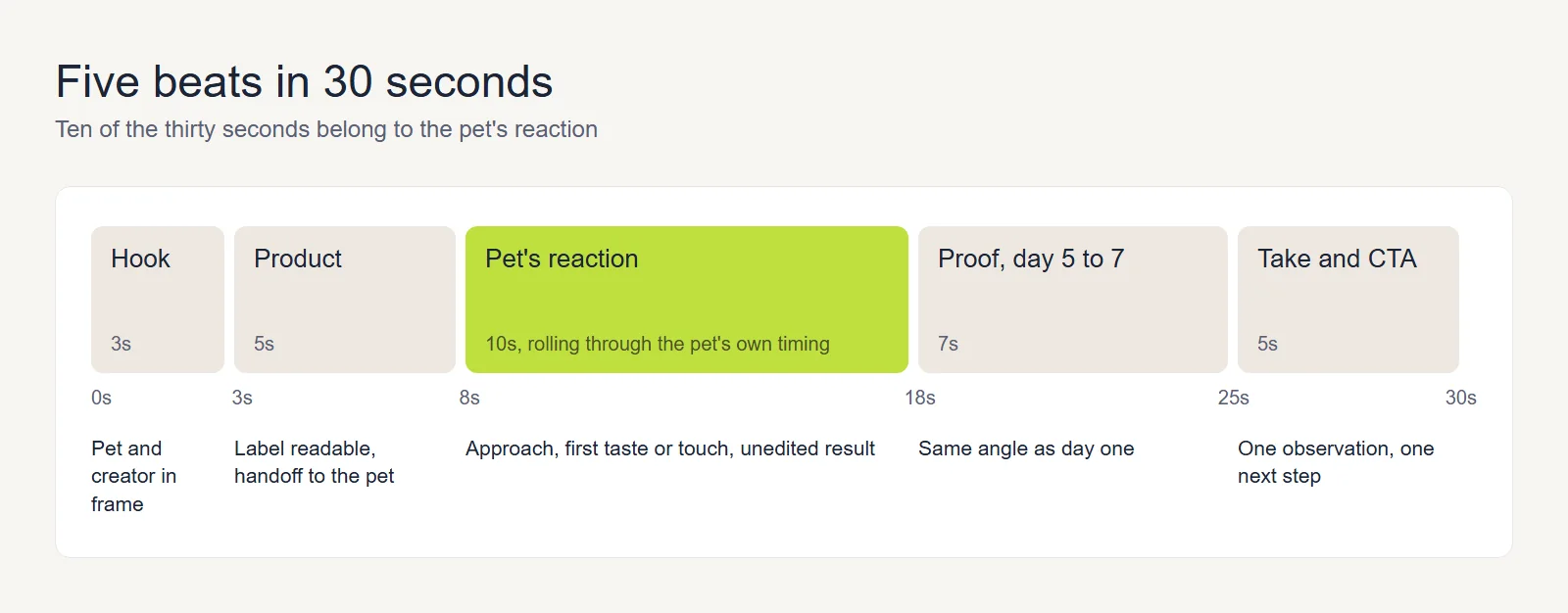
The length is a starting point, and our UGC video length benchmark shows how to test shorter and longer cuts once you have a winner.
Dog Version and Cat Version of the Same Shot List
The sequence stays the same, but the filming approach depends on the animal. A dog may respond to a familiar cue, while a cat may need a quiet space and more time before engaging.
| Beat | Dog | Cat |
|---|---|---|
| Hook | Film with the dog beside the owner; a familiar cue or treat held near the lens may draw attention without pressure | Film the cat in its usual spot; do not call or reposition it |
| Product | Ask for a sit, show the product, then reward | Place the product in the cat's space and step back |
| Reaction | Short takes of 30 to 60 seconds with a reward at the end | Roll for several minutes and wait for the natural moment |
| Proof | Repeat the same product-use shot on day five, if the pet willingly participates | Re-film at the same time of day on day five |
| Raw footage | Standard amount | Ask for more; the best cat clip is often short |
Treats, sound and a tripod are the real direction tools. Between takes, a crinkled bag or a toy waved above the lens can pull a cat's attention toward the camera, while a phone propped on books frees both hands for the product and the pet.
Light, Camera Position and Audio Specs
Good lighting makes the pet and product easier to evaluate. Ask creators to film near a window and avoid flash or harsh light near the animal's eyes. The aim is consistent coat color and an accurate view of the product.
Write these specs into the brief:
- Put the camera at the pet's eye level for the reaction beat
- Mount the phone on a tripod or a stack of books so both hands are free
- Record clean ambient sound and deliver a version without licensed music, so the brand can add suitable audio for each placement
- Provide a captioned export and editable caption file; keep all text in the safe zone
Format Specs by Social Channel
Start with a clean 9:16 master, keeping the pet's face, packaging and captions clear of likely interface overlays.
Then preview and export for each placement when the crop or technical limits differ. The table links to each platform's specifications.
| Channel | Ratio and length | Safe zone | Ad route |
|---|---|---|---|
| TikTok | 9:16 recommended, at least 540 by 960 px; in-feed video up to 10 minutes | Set by format and caption length; download TikTok's safe-zone template | Spark Ads code, valid for 7, 30, 60 or 365 days |
| Instagram Reels | 9:16; ad video up to 15 minutes | 14% top, 35% bottom, 6% on each side free of key elements | Partnership ads, which require the partner's permission |
| YouTube Shorts | Square or vertical, up to three minutes | Keep captions off the bottom edge | Standard video ad routes |
| Meta feed and Stories | 9:16 for Stories; export and preview each placement separately | Start with Reels margins; verify each placement | Partnership ads |
The Reels margins are a starting point for ads. Videos with disclaimers may need around 40% of the bottom kept clear; preview each Stories and Reels placement before approving the export.
Also keep two permissions separate: the license to use the video and the authorization to advertise through the creator's account. Agree on both before launch.
Pet Welfare, Claims and Disclosure Rules for Pet UGC
Once the filming requirements are clear, make the boundaries equally visible. Every brief should cover animal welfare, permitted product claims and advertising disclosure, so creators can check those rules before recording.
Welfare rules for the brief:
- The owner handles the pet; nobody else directs or restrains it.
- No forcing: if the pet declines the treat or the toy, film that and stop.
- Use the product as its label says, including portions, age limits and the food-transition schedule.
- Keep sessions short, with water and breaks, and stop if the pet shows stress.
- Never fake a reaction with an ingredient the product does not contain or with an edit that changes what happened.
Platforms enforce the first rule too. TikTok's advertising policy states that it does not allow animal abuse, cruelty, neglect or exploitation. For creator screening and vet-voice partnerships, our pet influencer marketing guide lists the welfare screening questions to ask a creator.
Next, check the claims. The FDA says expressed or implied claims that a pet food cures, treats, prevents or mitigates disease can indicate an intent to offer it as a new animal drug, which would need approval.
For example, saying a chew helps with arthritis may introduce a disease-treatment claim. Even a personal observation such as "her coat looks shinier" can imply a benefit that needs substantiation. Show the product's actual use, and review proposed outcome claims before publication.
Finally, make the disclosure explicit. The FTC's guidance for influencers says a material connection includes free or discounted products as well as payment, and the disclosure should sit in the video itself as well as in the caption. The Earthborn Holistic example later in this guide shows the caption half of that rule, with "#ad" as the first line of the caption.
Pet UGC Asset Acceptance Checklist
After filming, the brief becomes the reference for approving the files. Reviewers need to separate simple technical fixes from problems involving safety, accuracy or rights. Apply the same standard to every delivery before it reaches the ad account.
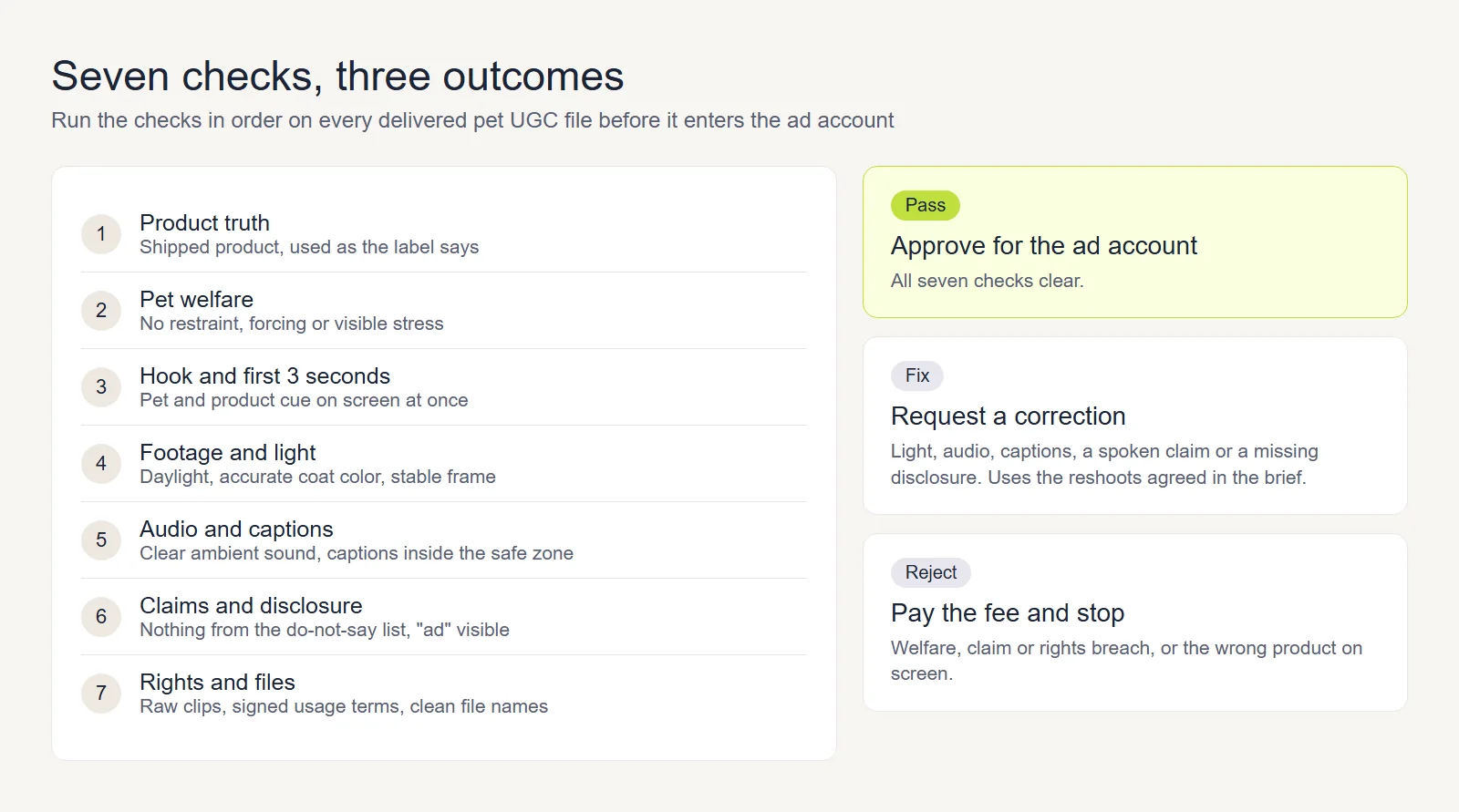
Seven Areas to Review Before Approving Pet UGC
Start with issues that could rule out the asset altogether, then assess the creative and technical details:
- Product truth. The product shown is the product shipped, used as its label says.
- Pet welfare. No restraint, forcing or visible stress.
- Hook and first three seconds. The pet and a product cue are on screen immediately.
- Footage and light. Daylight, accurate coat color, stable framing.
- Audio and captions. Clear ambient sound, product name audible, captions inside the safe zone.
- Claims and disclosure. Nothing on the do-not-say list; "ad" visible where required.
- Rights and files. Raw clips, usage terms signed, files named to your convention.
Use the signed brief to judge each row, including background logos and identifiable people, rather than treating the checklist as a substitute for agreed requirements.
| Check | Pass looks like | Request a fix when | Reject when |
|---|---|---|---|
| Product matches label | Correct SKU, label readable | Label is hidden for the key shot | Wrong product or competitor product shown |
| Label-accurate use | Portion and age limits followed | Portion unclear on screen | Product used against its label |
| Pet welfare | Pet chooses to engage; breaks visible | Pet moves away without distress; pause and request voluntary footage on another day | Restraint, forcing or visible distress |
| Reaction authenticity | Unedited moment backed by raw clip | Reaction was cut or sped up | Reaction faked with another food or edit |
| First three seconds | Pet and product cue on screen | Slow start before the pet appears | The hook never reaches the objection |
| Hook takes | Three separate hook clips delivered | A required hook is missing or the three angles are too similar | The required three-hook set still fails the brief after the agreed correction window |
| Light | Daylight, accurate coat color | Yellow cast or blown highlights | Footage unusable in the dark |
| Camera position | Pet's face inside the safe zone | Face sits under the caption area | Pet barely visible |
| Audio | Ambient sound clear | Wind or music bed present | Speech inaudible |
| Captions | Burned in, readable | Captions run into the bottom margin | None and speech unclear |
| Claims | No disease or vet-replacement line | A claim spoken in a voiceover | A prohibited claim remains after corrections |
| Disclosure | "Ad" visible in the video where needed | Disclosure only in the caption | No disclosure on a paid or gifted post |
| Other brands and people | None in frame | A logo partly visible | Competitor logo prominent |
| Rights and files | Raw clips and usage terms in hand | File names off-convention | Usage terms unsigned |
When a reaction is central to the product claim, our comparison of AI UGC ads and real UGC shows why the raw, unaltered moment matters during review.
Request a Reshoot or Reject: Decision Rules
Use the signed brief and agreement to separate fixable technical problems from misrepresentation or animal-welfare failures.
Re-record an unsupported spoken claim if a compliant version is possible; reject footage that relies on coercion or a fabricated reaction. Costs follow the agreed correction and welfare terms.
| Issue | Action | Who bears the cost |
|---|---|---|
| Yellow cast or dim light | Request a refilm in daylight, within the agreed reshoots | Creator |
| Pet refused the product, no reaction | Accept honest footage or refilm on another day; never request a staged reaction | Shared, as stated in the brief |
| Disease claim in the voiceover | Request a re-recorded voiceover; no reshoot needed | Creator |
| Disclosure missing | Request a caption or on-screen fix | Creator |
| Restraint or visible stress | Reject the asset | Brand compensates a good-faith stop; deliberate violations follow contract remedies |
| Pet does not meet the agreed casting spec | Recast or end the assignment | Assign to the party that missed the approved casting spec |
| Late delivery | Apply the deadline term from the brief | As contracted |
If an animal becomes stressed despite responsible handling, stop the shoot and compensate the creator for work completed as agreed.
Deliberate pressure or restraint that breaches the welfare brief needs separate handling under the contract. Retain raw footage to review what happened.
Pet Creator Content Examples: Lessons for UGC Production
These examples cover a sponsored reel, a creator call and an ambassador program. Each has a different purpose, but together they offer ideas for disclosure, recruitment and creative direction. For commissioned UGC, set delivery and licensing terms separately.
For more examples across categories, see our roundup of user-generated content examples.
Earthborn Holistic: One Campaign Mechanic, Clear Disclosure
In April 2026, Earthborn Holistic worked with pet creators on an Earth Day initiative linked to Trees for the Future. The campaign offered to plant a tree for each comment in the first 24 hours, up to 25,000 trees.
Watch an Earthborn creator reel
Creator posts for the campaign included sponsorship disclosures such as #ad. Independent Earth Month coverage also documents the comment-to-tree promotion. Check the disclosure in both the caption and the video before using a post as a briefing reference.
The lesson for a pet UGC brief is to give the creator one concrete campaign action and room for a genuine delivery, while checking every disclosure placement separately.
BarkVites: A Public UGC Brief With Specific Deliverables
A public BarkVites campaign listing from May 2026 sought 10 dog-owner creators to film content for the brand's 14-in-1 multivitamins. Unlike a vague creator call, it spelled out exactly what applicants would deliver.
See the public BarkVites UGC listing
Each selected creator was asked for one 20- to 45-second narrative video, raw footage without captions or music but with voiceover, and two lifestyle photos. The listing also promised reimbursement for the product and shipping, with the full content brief shared individually.
That level of detail makes the assignment easier to quote and deliver. State video length, file types, photo count and reimbursement terms up front, and review any supplement claims under the compliance rules above.
Butternut Box: A Staged Posting Cadence and a Contrast Frame
Butternut Box's ambassador program page states the cadence a creator is asked to follow: share an honest experience in their own style once the first box arrives, then space posts 5 to 7 days apart.
Creators receive a brief with key messages and content guidelines on signup, and the program accepts accounts from 500 to 50,000 followers, which suits an ambassador program that posts on the creator's own feed; a UGC listing needs no follower band.
For a visual contrast, see a Butternut Box TikTok video alongside a creator's home-filmed clip.
The comparison is about framing and production polish, rather than proof of how an ambassador or commissioned UGC assignment was briefed.
That posting cadence belongs to an ambassador program. For licensed UGC, turn it into a filming schedule instead: specify the days to capture and the proof moments each clip needs.
Pet UGC Jobs: How to Write a Listing Creators Can Answer
With the production brief ready, casting becomes easier. A clear listing shows the deliverable, fee, usage rights and deadline at a glance. Whether you recruit through creator platforms, customer communities or an agency, reuse the relevant details from that brief.
Remove Ambiguity From Creator Listings
Before posting, check four details that often lead to unnecessary back-and-forth:
- Mixed roles. Clarify whether the creator must develop the concept, write a script, film, edit or simply deliver raw clips.
- No usage terms. State whether organic use, paid media and creator-handle advertising are included.
- Vague claims guidance. Provide a short approved-say list and prohibited-claims list, especially for health-related products.
- Unclear deliverable. Distinguish a paid video assignment from a written review, gifted product or optional content submission.
A link to the full brief can answer any remaining production questions.
Make the Listing Easy to Quote and Deliver
Experience is only part of the picture; a suitable pet and usable sample footage matter too. To help newer creators quote the project accurately, include:
- One deliverable, one fee, one deadline
- A sample shot list and a link to your brief
- A statement that no follower minimum applies
- Usage terms in one sentence
- A request for two or three short existing clips of their own pet as a portfolio, with no product involved
Those existing clips show how the owner films and how the pet behaves on camera, without asking anyone to produce unpaid custom work.
Should Brands Ask for Spec Videos?
Avoid requiring unpaid custom sample videos. Review existing footage of the creator's pet instead; if you need someone to demonstrate your specific product, commission a paid short test clip. Agree on the deliverable and rights before asking them to film.
Those deliverables also make quotes easier to compare: separate the base edit, licensing and extras such as additional hooks or raw clips. Our UGC rates guide shows how those lines are usually priced, and listing them separately makes your budget predictable.
How Much Does Pet UGC Cost? Budget-Friendly Solutions for a First Test
A six-creator pilot could cost $2,280 under the assumptions below. Treat that figure as a planning example, since pet, format and licensing requirements vary. Compare the finished edit, extra hooks, raw clips and paid usage separately, then negotiate creator-handle permissions if the ad setup requires them.
For this scenario, the cost inputs are:
- An illustrative base fee of $150 per finished video
- An assumed $50 per additional hook
- An assumed 30% of the base fee for three months of paid-media usage (confirm scope in each quote)
- An assumed 40% of the base fee for raw footage
The $25 per creator for product and shipping is an estimate too. Historical UGC benchmarks offer context, while current quotes should determine the budget. Confirm any creator-handle advertising permissions in writing before filming.
| Line | Cost driver | Illustrative amount |
|---|---|---|
| Creator fee | 6 creators at $150 | $900 |
| Extra hooks | 2 extra hooks each at $50 | $600 |
| Paid usage, 3 months | 30% of $150 base fee, 6 videos | $270 |
| Raw footage | 40% of base, 6 videos | $360 |
| Product and shipping | Assumed $25 per creator | $150 |
| Total | $2,280 (illustrative) |
That spend could produce 18 variants: three hooks for each creator's main video.
Compare openings within the same video first, then look for similar responses across pets. Extend licensing only for clips that warrant more testing, with raw footage priced separately.
The next step is to find which opening deserves the ad budget.
Turn Pet UGC Into Content for Ads With a Hook Test
Once the footage arrives, test each creator's three hooks against the same main video. Keep audience, placement, budget and runtime comparable, then look at three-second retention before weighing later actions. This helps identify which angle deserves more spend.
- Use consistent creator and hook labels in the ad account so reports can separate the effect of an opening from differences between pets and audiences.
- On Meta, use an appropriate unpublished-ad route when the brand runs the licensed asset; our guide to dark posting creator content explains the setup.
- On TikTok, use Spark Ads only when the setup calls for authorization of a creator-linked post or supported identity; otherwise use the brand's standard ad route. On Meta, partnership ads require the relevant account permission. These permissions are separate from asset licensing.
- Pause weak opening variants after a fair comparison; extend usage only when the complete performance and rights terms justify it.
Decide the minimum test period, spend and success threshold before launch. That way, the results, rather than a preference for one video, determine the next brief.
Brief Pet UGC With inBeat Agency
A useful pet UGC campaign begins with suitable casting and ends with footage a brand can approve confidently.
At inBeat, we connect those steps, from creator selection and briefing to asset review and testing. Book a strategy call to discuss your product, the creators it needs and a practical first test.
FAQs
Can a pet UGC video show a pet refusing the product?
Yes, if it serves the concept and represents what happened. A refusal can be useful product feedback, but it may be unsuitable for a positive-results ad. Never fabricate an enthusiastic reaction, and agree on an alternate creative angle before asking for another session.
What happens if the shipped product arrives late or damaged?
Start the filming deadline from confirmed delivery, document any damaged or missing items and agree on a replacement timeline. If the problem is on the brand or carrier side, adjust the schedule and fee terms rather than treating the creator as late.
How should a creator handle a child or visitor appearing in the background?
Avoid identifiable bystanders, children and private details in the frame unless the necessary permissions are documented. Ask for a clean alternate take or crop when possible; obtain the proper release before commercial use if someone remains identifiable.
Can the brand request a different edit after accepting the footage?
Yes, under the agreed revision scope. Define whether acceptance covers raw clips, a finished edit or both, and distinguish correcting a missed brief requirement from commissioning a new hook, format or storyline.
How can a vet or trainer contribute without making unsupported claims?
Brief the expert on general feeding education, safe product use and the specific topic their credentials cover. A professional title does not automatically substantiate efficacy claims, and personal observations can still imply a measurable outcome. Verify credentials and review every objective or implied claim before using the clip in an ad.
Should the brand ask creators to film a medical outcome over several days?
Avoid implying a medical result from a short self-reported trial. For disease-related claims, require appropriate substantiation and specialist review; film label-accurate use and truthful observations rather than promising treatment effects.