%20(1).png)

The best UGC video type is the one that gives a specific audience the proof it needs to take the next step.
A polished list of formats cannot make that choice for you.
Start with the campaign job, the buyer's unanswered question, the placement, and the evidence your product can show honestly. Then select a format and build variants around it.
That decision matters more as creator content becomes a larger media input. In fact, the IAB projects U.S. creator ad spend at $44 billion in 2026, and it’s only poised to grow more.
This guide explains 10 useful UGC video types, where each works, and how to turn format selection into a repeatable creative testing system.
UGC Video Formats at a Glance
Choose a starting format by the job the video must do. This table is a shortlist; we are not stating that one format will win every account.
| Campaign job | Strong starting formats | Primary signal |
|---|---|---|
| Introduce a problem or category | Problem-solution, lifestyle, trend or reaction | Hook rate, hold rate, qualified reach |
| Make the product easy to understand | Tutorial, product demonstration, Q&A | Watch time, saves, landing-page engagement |
| Prove a result | Review, before-and-after, case story | Click-through rate, conversion rate, CPA |
| Reduce purchase uncertainty | Unboxing, try-on, haul, comparison | Product-page visits, add-to-cart rate |
| Create urgency | Offer, announcement, limited-drop video | Conversion rate, revenue, offer redemption |
| Answer a final objection | Q&A, testimonial, comparison | Conversion rate, cost per acquisition |
The strongest starting point is usually a small portfolio of meaningfully different formats. It gives your media team more useful information than a batch of near-identical edits.
What Counts as a UGC Video?
A UGC video is customer- or creator-made content that presents a product through a first-person, social-native point of view.
- Organic UGC comes from customers who post independently.
- Commissioned UGC is created to a brand brief, typically for use on your brand's channels or in paid ads.
Both can be valuable, but they have different workflows.
- Organic customer content requires permission before reuse.
- Commissioned creator content requires an agreement covering deliverables, usage rights, disclosure, revisions, and paid-media terms.
- Influencer content adds distribution through the creator's audience; UGC production can focus on the asset itself.
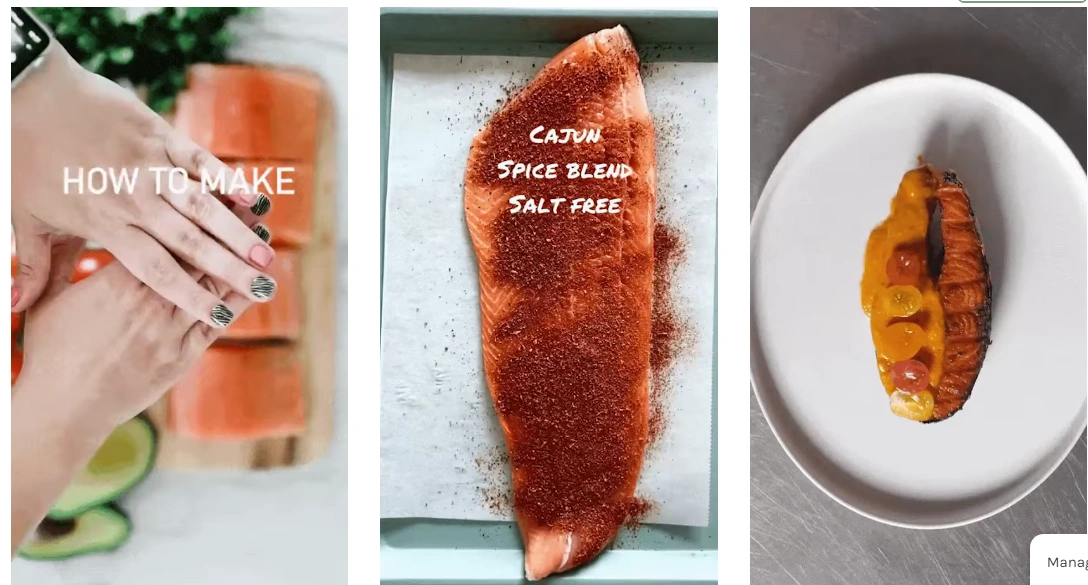
For Bluehouse Salmon, inBeat used educational and recipe-led creator content to make a familiar product more distinctive and useful in-feed. The Bluehouse Salmon campaign shows why “UGC” describes a source and point of view, while recipe, education, and demonstration describe what the video does.
Format, Angle, Hook, and Delivery Are Different Decisions
Teams tend to call every creative choice a “format.” That makes performance data hard to interpret. Use this five-part vocabulary in briefs and reports:
- Source: an organic customer, commissioned creator, employee, expert, or influencer.
- Format: the structural container, such as a review, tutorial, unboxing, or Q&A.
- Angle: the argument, such as convenience, value, confidence, speed, or social proof.
- Hook: the opening device that earns attention, such as a question, visual result, confession, or surprising claim.
- Delivery: the execution, including direct-to-camera, voiceover, green screen, interview, montage, or text-led edit.
A testimonial format can use a skeptical-buyer angle, open with a result, and run as a direct-to-camera Reel. If that creative wins, the labels tell you what to preserve and what to test next.
10 UGC Video Types and When to Use Each One
These types cover the most common campaign jobs. The boundaries can overlap because one video may combine a demonstration with a review or place an offer inside a Q&A. Give each concept one primary job so the message stays clear.
1. Problem-Solution Videos
Problem-solution videos name a recognizable pain point, make its cost tangible, and show the product resolving it. They are useful for cold audiences who understand the problem but have not connected it to your category or brand.
- Best for: products with an easy-to-recognize frustration, including software workflows, home products, personal care, financial tools, and services.
- What it proves: relevance. The viewer can see that the product addresses a situation they already experience.
- Watch-out: avoid stretching the setup so long that the product arrives after attention is gone. Show the problem visually, then move quickly to the mechanism and result.
Miro's creator content is a useful B2B example. A video can begin with an unproductive brainstorming session, introduce the template, and show how the workflow becomes easier. The format translates an abstract software benefit into a recognizable moment.
2. Unboxing and First-Impression Videos
Unboxing videos document the first encounter with packaging, components, setup, texture, or presentation. Their strength is uncertainty reduction. Viewers see what arrives and how the experience begins.
- Best for: product launches, subscription boxes, premium packaging, gifts, electronics, food, beauty, and products with a satisfying setup or reveal.
- What it proves: the product and packaging match expectations.
- Watch-out: an unboxing with no distinctive reveal becomes generic quickly. Brief the creator to notice specific details, show scale, and give a genuine first impression. Use a separate review after meaningful product use when efficacy matters.
Our client Dashing Diva uses creator unboxings like the one below quite frequently:
UGC strategies like these brought the brand a 24% reduction in CAC.
3. Before-and-After Videos
Before-and-after videos compress a visible change into a simple comparison. The proof may be appearance, organization, cleaning, speed, setup, or another observable outcome.
- Best for: products with a clear, ethical, and visually verifiable transformation.
- What it proves: a result occurred under the conditions shown.
- Watch-out: document timing, conditions, and limitations. Avoid retouching, misleading cuts, exceptional results presented as typical, or claims the brand cannot substantiate. Sensitive health, body, and financial categories need additional policy and legal review.
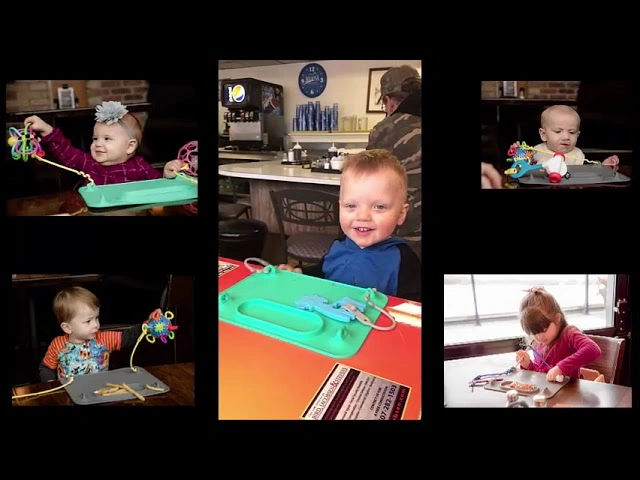
Baby Busy Mat content demonstrates this principle through use. A strong version shows the baseline mess or movement, the product in action, and the resulting difference in the same environment.
4. Testimonial and Review Videos
Reviews evaluate the product, while testimonials focus on the customer's experience and outcome. Both transfer some persuasive work from the brand to a person the viewer can assess.
- Best for: considered purchases, unfamiliar brands, subscriptions, services, products with perceived risk, and retargeting audiences that already know the offer.
- What it proves: a credible person used the product and can describe the experience.
- Watch-out: specificity creates trust. “I loved it” carries less information than what the buyer tried before, how they used the product, what changed, and who it may suit. Paid or gifted relationships must be disclosed clearly.
Our client Booksy uses this strategy quite frequently:
This led to a 1700% increase in business registrations in just 3 months, plus a 92% drop in the cost of these registrations MoM.
For production planning, separate the creator fee from editing, variation, and usage-rights costs. The performance creative pricing guide explains why a raw creator clip and a test-ready ad package are different deliverables.
5. Tutorial and Product-Demonstration Videos
Tutorials teach a sequence. Demonstrations show the product performing a task, sometimes in a single visual beat. Both make the mechanism concrete.
- Best for: products with a learning curve, multiple use cases, a novel mechanism, hidden features, setup steps, or a visually satisfying action.
- What it proves: the product works in a real context and the buyer can use it.
- Watch-out: choose one learning outcome per short video. A complete onboarding lesson may need a longer video, while a paid-social cut should usually isolate the step most connected to purchase intent.
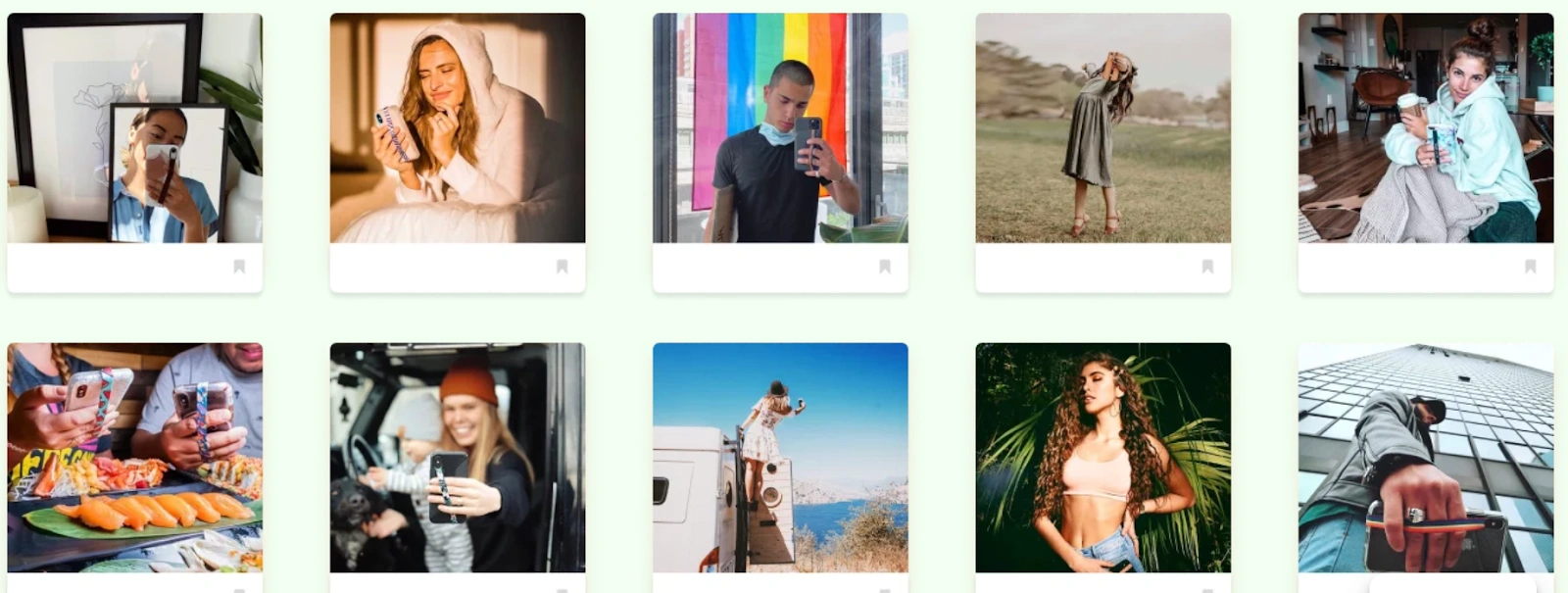
Phone Loops is a natural demonstration product. A creator can show installation, one-handed use, drop prevention, and compatibility as separate concepts. That creates more testable assets than a single video that races through every benefit.
6. Product Haul and Try-On Videos
Hauls present several products in one viewing session. Try-ons add fit, appearance, texture, styling, or scale on a real person. They help buyers compare options and imagine ownership.
- Best for: fashion, beauty, home, food, product collections, seasonal drops, and categories where variety drives discovery.
- What it proves: how products look, combine, or differ outside a catalog setting.
- Watch-out: too many items can erase the message. Organize the video around a useful frame, such as three office looks, a routine for dry skin, or gifts under a price point. Include product identifiers so viewers can act.
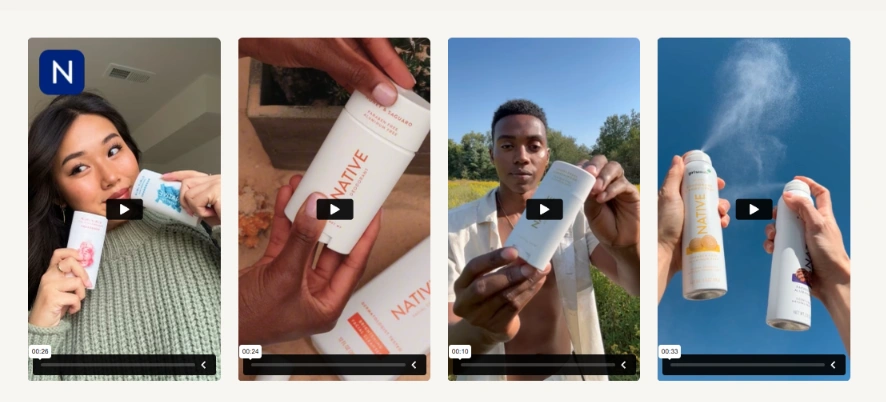
At scale, the format also depends on casting and operations. inBeat's Native case study documents more than 1,000 unique photo and video assets across five collection releases, illustrating how creator diversity and production volume support frequent product drops.
7. Offer and Announcement Videos
Offer videos put a promotion, launch, event, or limited-time reason to act inside a creator-led message. The creator can explain the value and show the product before delivering the call to action.
- Best for: product launches, seasonal sales, bundles, free trials, retail events, and time-bound promotions.
- What it proves: the offer is relevant and worth acting on now.
- Watch-out: an offer cannot rescue a weak product story. Give the viewer a reason to care before the deadline, code, or price. Confirm availability, geography, terms, and end dates before publishing.
8. Educational and Expert-Led Videos
Educational UGC teaches something useful while placing the product, organization, or point of view inside the lesson. The speaker may be a customer, creator, employee, practitioner, or qualified expert, depending on the claim.
- Best for: complex categories, public information, B2B products, high-consideration purchases, and regulated topics where clarity builds confidence.
- What it proves: the brand understands the problem and can explain a useful next step.
- Watch-out: match authority to the claim. A relatable creator can explain a voting process or show a software workflow. Medical, legal, and financial advice may require licensed review, careful disclaimers, and narrower claims.
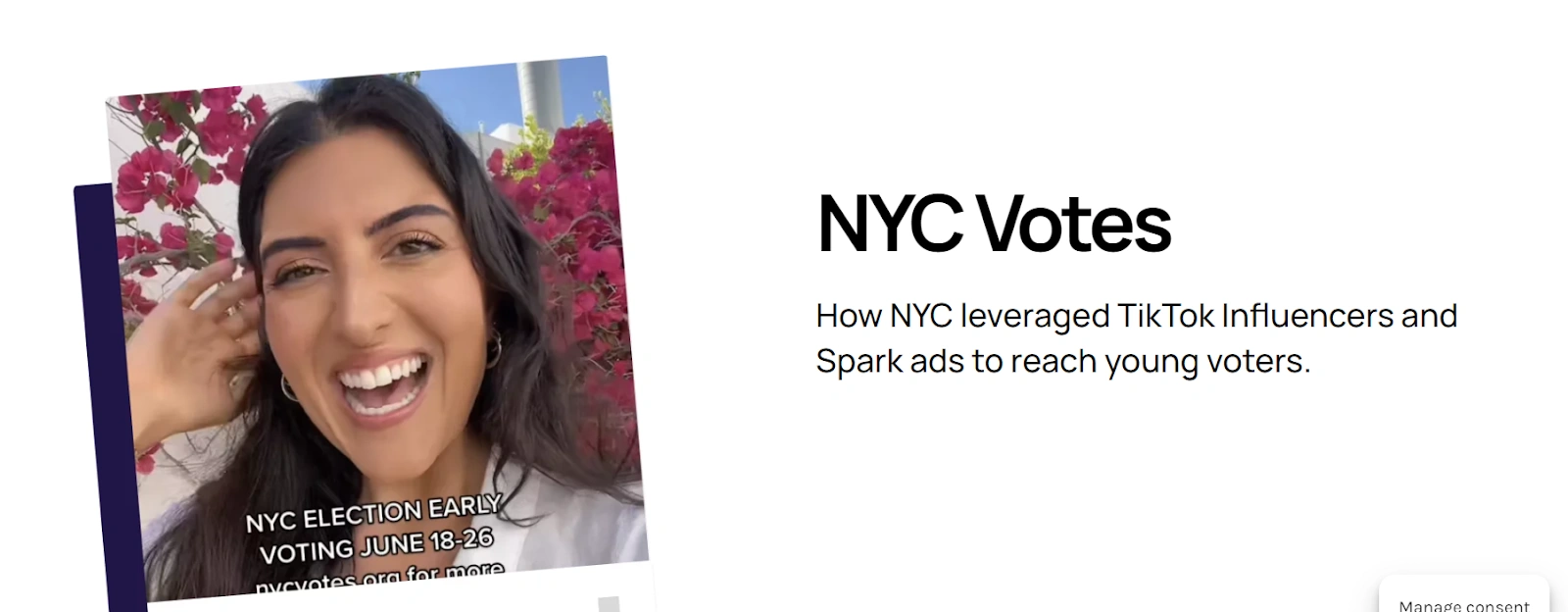
For NYC Votes, inBeat worked with 10 local creators to discuss voting in a TikTok-native format. The campaign generated 2.5 million views and a 70% average view-through rate. The lesson is the fit among message, messenger, and platform.
9. Trend, Reaction, and Culture-Led Videos
Trend-led videos use a current sound, meme, visual convention, conversation, or cultural moment. Reaction videos capture a response to a product, claim, result, or event. Their advantage is instant familiarity.
- Best for: awareness, launches, entertainment, fashion, food, beauty, and brands with the approval speed to publish while a moment is still relevant.
- What it proves: cultural relevance and creator fluency.
- Watch-out: the product still needs a role. If the concept works unchanged after removing the brand, it may earn views without building memory or intent. Maintain a bank of evergreen concepts because trend windows close quickly.
The Nordstrom creator campaign for the Wildfang collaboration used creators who embodied the inclusive fashion concept. The case study reports seven cast creators and more than 50 photo and video assets, showing how cultural alignment can guide both casting and content.

10. Q&A and Objection-Handling Videos
Q&A videos respond to a real or representative customer question. They turn comments, sales calls, reviews, search behavior, and support tickets into a creative backlog.
- Best for: retargeting, product launches, complex products, service businesses, and categories with repeat objections about fit, price, setup, ingredients, compatibility, or timing.
- What it proves: the brand understands the hesitation and can answer it directly.
- Watch-out: use the customer's language. A staged question that nobody asks feels like an ad in disguise. Show evidence inside the answer, then direct the viewer to the logical next step.
How to Choose the Right UGC Video Type
Format selection becomes much easier when you make six decisions in order.
1. Define the Campaign Job
Write one sentence: “This video should help [audience] move from [current state] to [next action].” Awareness, consideration, conversion, onboarding, and retention require different proof. Tie the job to the broader paid social strategy so creative is judged against the outcome the media plan can actually deliver.
2. Name the Buyer's Unanswered Question
Use research calls, comments, reviews, customer support, and sales notes to identify the question blocking progress. “Will this fit?” suggests a try-on. “Is setup difficult?” suggests a tutorial. “Is it worth the price?” may need a comparison, testimonial, or use-case story.
3. Choose the Proof Mechanism
Decide what the viewer should see or hear to believe the message:
- A live product action
- A visible result over time
- A customer's specific experience
- A side-by-side comparison
- A step-by-step explanation
- Several independent voices
The format should make that proof easy to deliver. A review is weak when the claim needs a visual demonstration. A beautiful demo may be insufficient when the barrier is trust.
4. Adapt to Placement and Viewing Behavior
Create for the primary placement first. TikTok's creative guidance emphasizes native execution, an early hook, captions or text overlays, and creative variation. Meta's Reels guidance recommends vertical 9:16 creative, quality audio, and key messages inside the safe zone.
Those are execution requirements, not a reason to make identical edits. A sound-dependent reaction may feel natural on TikTok, while a demonstration with large on-screen text may travel more easily across placements.
5. Match the Creator to the Delivery
Choose for the behavior the concept requires. Direct-to-camera reviews need believable delivery. Tutorials need clear sequencing. Comedy needs timing. Expert education needs appropriate credentials. Product hauls need category fluency and enough visual variety.
Follower count matters primarily when distribution is part of the buy. For brand-owned UGC assets, casting fit, performance history, communication, and the ability to deliver modular footage may matter more. A paid-first ambassador program can retain creators who repeatedly produce usable, scalable work.
6. Check Rights, Disclosures, and Claims Before Filming
Define paid and organic usage, term, territory, editing rights, raw-footage delivery, creator-handle use, exclusivity, and renewal terms. Obtain permission before reusing organic customer content.
The FTC Endorsement Guides require endorsements to be honest and not misleading, with material connections disclosed clearly. Also review product claims and platform policies before production, especially for health, finance, body image, and regulated products.
How to Build a Testable UGC Video Batch
A useful test batch contains distinct concepts and controlled variants. Start with three or four formats that solve the same campaign job through different proof mechanisms. For example, a skincare brand could test a tutorial, a customer review, a routine-led lifestyle video, and a documented transformation.
Within each concept, capture modular footage:
- Three opening hooks
- One clear problem or context beat
- Product-in-use B-roll
- One proof sequence
- Two calls to action
- Clean footage without captions or music
- Placement-ready edits with safe-zone text
Name assets by format, angle, creator, hook, CTA, placement, and date. That lets analysts compare meaningful variables. Changing the creator, format, hook, offer, and edit simultaneously may produce a winner, but it will not explain why the winner worked.
This is where a creative strategy system becomes more valuable than isolated videos. The brief creates hypotheses, production captures reusable components, and media results shape the next round.
Measure the Format Against Its Job
Do not select a “winning” format from views alone. Read early attention, message delivery, and business outcomes together.
| Job | Diagnostic + outcome metrics | Inspect next |
|---|---|---|
| Stop the scroll | Hook rate, early retention, qualified reach, CPM | First frame, delivery, visual interruption |
| Hold attention | Watch time, completion, retention, landing-page engagement | Pacing, proof timing, unnecessary setup |
| Drive interest | CTR, saves, comments, product-page sessions, lead quality | Angle, CTA, audience-format fit |
| Convert | Add-to-cart, checkout, CPA, CAC, revenue, ROAS | Offer, claim, proof, landing-page continuity |
| Sustain scale | Spend by asset, frequency, fatigue, marginal CPA or ROAS | Concept depth, creator mix, refresh cadence |
Look for interactions between metrics. High hold rate with weak clicks can signal entertaining creative with an unclear product role. Strong clicks with weak conversion can point to a mismatch between the ad promise and landing page. Weak early retention can hide a solid proof sequence that deserves a new hook.
inBeat's Hurom case study shows the value of analyzing hooks, calls to action, social proof, and other creative factors as a system. The engagement reported 300% ROAS growth and a 65% reduction in overall CPA. Treat results as account-specific evidence, then validate the learning in your own media environment.
Common UGC Format-Selection Mistakes
- Choosing the trend before the job: cultural relevance cannot replace a clear communication goal.
- Making one video do everything: awareness, education, proof, and urgency compete for limited attention.
- Calling minor edits new concepts: caption color and music changes do not create format diversity.
- Judging creative on likes alone: organic engagement may not predict qualified traffic or conversion.
- Scripting every sentence: a rigid read can remove the creator's natural phrasing and useful detail.
- Requesting only finished edits: raw, modular footage gives the brand more room to test hooks, pacing, and placements.
- Ignoring the handoff: rights, naming, metadata, and performance reporting determine whether one shoot becomes a reusable creative library.
When creative fatigue is already raising acquisition costs, volume must come with variation. The Genomelink case study describes an ongoing pipeline of performance-based UGC videos and reports a 73% decrease in CAC. The system increased throughput while varying hooks, calls to action, Spark Ads, voiceovers, and actors.
AI-Generated UGC: Where It Fits
AI-generated UGC swaps the live shoot for an AI avatar and AI voiceovers, built from a product photo, a script, and a chosen delivery style. It sits inside the same five-part vocabulary as the rest of this guide: it's a production method, so it still needs a real format, angle, and hook behind it.
- Fast concept testing. Because there's no casting or shoot to schedule, a team can turn ten hooks into ten finished clips in a day and run them through an A/B testing round before booking a single human creator. This is where AI-generated UGC earns its keep in the testing structure described earlier: it tells you which angle to scale before you spend on production.
- Filling gaps in a content asset library. When a brand needs product-focused clips for a new SKU or market and can't wait on a creator's calendar, AI-generated video reviews and demos can hold the placement until commissioned content is ready.
- Localization. AI voiceovers can adapt the same script into several languages without re-shooting, which is useful for brands scaling accounts across regions.
- Where it still falls short. Native-style videos built entirely by AI tend to read as synthetic in anything that depends on lived detail: event or experience content, spontaneous reactions, and creator voices with real personality and timing. Treat AI output as a placeholder or a testing tool for these jobs, not a replacement.
Content rights are simpler in one sense (a brand typically owns the AI-generated output outright, since no creator likeness or voice is licensed) but disclosure gets stricter.
However, the FTC's Endorsement Guides already require material connections to be disclosed, and IAB's AI Transparency Disclosure Framework sets out when and how AI use itself needs a consumer-facing label.
In other words, an AI startup's polished avatar library doesn't change that a viewer needs to know they're looking at synthetic content.
Best Platforms for UGC Video Ads
The right platform for a UGC campaign usually follows the buyer, though the instinct is to follow the format. However, the same clip rarely performs the same way twice across social media platforms, so it helps to know what each one rewards before adapting a concept to it.
- TikTok. Best for problem-solution, trend-led, and Q&A content aimed at cold audiences. TikTok's own Creator Marketplace is the most direct route to sourcing and managing creators for these content formats, with built-in creator management, performance metrics, and payment handling.
- Instagram Reels. Best for testimonial, unboxing, and haul content aimed at warmer, retargeting audiences already familiar with the brand. Reels also carries the most direct path from view to purchase, since native shopping tags and product photos in-feed can shorten the trip from click-through rates to landing pages.
- YouTube Shorts. Best for tutorials, demonstrations, and longer-form review content that benefits from a slightly more patient viewer. YouTube's own ad guidance recommends vertical, native-feeling creative under 60 seconds, which mirrors the advice already covered for TikTok and Reels above.
- Facebook and Meta Advantage+. Best for offer and announcement videos and for testimonial content aimed at older or more price-sensitive audiences, where UGC ads still outperform polished brand creative on conversion rates.
A brand ambassador program can feed all four placements at once, but the edit still needs to respect each platform's pacing and safe zones. Match the platform to the campaign job first, then let performance metrics tell you where to put the next dollar.
Build a UGC System That Learns
The right UGC video type is a hypothesis about what proof will move a specific audience. Choose it deliberately, brief it clearly, capture enough modular footage to learn, and judge it against the job it was hired to do.
Start with a small, diverse batch. Preserve the winning message, then test new hooks, creators, deliveries, and placements around it. Retire formats when the evidence changes. Scale them when the result survives beyond one edit or one audience pocket.
If your team needs creator sourcing, production, paid usage rights, testing, and reporting in one workflow, inBeat's performance-focused UGC agency can map the first batch to your campaign goals and build the feedback loop around it.
Frequently Asked Questions
Which UGC Video Type Performs Best?
No single type wins universally. The strongest option matches the buyer's question, the proof your product can show, the placement, and the campaign objective.
For a visually demonstrable product, begin with a tutorial or before-and-after. For a trust barrier, test a specific review or testimonial. For purchase uncertainty, try an unboxing, comparison, haul, or Q&A.
How Many UGC Video Formats Should You Test at Once?
Start with three or four meaningfully different formats for one campaign job. Give each enough budget and time to produce a readable signal.
Within each format, use a small set of hook or CTA variants. This balance creates diversity without spreading spend across so many combinations that no concept gets a fair test.
Should the Same UGC Video Run on TikTok, Reels, and YouTube Shorts?
The same core concept can run across platforms, but each edit should respect its placement. Adapt pacing, text safe zones, audio, captions, duration, and CTA.
Keep the underlying angle and proof stable when you want to learn about platform fit. If you change the concept at the same time, the comparison becomes harder to interpret.
What Is the Difference Between a UGC Format and a Hook?
A format is the video's structure; a hook is its opening attention device. One tutorial can support several hooks without becoming a different format.
For example, a tutorial might open with a question, a mistake, a finished result, or an unexpected use case. Tracking the two separately helps you scale a strong format without repeating the same opening.
Can a Commissioned Creator Video Still Be Called UGC?
Yes, “UGC” commonly includes commissioned creator-made assets in marketing, although “creator-generated content” or “UGC-style creative” can be more precise.
The important distinction is operational. State whether the content came from an independent customer or a paid creator, secure the correct rights, and disclose any material relationship when the content functions as an endorsement.