

Your next retail campaign could fail even if the ads do everything right. A shopper clicks, finds exactly what they want, then discovers their size is out of stock or delivery will arrive too late. You've paid for the visit, but the sale is already lost.
And this happens against a troubling backdrop: Baymard's analysis of 50 studies puts average cart abandonment at 70.22%. Shoppers leave for many reasons, but some problems can be caught before you spend a dollar on advertising.
This retail readiness checklist helps you find those problems through 12 practical checks, clear pass criteria, and a final decision on whether your store is ready for paid traffic.
Is your store ready?
TL;DR
- Paid clicks can reach an attractive listing and still fail at stock, price, delivery or checkout. This checklist tests the purchase journey before media spend begins.
- Launch only when five hard stops pass and applicable scored checks earn at least 87.5%. Of seven scored checks, own-site campaigns need 6.5/7; an Amazon Sponsored Products example with two justified N/A checks needs 4.5/5.
- Use the reference table below to verify all 12 checks, then record each SKU's results, evidence, owner, and review date in the interactive scorecard. Mark inapplicable platform-controlled items N/A only with a documented reason.
What Is Retail Readiness?
Retail readiness means the offer, listing, stock, delivery, economics and measurement can support paid clicks becoming orders. Walmart Connect highlights listing quality, Buy Box competitiveness and fast delivery for its marketplace; the exact checks depend on where an ad sends shoppers.
Amazon retail readiness why it’s important for listing. Source: Fakhi's Vision on YouTube
Here, the digital shelf means an advertised product page and the path to purchase. Supplier onboarding (barcodes, buying-team approval and case packs) and physical-shelf merchandising are different jobs; this checklist focuses on ad-destination readiness.
The checklist covers marketplace destinations and brand-owned stores. Use the rules for the destination and ad format you are actually buying; regulated products add a claims and fulfillment review.
What Is Amazon Retail Readiness?
For Amazon Sponsored Products and relevant Sponsored Display formats, check stock, listing quality and Featured Offer eligibility for each promoted ASIN. Sponsored Brands can have different eligibility requirements: confirm that the advertised item is buyable, rather than applying the Featured Offer requirement to every format.
The Retail Readiness Framework Every Amazon Seller Needs. Source: Amazonia PPC on YouTube
How the Ecommerce Advertising Readiness Gate Works
Before you spend on ads, each promoted product must pass two tests: five mandatory checks and a score for the remaining seven. This is inBeat's launch-readiness framework, rather than a retailer-issued requirement.
Step 1: Pass the Five Hard Stops
Five checks are mandatory: availability (1), offer eligibility (2), claims and rights (4), contribution economics (8), and tracking (12).
All five must pass. A single failure puts the product on HOLD, regardless of its score elsewhere.
Step 2: Score the Remaining Checks
The other seven checks assess listing quality, reviews, pricing, delivery, and the purchase experience.
Each applicable check receives:
- Pass = 1 point: The requirement is fully met.
- Partial = 0.5 points: A minor issue remains, with a documented plan to fix it.
- Fail = 0 points: The requirement is unmet.
- N/A: The check is outside the seller's control and can be excluded with a written reason.
The launch threshold depends on where your ads send shoppers.
| Ad destination | Scored checks | Minimum to launch |
|---|---|---|
| Own ecommerce site | 3, 5, 6, 7, 9, 10, 11 | 6.5 / 7 |
| Amazon Sponsored Products | 3, 5, 6, 7, 9 | 4.5 / 5 |
These thresholds follow an 87.5% minimum, rounded up to the next half-point. In both examples, one Partial is acceptable, but any Fail means HOLD.
For Amazon, Checks 10 and 11 are excluded from scoring where the platform controls checkout. Sellers should still inspect visible shipping charges and return terms under Check 10, recording issues that need correction or escalation.
Step 3: Make the Launch Decision
LAUNCH: All five hard stops pass, and the product meets its applicable scoring threshold.
HOLD: A hard stop fails, or the scored checks fall below the required threshold.
For every Partial, record the issue, supporting evidence, responsible owner, and next review date. Repeat the assessment when stock, ad formats, retailer requirements, or other material conditions change.
What Qualifies as a Partial Pass?
A Partial applies only when the essential purchase journey works and a limited improvement remains:
- Check 3: Required listing details are complete, but optional content is missing.
- Check 5: Reviews meet the limited-test criteria, or a capped new-product test has been approved.
- Check 6: A compliant review workflow is configured, with an owner and activation date.
- Check 7: A manageable pricing concern has a documented, capped validation plan.
- Check 9: Delivery is slower than comparable offers, but the ETA is accurate and an improvement plan exists.
- Check 10: All material costs and returns terms are disclosed, with a minor placement issue on an owned site.
- Check 11: Mobile checkout and payment work, although minor friction remains.
Missing required information, hidden charges, broken purchases, and unsupported claims count as failures.
Ready to assess your products? Download the interactive Retail Readiness Launch Scorecard to record results, supporting evidence, responsible owners, and your final launch decision for each advertised SKU. Use the reference table below to verify each check as you complete it.
| Check | Type | Pass rule / evidence | Verify in |
|---|---|---|---|
| 1. Availability & supply | Hard stop | Buyable now; signed stock + replenishment plan | Inventory / supplier |
| 2. Eligible offer / destination | Hard stop | Featured Offer held where required; otherwise a valid, purchasable destination | Ad console / live page |
| 3. Listing completeness | Scored | Walmart 80%+ or platform-specific listing QA | Seller Center / page |
| 4. Claims & rights | Hard stop | Claims and category approvals signed; rights checked | Compliance owner |
| 5. Rating & reviews | Scored | 1: 15+ at 4.0+; 0.5: permitted capped launch or 5+ at 3.5+ | Reviews / test plan |
| 6. Review collection | Scored | Approved neutral review workflow active; partial if planned | Retailer tools / CRM |
| 7. Price position | Scored | Benchmark comparison or justified premium | Merchant Center / research |
| 8. Contribution economics | Hard stop | Positive margin; break-even ROAS and pilot cap | Unit economics |
| 9. Delivery promise | Scored | Accurate ETA and credible fulfillment | Listing / logistics |
| 10. Costs & returns | Scored | Own site: costs/returns early; marketplace: verify visible details, UI edits N/A | Page / checkout |
| 11. Mobile checkout | Scored | Own site: mobile purchase passes; platform UI N/A | QA log |
| 12. Tracking & stop rules | Hard stop | Measurement tested; pause conditions recorded | Analytics / owner |
Re-run the gate for each new SKU, retailer, ad format, season or meaningful platform-rule change. Save the score, dated evidence and repair owner; our guide to marketing measurement explains which performance metrics are worth tracking.
What an Unready Page Costs per Order
An unready page raises the cost of every order, and the gap is easy to price. A campaign report hides it, because cost per click can hold steady while orders quietly fall.
Take $10,000 of spend at a $1.00 cost per click, which buys 10,000 clicks. This is an inBeat illustration; no benchmark sits behind it.
| Page state | Conversion rate | Orders from $10,000 | Cost per order |
|---|---|---|---|
| Ready | 4% | 400 | $25 |
| Mid (thin reviews, slow delivery) | 2% | 200 | $50 |
| Severely impaired (missing variants, checkout friction) | 0.5% | 50 | $200 |
The click price stayed at $1; in this illustration the paid cost per order changes from $25 to $200. That is not necessarily new-customer acquisition cost, since the orders may include existing buyers.
Availability and Offer Eligibility Before Spend
The first two hard stops ask whether shoppers can actually buy the promoted product and whether stock can support the planned demand. Featured Offer rules apply only to relevant marketplace ad formats; own-site destinations need an accurate, active offer.
Check 1: Confirm Availability and Plan 28 Days of Demand
First verify that the product is active, available to buy now and backed by an approved replenishment plan. A rolling four-week inventory target, discussed by Perpetua, is an inBeat planning heuristic rather than a universal Amazon ad-eligibility rule. Reliably replenished short-cycle products may justify a documented exception.
Forecast total units, not only advertising-attributed demand:
- Estimated ad-attributed daily orders = (daily ad spend / average CPC) × expected conversion rate. Adjust this estimate to incremental paid demand when advertising overlaps with organic purchases or other channels.
- 28-day unit need = expected non-ad orders over 28 days + incremental paid orders over the same 28 days + safety stock (units).
- Count sellable units plus confirmed inbound receipts arriving before they are needed; account for fulfillment lead time, expected returns and seasonality.
At $300/day, $1 CPC and a 3% conversion rate, the illustrative ad-attributed demand is 9 orders/day or 252 in 28 days. Add baseline non-ad orders and a lead-time safety buffer. Reorder when lead-time demand plus safety stock reaches the reorder point, early enough to maintain the target cover.
Amazon advertising requires an active, in-stock eligible item; out-of-stock items may stop serving. Confirm actual buyability at launch and pause an advertised SKU if stock becomes unavailable.
Check 2: Verify Offer Eligibility or a Purchasable Landing Page
For Amazon Sponsored Products and applicable Sponsored Display ads, check that each promoted SKU is eligible for and currently holds the Featured Offer. Eligibility alone doesn't guarantee that your offer will be selected. Sponsored Brands follow different rules and can continue serving as long as the product remains available to buy.
On Walmart, verify Buy Box status against the selected ad format's requirements. For an own-site campaign, confirm that the ad URL opens the correct purchasable product with matching price, stock availability, variant, and purchase CTA.
Marketplace offer ownership can change as sellers adjust price, stock and delivery. Audit the full advertised set at launch, then monitor high-volume SKUs more frequently and recheck the rest at a risk-based cadence.
For Amazon Sponsored Products, verify each promoted ASIN and record the result:
- Open Manage Inventory in Seller Central.
- Find the ASIN.
- Read whose seller name sits on Add to Cart and Buy Now.
- Log the result next to that week's ad impressions.
- Investigate any item where impressions fall while the offer sits with another seller.
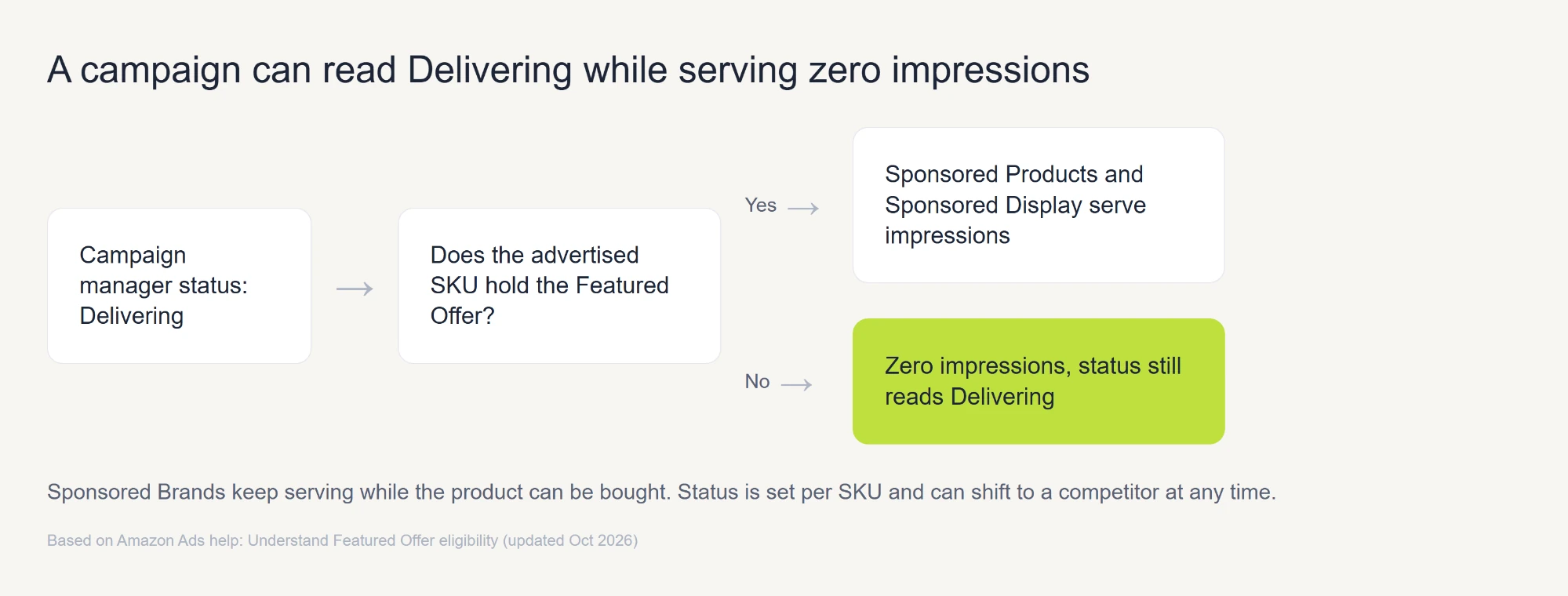
If impression volume falls, revisit offer eligibility and the related stock, price and delivery checks. For own-site campaigns, diagnose broken URLs or inventory-feed mismatches under Check 2; reserve payment and multistep checkout issues for Check 11.
Product Listing Readiness
A strong listing answers purchase questions accurately with useful copy, images and options. Assess the platform-specific quality signals rather than applying one retailer's score to every store.
Check 3: Pass Channel-Specific Listing Quality QA
For Walmart Marketplace, target an excellent Listing Quality score of 80-100% on promoted items. Amazon provides content and ad-eligibility guidance rather than the same universal numeric score.
On an own-site store, use a documented product-page QA checklist. An incomplete mandatory field is a fail; optional enhanced content may improve a listing without being a platform requirement.
| Element | What good looks like | Where to check |
|---|---|---|
| Title | Amazon non-media products: up to 75 characters, including spaces. Keep titles clear and descriptive; check category-specific exceptions. | Listing editor |
| Bullets | Amazon: accurate product details and useful bullets; requirements vary by category. | Listing editor |
| Main image | Amazon main image: pure white background; product fills at least 85% of frame. | Image tab |
| Secondary images | Secondary images: useful scale and detail; count and size depend on the channel. | Image tab |
| Video or enhanced content | Optional enhanced content/video when eligible; not a universal requirement. | Content manager |
| Variations | Correct variations; reviews share only between permitted materially similar variants (2026 policy). | Amazon catalog / review-sharing policy |
Dreame Tech illustrates how listing preparation can accompany a wider campaign.
Walmart Connect reports that Dreame Tech achieved a Listing Quality score above 90% before its November 2024-January 2025 campaign, while also using promotional offers and seller-program improvements. The company reported 5.9 million impressions and a high new-to-brand share. Those figures describe the combined campaign, not the isolated effect of the listing score.
Check 4: Clear Claims and Compliance Review Before Launch
Every advertised listing needs written approval of its claims before launch. An unsupported superlative or a restricted-category item can get a listing suppressed, and a suppressed listing takes its ad delivery with it.
Review these before sign-off:
- Superlatives such as "best" and "#1".
- Comparative wording that names a competitor.
- Restricted-category approvals the platform requires.
- Rights for every image and video on the page.
Assign one person to sign off the claims, media rights and required category approvals. For regulated claims, keep the substantiation or certification on file before a product is promoted.
How Many Reviews to Have Before You Scale
A product may be ready for a limited ad test before it has enough reviews to justify scaling. The table below separates Amazon's advertising guidance, inBeat's scoring criteria, and academic research to show how each informs that decision.
| Rule | Source | How firm it is |
|---|---|---|
| Amazon Ads recommendation: 5+ reviews and 3.5+ stars | Amazon Ads | Advertising advice, not a mandatory eligibility floor |
| inBeat: 15+ reviews and a 4.0+ rating to scale | inBeat editorial rubric | Full score for mature SKU; limited new-SKU test may earn 0.5 |
| Purchase likelihood is 270% higher with five reviews than with none | Medill Spiegel Research Center | Academic study, 2017 data |
| Purchase likelihood peaks between 4.0 and 4.7 stars | Medill Spiegel Research Center | Academic study |
| A verified-buyer badge adds 15% to purchase odds | Medill Spiegel Research Center | Academic study |
Check 5: Reach 15 Reviews and a 4.0 Rating Before Scaling
For a mature SKU, Check 5 earns 1 point at 15+ reviews and a 4.0+ average; give 0.5 if it has at least five reviews at 3.5+ stars but misses the full target, otherwise 0. For a new SKU, use 0.5 for an approved limited learning test with a documented review-building plan, including a zero-review launch where permitted. Scale only once the stronger review evidence is in place. These are inBeat scoring choices, not retailer eligibility requirements.
Here's the arithmetic. Five reviews averaging 5.0 drop to 3.86 after two one-star reviews. Fifteen reviews averaging 4.8 only fall to 4.35 after the same two.
The Medill Spiegel study found that review-display effects vary by product price, with a larger reported lift for higher-priced items. The study is historical research, not a guaranteed current conversion increase for any single listing.
Our guide to Amazon advertising strategies covers how to grow reviews alongside spend.
Check 6: Build Review Volume With Verified Buyers and Review Tools
Start review collection through each retailer's approved programs, such as Amazon Vine where eligible, and neutral post-purchase requests permitted by the channel. Keep the request unbiased and free of any reward tied to a rating.
Creator product seeding is a separate content strategy, not a way to generate Amazon product reviews. Free-product endorsements on social or owned channels require clear, appropriate disclosures. Do not ask gifted creators to post marketplace reviews in exchange for products.
Triage critical feedback promptly using the tools each retailer permits. A 48-hour response target can be an inBeat service goal, but public replies are not available on every marketplace. Amazon Brand Registry's Contact Customer feature is private and limited to eligible critical reviews; never ask customers to delete or change ratings.
Price Competitiveness and Margin Before Launch
Price gets two separate tests, one against the market and one against your own ad cost.
Check 7: Hold Price Within the Competitor Band
Use roughly +/-5% versus a comparable product benchmark as an inBeat diagnostic flag, not a Google Ads eligibility rule. Google Merchant Center provides price-gap data when a product can be matched using identifiers such as a GTIN. Premium prices may be justified by differentiation if conversion and contribution economics remain healthy.
Walmart has its own price-competitiveness signals and repricing tools; its Pro Seller criteria should not be confused with the Google Merchant Center benchmark or inBeat's +/-5% review flag. When comparable external data are unavailable, document a reasonable category comparison or margin-backed pricing decision.
Check 8: Confirm Margin Survives Break-Even ROAS
Check 8 is a hard stop. Confirm positive contribution per order BEFORE ad spend, calculate an item-level break-even ROAS, and set a conservative forecast plus a capped test budget. A prelaunch ROAS forecast is an assumption, not proven performance; scale only when observed results support viable economics.
Break-even ROAS = 1 / pre-ad contribution margin rate, where the margin rate = (net sales - variable pre-ad order costs) / net sales. Include product cost, marketplace commissions, fulfillment, payment fees, discounts and estimated variable returns costs where relevant. A 40% margin gives a 2.5x break-even ROAS, assuming consistent unit economics and compatible attribution.
Zero or negative pre-ad contribution means HOLD until pricing or variable costs change. Recalculate the threshold when fees, fulfillment costs, discounts or returns shift; apply a loss cap and move beyond a pilot only when validated results justify it.
Delivery Speed and Seller Account Health
Check 9: Meet the Delivery Speed Shoppers See on the Page
Check the delivery promise the shopper actually sees, its accuracy and how competitive it is for the product and delivery area. Walmart's OneDay and TwoDay services are useful marketplace examples, not universal requirements for DTC, specialty or made-to-order items. Delivery times should be achievable across the advertised service area.
Compare the published ETA with actual fulfillment performance, including exceptions, service areas and carrier cutoffs. Record the fulfillment owner for failed promises.
Walmart Pro Seller program standards and Amazon seller-health rules differ by tier, channel and date. Treat Walmart's on-time-delivery, cancellation and shipping-speed metrics as Walmart-specific account indicators; separately verify any Amazon account-health eligibility in Seller Central before claiming Featured Offer access.
| Option | Delivery promise | Best for | Watch-out |
|---|---|---|---|
| Walmart Fulfillment Services | TwoDay and OneDay standards | Walmart Marketplace sellers | Inventory must sit in Walmart's network |
| Fulfillment by Amazon | Prime badge | Amazon sellers | Prime eligibility depends on enrollment |
| Seller-fulfilled with a fast-ship badge | Set by your carrier | Brands with their own warehouse | Test own carrier SLA; Walmart's 95% target is program-specific |
| Third-party warehouse for an own-site store | Set by the warehouse SLA | Brands selling on their own domain | Test the promise on a live order |
Purchase Friction Between Product Page and Payment
Checks 10 and 11 address cost visibility and checkout friction. For a brand-owned store, both are directly actionable. On marketplaces, sellers can inspect what shoppers see, while the platform controls the checkout interface. Price transparency starts before add to cart.
Check 10: Show the Full Landed Price and Returns Terms Up Front
Show honest shipping and tax estimates and clear returns terms before shoppers commit; when final charges depend on location, offer an early estimator or clear cost disclosure.
For own-site stores the merchant can change checkout and product-page placement; marketplace sellers should mark platform-owned UI edits N/A, but still inspect buyer-visible shipping charges and return disclosures and log any mismatch for correction or escalation.
The Baymard research cited earlier also identifies unexpected costs as the leading fixable reason for cart abandonment among shoppers who were ready to buy. The chart below shows how other checkout issues compare.
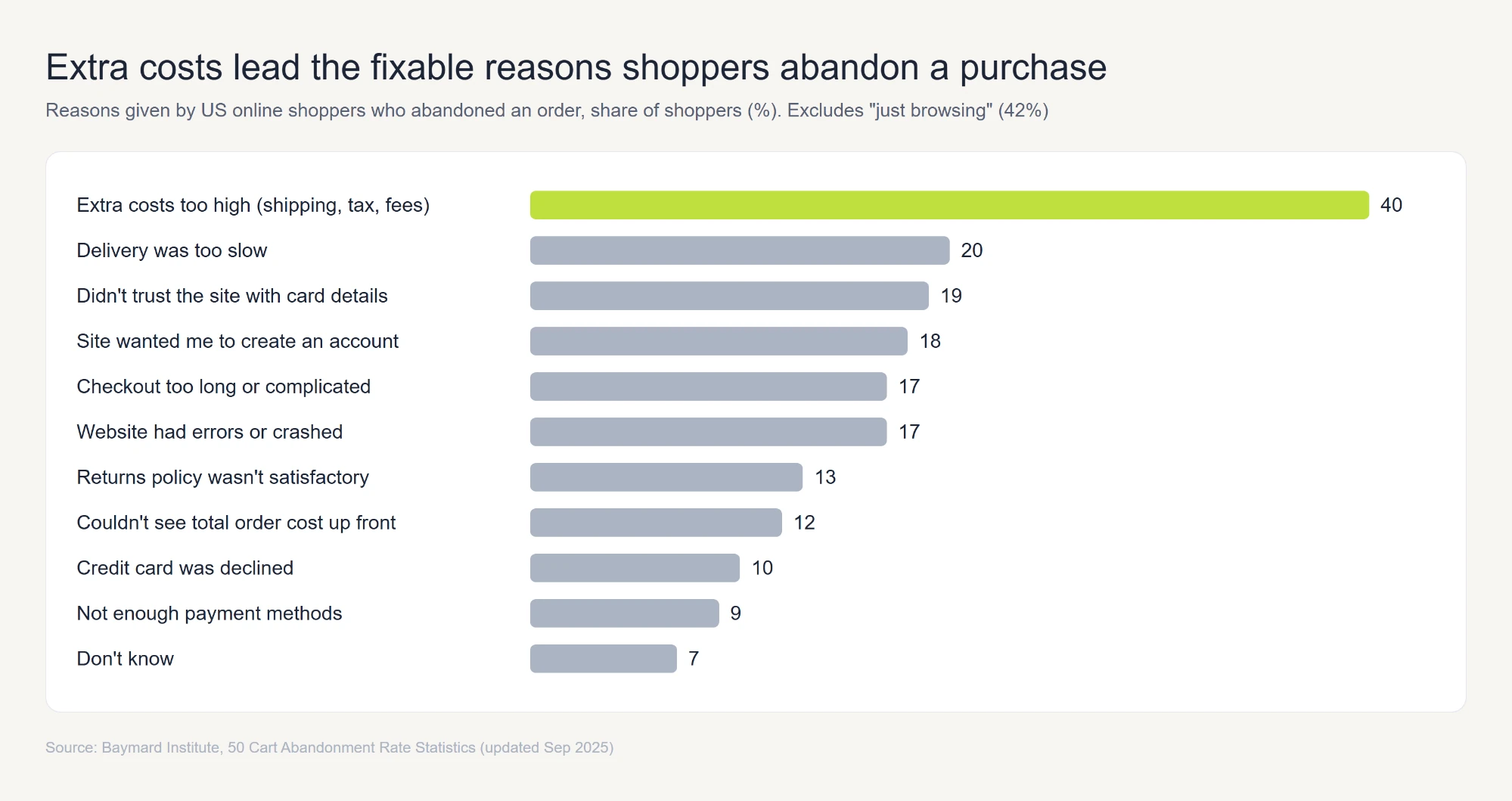
Address unexpected fees before changing checkout form fields:
- Display shipping and tax estimates or an early location-based calculator when exact totals depend on the address.
- Make return eligibility, exceptions and the return window clear close to the offer, within platform placement rules.
- On owned sites, show the payment methods available at checkout; marketplace payment methods belong to the platform.
For wider context, our online shopping statistics roundup covers cart abandonment by device and region.
Check 11: Cut Checkout Steps and Test the Page on Mobile
Baymard reports that checkout forms often contain more fields than necessary; its research cites roughly 12-14 ideal form elements versus 23.48 in the average US checkout it studied. Those benchmarks apply to merchant-controlled checkouts, not forms a marketplace seller can edit. Forced accounts, payment errors and mobile layout issues still merit smoke testing.
For a brand-owned site, test the mobile purchase path before launch and after meaningful checkout changes:
- Open the advertised product URL on a phone over mobile data and confirm the correct SKU and price.
- Choose a variant and add it to cart; confirm stock and fees stay consistent.
- Apply a valid discount if one is offered, and check the recalculated total.
- Use guest checkout if supported and complete payment with a test method.
- Verify the confirmation, receipt and one correctly valued purchase event.
Fail this check for broken steps, unexpected fees, payment errors or unusable mobile layout. Use measured response times rather than an arbitrary one-minute-per-step limit. For Amazon or Walmart checkout, record any buyer-visible issue and escalate to the platform; score platform-owned optimization N/A.
Tracking Baseline and Stop-Loss Before Launch
A working checkout gets shoppers to the finish line, but reliable tracking tells you what happens next and when it's time to adjust your spend.
Check 12: Set a Tracking Baseline and a Stop-Loss Rule
A campaign can only be evaluated when purchase data is reliable and someone is responsible for acting on it. This is a hard stop, so verify three things before launch:
- Record a baseline. For established SKUs, log conversion rate, add-to-cart rate, purchases, stock cover, and review count. Include Featured Offer share where relevant. For new products, document your traffic and conversion assumptions instead of inventing historical data.
- Test purchase tracking. On your own site, use the test order from Check 11 to confirm that analytics record exactly one purchase event with the correct value, currency, transaction ID, and product ID. Verify consent handling and campaign parameters. For marketplaces, check reporting access, conversion definitions, and attribution windows.
- Set pause conditions. Assign a decision owner, daily spend cap, and review schedule. Pause immediately for stockouts, unavailable products, compliance blocks, or broken measurement. Review ROAS against the break-even threshold from Check 8 once enough conversion data is available and the attribution window has matured.
Pass condition: Purchase reporting works, the baseline or assumptions are documented, and someone owns the pause decisions. Any missing requirement means HOLD.
Extra Checks for Regulated and Perishable Products
For regulated or perishable products, expand Checks 1, 4 and 9 to cover category-specific approvals, supported claims and realistic fulfillment. Requirements depend on product, jurisdiction and sales channel; avoid treating supplier onboarding rules as universal ad-readiness gates.
Keep the certifications, testing and substantiation actually required for the claimed product attributes. An organic claim needs the appropriate certification where applicable; category-restricted products may need marketplace approval before advertising.
For perishables, compare remaining shelf life with the promised delivery window and expected storage time. Verify cold-chain controls and handling evidence when the product requires them. Fold these results into the original 12 checks rather than adding an unrelated retail-pitch workflow.
Build a Retail-Ready Launch With inBeat
This checklist matters most when it changes what goes live. A product that passes can enter the campaign with a tested purchase path and a clear way to evaluate results. One that falls short comes with a specific fix, an owner, and a date to review again.
Keep those decisions attached to your media plan so changes in stock, delivery, or tracking lead to action before more budget is spent.
If you'd like a second opinion on your readiness scorecard, book a strategy call with inBeat. We'll help identify the highest-risk issues, prioritize the necessary fixes, and determine which products are ready for paid traffic.
FAQ
How much extra stock does a creator-driven spike need?
Model the extra peak-day demand from the last comparable creator post and other channels, then add it to baseline sales without double counting. Advance the reorder point to cover the actual supplier lead time and safety stock; retain the four-week planning target where it fits.
How should spend restart after a hard stop is fixed?
Restart with a capped budget after all five hard stops pass and measurement has been retested. Marketplace eligibility and impressions can take time to recover; monitor the affected SKU and ramp only once delivery and economics look stable.
Should I run the retail readiness checklist for every SKU or just once per store?
Run the gate separately for each advertised SKU and retailer destination. Stock, pricing, delivery, and offer eligibility can differ between products, while checks such as checkout functionality and tracking may share store-level evidence. Reuse that evidence where appropriate, but record a separate launch decision for every promoted SKU.
Does passing the retail readiness checklist guarantee a profitable campaign?
Passing the checklist helps catch preventable problems before you pay for traffic. It cannot predict click costs, creative performance, or how shoppers will respond to your offer. Start with the approved spend cap, then compare actual campaign results against the break-even ROAS from Check 8 before increasing your budget.