

Imagine a $150,000 media plan with a clear budget and target for every channel. By week five, paid social is costing more per conversion than expected, while search still has room to deliver. Do you keep the original split or move money? And what would justify that decision?
A useful media planning template answers these questions before the campaign starts. This guide shows how to build one, connect forecasts to weekly results, and write rules for reallocating spend. You'll also see how those rules play out over a 13-week campaign.
See how it works.
TL;DR
- Six tabs: brief, audience and channels, budget, forecast, calendar, actuals.
- Forecast math: CPM-based campaigns use impressions and CTR, while CPC-based campaigns calculate clicks directly. Both apply conversion rate to forecast results, and target conversions multiplied by expected CPA determine the required budget.
- Learning-volume check: estimate whether each Meta ad set can generate roughly 50 optimization events per week, using platform-specific targets for other campaigns.
- Decision rules: six written thresholds say when to shift 10% of a line, when to wait, and when to run a holdout first.
- Outgrowing the spreadsheet: move to planning software when line count, editors or report hours pass a set trigger.
What Is a Media Plan Template, and Which Decisions Must It Answer?
A media plan template is a spreadsheet that fixes how a budget is split across media channels, in which weeks, for which expected result. It turns a marketing budget, which is a finance number, into a plan with owners, dates and targets.
A useful template answers five decisions before launch:
- How much: total spend and the share each line gets.
- Where: which channels, and which role each one plays.
- When: the weeks each placement runs.
- What result: the conversions, reach or revenue each line should produce.
- What changes the plan: the written triggers for moving money.
Planning sets the split and buying executes it. Who runs the buying, in-house or with an agency, is a separate choice, covered in our hybrid media buying guide.
This page covers the paid and creator layer plus owned channels such as email. Television, radio, print and out-of-home fit the same columns, with cost per rating point replacing the click-based metrics.
How to Create a Media Plan in Excel or Google Sheets: Six Tabs From Brief to Actuals
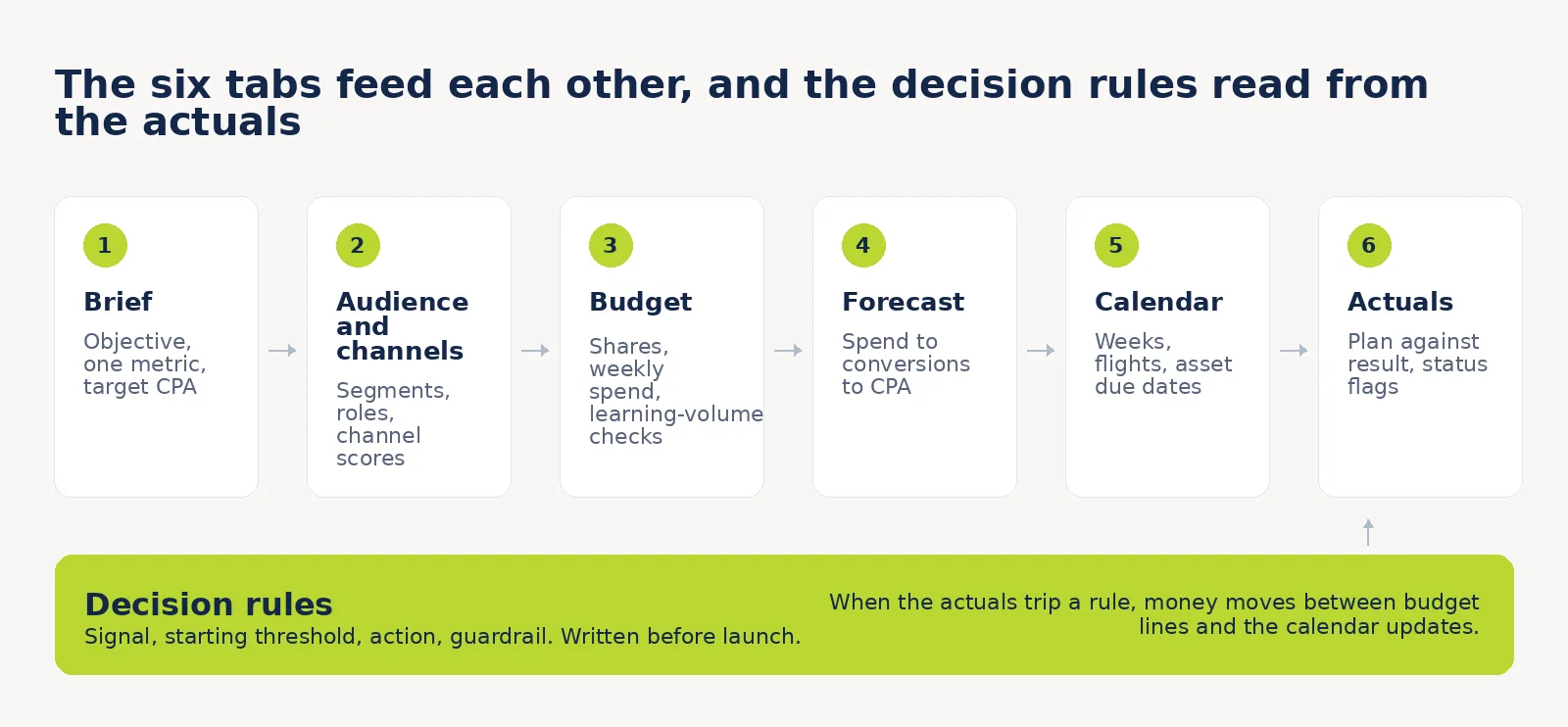
Build the template in Microsoft Excel or Google Sheets as six linked tabs. Each tab answers one decision and feeds the next.
| Tab | Decision it answers | Feeds into |
|---|---|---|
| 1. Brief | Which outcome, and which metric counts | Every other tab |
| 2. Audience and channels | Who is reached, through which channel role | Budget |
| 3. Budget | How much each line gets | Forecast, calendar |
| 4. Forecast | What each line should deliver | Actuals, rules |
| 5. Calendar | When each placement runs | Actuals |
| 6. Actuals | What happened | Decision rules |
The decision rules sit in their own block after the tabs. They connect weekly performance to specific actions, making it clear when to reallocate spend, when to wait, and when to test first.
Keep every threshold in a single assumptions block with one named input cell each. When a platform changes a rule, the fix is a one-cell edit.
Download the filled example (PDF). The same plan used throughout this guide: all six tabs, the decision rules, the decision log and a pre-approval checklist.
Download the editable calculator (HTML). Open the file in any browser, change the yellow cells, and it recalculates budgets, projected learning volume, forecast CPA and rule 1 for you.
Tab 1: Brief, Campaign Objectives, and the Metric Each One Must Move
Start with a seven-field brief, then assign one primary KPI to each campaign line. The table below provides suggested metrics, which you can adjust to match the campaign's objective and buying model.
- Business goal: the outcome in one sentence.
- Campaign objectives: awareness, consideration, conversion, or retention.
- Primary KPI: the one number that decides success.
- Target CPA or ROAS: the ceiling or floor for that KPI.
- Dates: start, end, and any fixed events.
- Hard constraints: account limits, usage rights, approval time.
- Deciding source: which system settles a disagreement, such as the shop backend.
The objective then sets the metric, and the metric sets what the plan has to protect.
| Campaign objective | Primary metric | Supporting metric | What it changes in the plan |
|---|---|---|---|
| Awareness | Reach | Frequency, CPM | Reach budget and frequency ceiling |
| Consideration | Video views | Cost per view | Creative length, audience size |
| Conversion | Conversions | CPA, ROAS, new-customer share | CPA target and learning-volume check |
| Retention | Repeat purchase rate | Revenue per send | A capacity number and a tooling line |
For TV campaigns, TRP can replace reach as the primary KPI, with cost per TRP as a supporting metric. Conversion campaigns focused on efficiency may prioritize CPA over conversion volume. Choose one primary KPI per campaign line before setting the budget.
Tab 2: Audience Segments and the Channel Role for Each
Give every audience segment a row, then assign each one a channel and a role: capture demand, create demand, or retain.
- Capture: people already looking. Paid search and retargeting.
- Create: people who have not decided to look yet. Paid social prospecting and creator-led paid amplification.
- Retain: people who already bought. Email and SMS.
Creator-led paid amplification gets its own row because media spend should be tracked separately from creator fees and production costs. IAB projects U.S. creator ad spend at $44 billion in 2026.
| Channel | Role | Audience segment | Primary metric | Cost metric |
|---|---|---|---|---|
| Paid search | Capture | High-intent searchers | Conversions | CPC, CPA |
| Paid social prospecting | Create | Persona-matched cold audiences | Conversions | CPM, CPA |
| Creator-led paid amplification | Create | Persona-matched cold audiences | Conversions | CPM, CPA |
| Retargeting | Capture | Site visitors, last 30 days | Conversions | CPM, CPA |
| Email and SMS | Retain | Past purchasers | Revenue per send | Cost per send |
Owned channels carry a capacity number and no conversion forecast. Email capacity is list size times sends per week, for example 80,000 subscribers at two sends a week is 160,000 sends. The budget line only pays for tooling and production.
Score every channel before it gets money. Rate five criteria from 1 to 5, where higher is better:
- Audience fit
- Measurability
- Cost efficiency
- Ease of execution
- Creative cost (5 means cheap)
A total of 15 or more earns a line. Below 15, the channel gets test reserve only. The scale is ours, so adjust the cutoff to your margin.
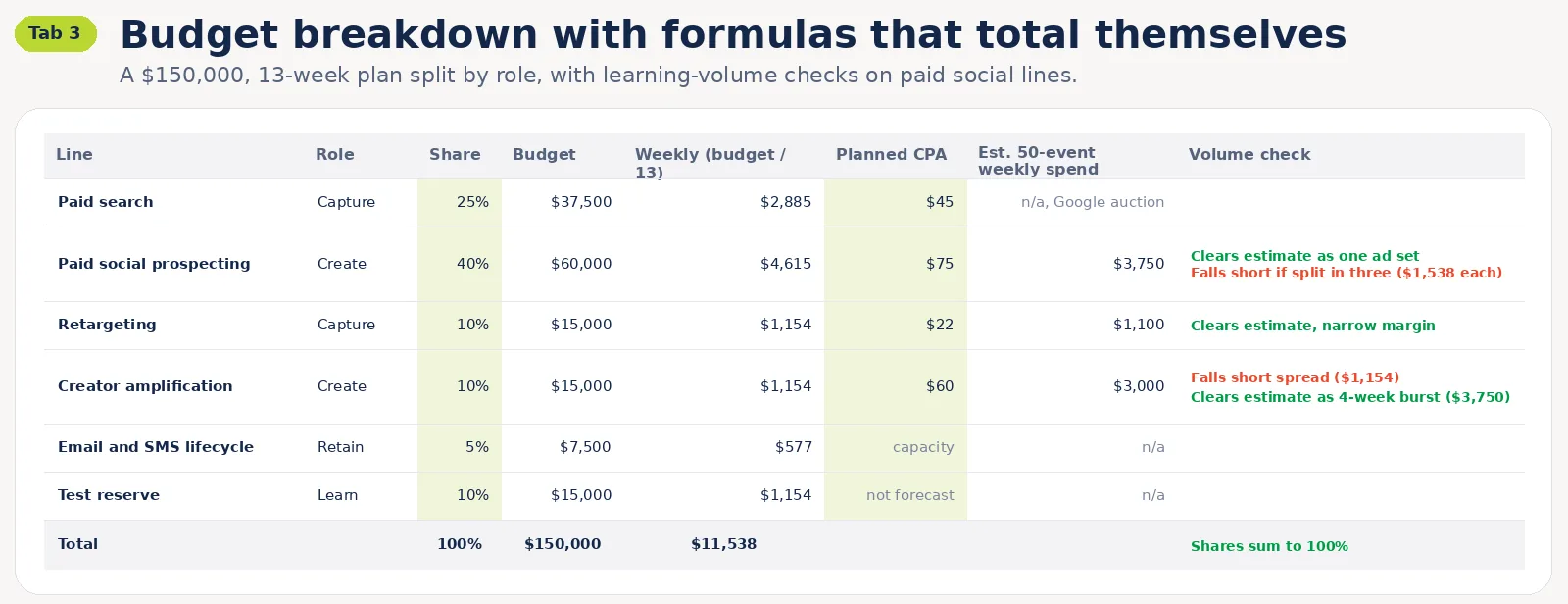
Tab 3: Budget Breakdown With Formulas That Total Themselves
Build the budget breakdown top-down: total, split by role, split by channel, then by month. Every line carries a share-of-total column, and a check cell confirms the shares sum to 100%.
This is a plan-level tab, so it differs from a finance-level marketing budget template. It includes paid media lines, owned-channel costs, a test reserve, and learning-volume estimates where applicable.
Four formulas do most of the work:
- Share of total: =line budget / total budget
- Weekly spend: =line budget / number of weeks
- Monthly from a daily budget: =daily budget * 30.4, the factor Google Ads uses for the average month
- Reserve: =total budget * reserve share
Pro tip: Hold a fixed share back for tests. Ten percent is a starting value, and our creative testing guide covers how to spend it.
The learning-volume check
Before splitting a paid social budget across ad sets, check whether each can generate enough optimization events for delivery to stabilize.
Meta typically uses around 50 optimization events within seven days of the last significant edit as a learning-phase benchmark. TikTok's guidance varies by campaign type, so the same threshold shouldn't automatically apply to every platform.
For a Meta ad set optimized for purchases, use this planning estimate:
Estimated weekly learning-volume budget = planned CPA × 50
At a $75 CPA, that works out to approximately $3,750 per week, or $536 per day. This is a feasibility estimate rather than a required minimum spend or a guarantee of stable delivery.
If the budget falls short, consider consolidating similar ad sets or concentrating spend into fewer weeks. Keep the event target editable in your assumptions block and check each platform's current guidance. Google Search has no directly comparable 50-event learning benchmark.
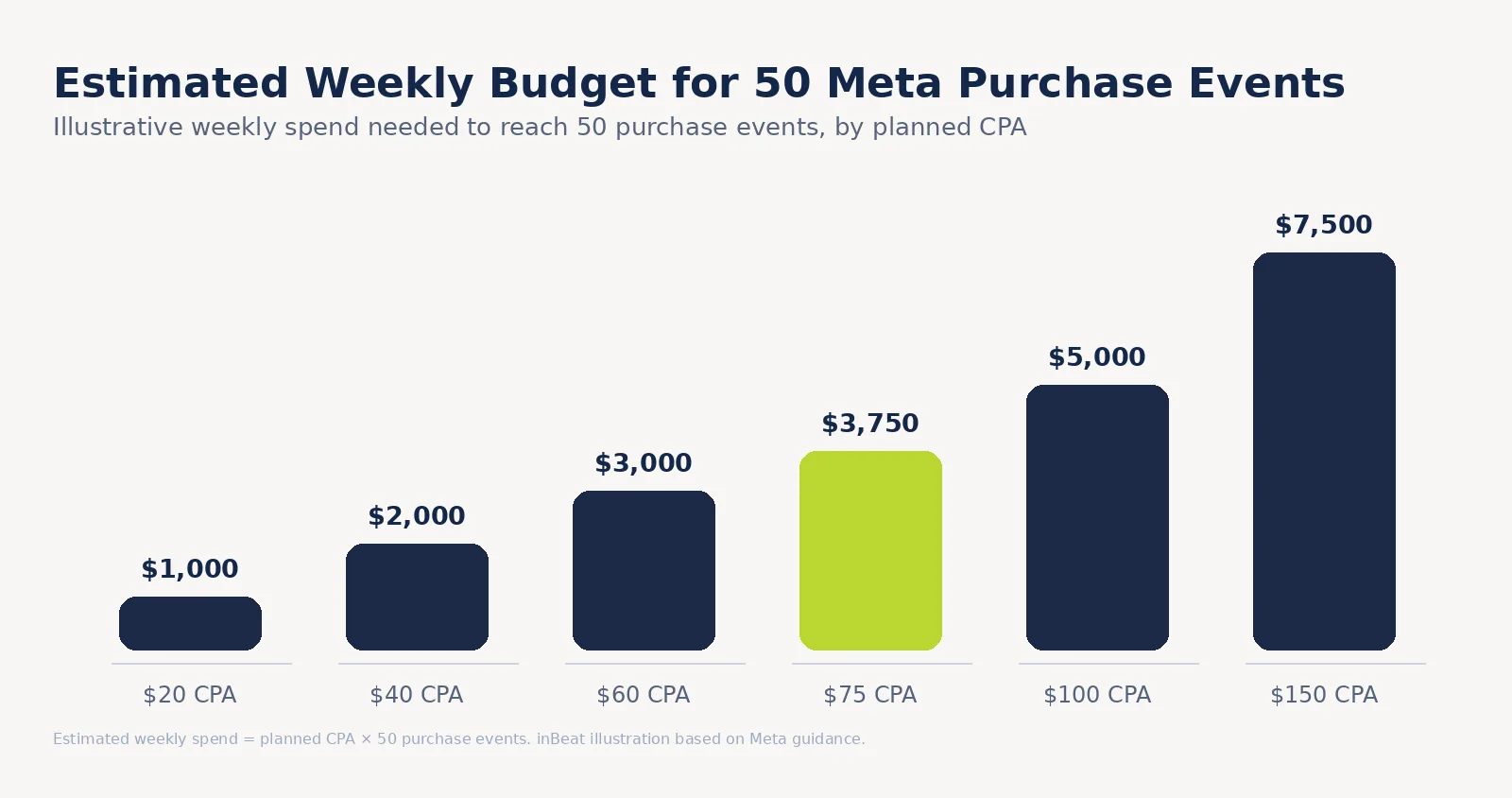
For platform-by-platform percentage splits, our paid social budget allocation guide owns that question. This tab checks whether the planned spend can support sufficient optimization-event volume.
Tab 4: Forecast Performance Metrics Before the Money Moves
Forecast each paid performance line using its buying model. CPM-based campaigns turn spend into impressions, clicks, and conversions.
CPC-based campaigns calculate clicks directly from spend and expected CPC. Both paths produce a forecast CPA to compare against the target.
| Metric | Formula | Where the input comes from | Common error |
|---|---|---|---|
| Impressions | spend / CPM x 1,000 | Account data, last 90 days | Using an industry average CPM from a blog |
| Clicks (CPM-based) | impressions x CTR | Account CTR by channel | Blending CTR across channels |
| Clicks (CPC-based) | spend / CPC | Account CPC, last 90 days | Using a blended CPC across different campaigns |
| Conversions | clicks x conversion rate | Site analytics | Applying the whole-site rate to a cold audience |
| CPA | spend / conversions | Computed | Comparing platform CPA with backend orders |
| Budget needed | target conversions x expected CPA | Brief and forecast | Skipping the learning-volume check |
| TRP | reach % x average frequency | Google Reach Planner | Mixing TRP and GRP definitions |
Run the budget formula backwards when the target is fixed. If the brief needs 2,000 conversions at a $60 CPA, the plan needs $120,000.
For awareness lines, plan a ceiling. Google's documentation shows that reach curves flatten as budget grows because extra spend mostly buys frequency, while video views stay close to linear. The same page lists weekly target frequencies of 2 to 4 and monthly targets of 4 to 8 as the options for video.
Inputs come from your own history first. Platform planners come second: Reach Planner forecasts reach, frequency and conversions for a plan, and Performance Planner simulates budget scenarios up to 18 months. Both forecast, and neither guarantees results.
Definitions for CPA and its neighbors live in our customer acquisition metrics guide.
Tab 5: Media Placement Calendar and Flighting by Week
Lay out media placement as a weekly grid, one row per placement. Every row gets:
- a channel and a format
- a start week and an end week
- weekly spend
- the creative asset it needs
- the date that asset is due
Set the due date before go-live, never on it.
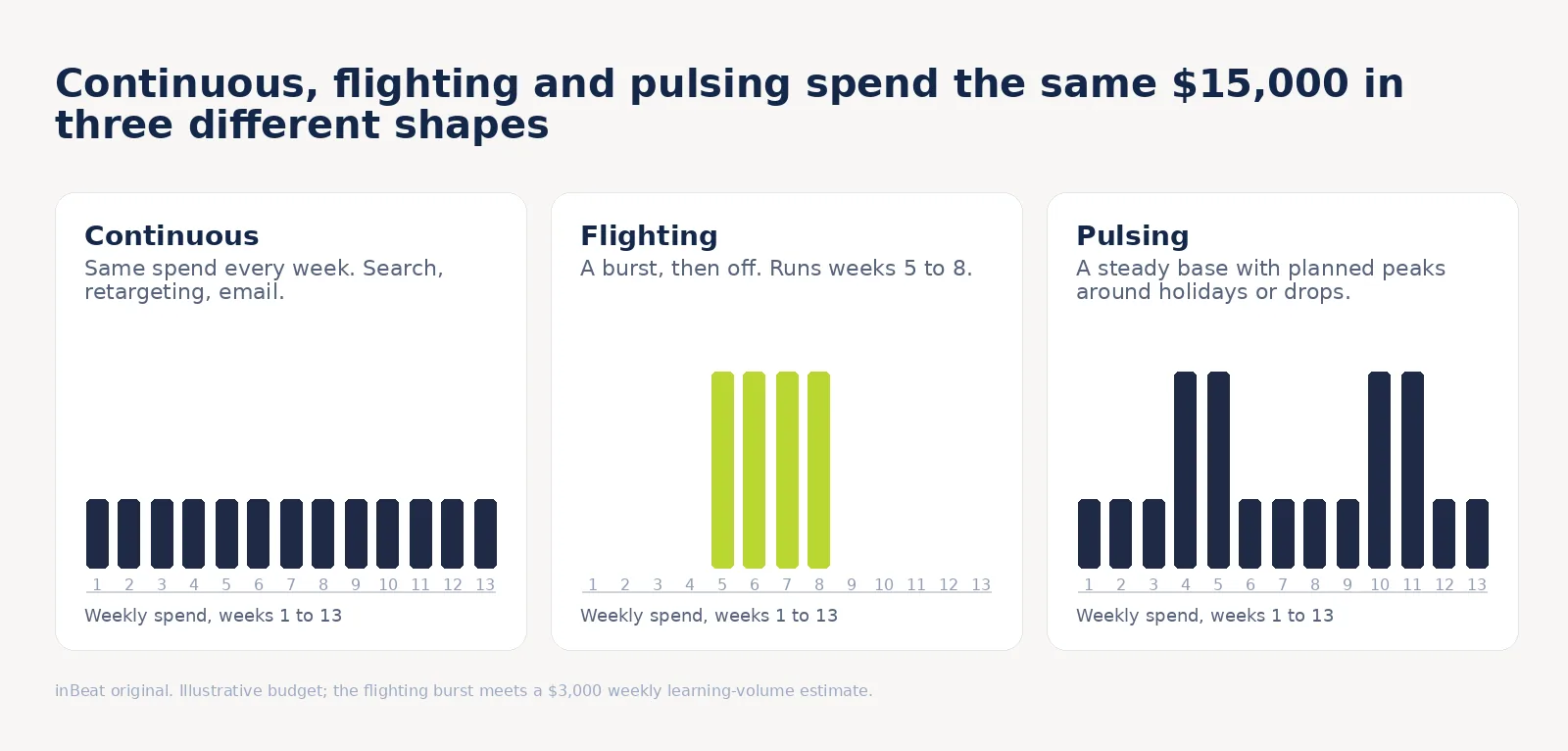
Pick one of three flight shapes per line:
- Continuous: the same spend every week. Best for search, retargeting and email.
- Flighting: on for a burst, off between bursts. Best for launches and creator pushes.
- Pulsing: a steady base with planned peaks around holidays or drops.
The calendar and learning-volume check work together. Concentrating a limited budget into fewer weeks can increase weekly optimization-event volume, giving delivery a better chance to stabilize.
Keep edits low once a line is live. Meta lists frequent budget changes among the edits that can send an ad set back into learning, so the calendar marks each line's last significant edit.
Frequency matters too. When the same audience sees the same ads too often, results fall; our creative fatigue guide shows what to watch.
Tab 6: Actuals Log That Feeds Performance Reports
Paste actuals beside the plan every week. One row per line, no merged cells, so a report or dashboard can read the tab directly.
- Columns: planned spend, actual spend, pacing, results, actual CPA, planned CPA, CPA variance, and days since the last significant edit.
- Status flag: one formula that returns Learning, OK or Over.
- Streak counter: weeks in a row over the threshold, which is what triggers a move.
Calculate CPA variance as (actual CPA / planned CPA) - 1, and store the alert threshold in a named assumptions cell rather than hard-coding it into formulas.
The status flag returns Learning during the initial review period after launch or a significant edit, Over when CPA variance exceeds the configured threshold, and OK otherwise. A separate counter tracks consecutive Over weeks for each budget line.
An Over flag prompts a review rather than an immediate budget change. Rule 1 also requires two consecutive weekly reviews above the threshold, at least 50 results across that window, and a data-quality check before reallocating spend.
Track two result layers and say which one decides. Platform-reported conversions are the within-channel signal. Orders from the shop backend or CRM settle disagreements.
If platforms report 612 conversions while the backend records 540 orders, that's a 13.3% reporting gap. The difference may reflect overlapping attribution, different conversion windows, or tracking discrepancies. Reconcile these figures before calculating blended CPA.
Decision Rules for Campaign Management: When the Template Moves Budget
Write the decision rules before launch, inside the workbook, so a budget move becomes a lookup. Campaign management without written thresholds turns every review into a debate about taste.
The table contains six decision rules with starting thresholds to calibrate against your margins, sales cycle, and historical performance.
The 50-result checkpoints in rules 1 and 5 are internal review thresholds, separate from platform learning-phase requirements. Reaching them provides an initial basis for reviewing performance, but does not establish statistical significance.
| Signal | Starting threshold | Action | Guardrail |
|---|---|---|---|
| 1. Line CPA above plan | More than 1.25x plan CPA for 2 weekly reviews, with 50+ results in the window | Shift up to 10% to an eligible line with available capacity and a lower forecast marginal CPA. | Ignore the first week after launch or any significant edit |
| 2. Line CPA well below plan | 20% or more under plan, pacing above 90% | Add up to 10% from the weakest line | Read marginal CPA for one review before a second shift |
| 3. Under-pacing | Spend below 85% of plan for 7 days | Diagnose delivery first: audience size, caps, bids | Move money only if a demand ceiling is confirmed |
| 4. Frequency over ceiling | Weekly frequency above the planned ceiling, click rate falling | Rotate creative first, release budget second | One significant edit per ad set per week |
| 5. Test reserve winner | Beats control CPA with 50+ results | Graduate part of the reserve into a main line | Keep some reserve for the next test |
| 6. Large scale-up | Any line grows more than 50% in a quarter | Run a holdout before adding the money | Read incremental results from the holdout |
Before reallocating spend, estimate marginal CPA as additional budget divided by expected additional conversions. Use account data or budget scenario forecasts to estimate the next increment. A channel's current average CPA may be lower than its cost of acquiring additional customers.
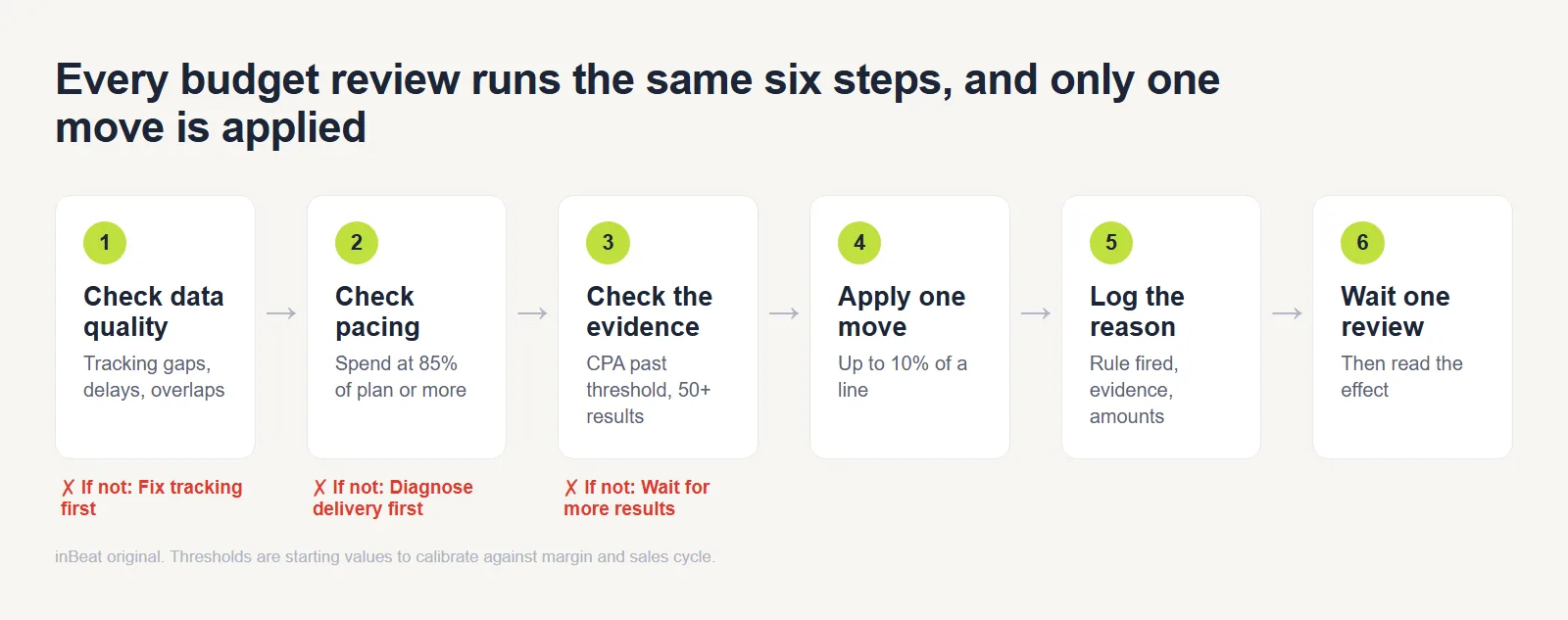
Run every review in the same order:
- Check data quality: tracking gaps, conversion delays, overlaps.
- Check pacing against the plan.
- Check CPA against the evidence minimum.
- Apply one move, never several.
- Log the move and the reason.
- Wait one review period before the next move.
Remember: The large scale-up rule depends on measurement that platform reports cannot supply.
Media Plan Example: Four Budget Decisions Across One Quarter
This illustrative DTC media plan allocates $150,000 over 13 weeks across four paid campaigns, owned email, and a test reserve, with a $60 target CPA. The $15,000 creator line covers paid amplification, while creator fees and usage rights are budgeted separately. All figures are illustrative.
| Line | Role | Share | Budget | Planned CPA | Planned conversions |
|---|---|---|---|---|---|
| Paid search | Capture | 25% | $37,500 | $45 | 833 |
| Paid social prospecting | Create | 40% | $60,000 | $75 | 800 |
| Retargeting | Capture | 10% | $15,000 | $22 | 682 |
| Creator-led paid amplification | Create | 10% | $15,000 | $60 | 250 |
| Email and SMS lifecycle | Retain | 5% | $7,500 | capacity | not forecast |
| Test reserve | Learn | 10% | $15,000 | not forecast | not forecast |
The forecast lines total $127,500 and 2,565 conversions, a blended CPA of about $49.70 against the $60 target, with the reserve unspent. Email stays out of the conversion total so the same order is not counted twice.
Four decisions follow across the quarter:
- Before launch, check learning volume. At a $75 CPA, the $60,000 Meta prospecting budget projects 62 purchase events weekly in one ad set, versus 21 per set if split three ways. Keep it consolidated to approach Meta's typical 50-event benchmark. A $15,000 creator amplification budget at $60 CPA projects 63 weekly events over four weeks, versus 19 across 13 weeks. Retargeting projects 52 at a $22 CPA. These estimates guide budget allocation but cannot guarantee stable delivery.
- Week 5, rule 1 triggers a review. Prospecting CPA reaches $98 against the $75 target (1.31x) in weeks 4 and 5, with 94 results. Paid search reports a $41 average CPA, but the team checks its incremental potential before reallocating spend. In this illustrative scenario, an additional $6,000 is forecast to generate 120 conversions, giving search a $50 marginal CPA. Search is losing impression share to budget rather than rank, indicating room to scale, so $6,000 shifts from prospecting to search.
- Week 8, rule 4 fires. Retargeting sits at its frequency ceiling with falling click rate, and a creative rotation in week 7 changed nothing. $3,000 goes to an unassigned pool.
- Week 10, rule 5 triggers a test review. A reserve-funded creative records 52 conversions at a $62 CPA, using $3,224 of the $15,000 reserve. After reviewing the $79 control and test conditions, the team reallocates $9,000 to prospecting. Assuming no other reserve spending, the remaining $6,000 allocation includes $3,224 already spent, leaving $2,776 available for future tests.
Every move is zero-sum. The revised allocations are $43,500 to search, $63,000 to prospecting, $12,000 to retargeting, $15,000 to creator amplification, $7,500 to email, $6,000 to the reserve, and $3,000 to the unassigned pool, totaling $150,000. These figures represent cumulative budget allocations, including amounts already spent, rather than unspent balances.
All six tabs for this plan, filled in, are in the PDF linked above.
Media Plan Checklist: What to Verify Before You Approve It
Run this checklist before anyone signs off. A plan with open rows is a plan that cannot guide a decision yet.
- Complete lines: every line has an objective, a primary metric, an owner, and a planned CPA or capacity number.
- Shares and reserve: shares sum to 100% and a test reserve exists.
- Learning-volume feasibility: each paid social line has a platform-specific event target, with consolidation or flighting considered where projected volume falls short.
- Forecast fits: forecast CPA sits inside the target with the reserve unspent. If the plan only meets the target once the reserve is counted, it fails.
- Owned channels: email marketing and similar channels carry a capacity number and no conversion forecast, so conversions are not counted twice.
- Deciding source: the plan names which measurement source settles disagreements.
- Rules written: decision rules exist and thresholds sit in input cells.
The same list compares two plans, such as an agency proposal and an internal draft. Score both, and the plan with fewer open rows wins before cost is compared.
Media Planning Software or Spreadsheet: When to Outgrow the Template
Move from a spreadsheet to media planning software when the workbook starts costing more time than it saves. Spreadsheets win on control and cost, and software wins on live data and shared editing.
| Option | Strength | Limit | Move on when |
|---|---|---|---|
| Microsoft Excel | Full formula control, offline | Version drift across copies | Several people email copies of the file |
| Google Sheets | Live co-editing, easy sharing | Slows with many lines and live connections | Formal approval workflows and detailed change tracking become necessary. |
| Media planning software | Live pacing, approvals, audit trail | Subscription cost, setup time | Pacing is needed daily across many platforms |
| BI layer, such as Looker Studio or Power BI | Dashboards over the actuals tab | Reads data and cannot plan | Reports take hours to assemble by hand |
Treat these as triggers to calibrate:
- Lines: more than five active lines across more than three platforms.
- Editors: multiple teams require formal approvals, permission controls, or an auditable change history.
- Report time: manual reporting that passes a monthly hour limit you set in the assumptions block.
- Cadence: daily pacing checks that the weekly paste cannot support.
Excel, Google Sheets or media planning software can each run the six tabs, and the tabs move to software intact. Once a plan spans many channels, media mix modeling is the next layer above the spreadsheet rules.
Build a Media Plan That Moves Money on Evidence With inBeat Agency
A media plan earns its keep when the next dollar goes where the last dollar worked. The six tabs, learning-volume estimates and written rules give a team that discipline without extra software.
If you want the plan built, forecast and run alongside the creative that feeds it, book a strategy call. We will review your current plan against the six tabs and the decision rules, and show where the budget is likely to be misplaced.
FAQs
How do you size a test reserve when weekly conversion volume is low?
Separate the platform's learning requirements from the evidence needed to evaluate a test.
At a $75 CPA, a test spending $1,000 per week would generate roughly 13 conversions weekly, or 53 over four weeks. That longer window may provide a directional CPA estimate, but it doesn't meet Meta's typical weekly learning-volume benchmark.
It also doesn't automatically make the test statistically significant. If conversion volume is limited, consolidate similar ad sets, test fewer variations, and set a review window appropriate to the decision you're making.
Should creator whitelisting sit in the media line or the production line?
Track creator fees and usage rights as production costs, and paid amplification as media spend. In the $150,000 example, the $15,000 creator line covers advertising spend only, with production costs budgeted separately.
This separation keeps media CPA calculations consistent. To evaluate the campaign's full acquisition cost, include creator fees and usage rights alongside advertising spend.
How does the template change for a B2B account with a 90-day sales cycle?
Lengthen the evidence window and move the decision metric earlier in the funnel. Judge lines on qualified leads or pipeline created for the first weeks, and apply rule 1 to cost per qualified lead.
How do you reconcile channel-reported conversions that add up to more than total orders?
Compare conversion definitions, attribution windows, and reporting periods first. Calculate the reporting gap by dividing total platform-reported conversions by backend orders and subtracting 1. In the example above, the gap is 13.3%, though this alone doesn't reveal how many conversions were counted twice.
Use deduplicated backend orders to calculate blended CPA, while keeping platform-reported conversions for within-channel performance comparisons.
When two lines both clear their CPA target, which one gets the next dollar?
The one with the lower cost on the next increment. Average CPA hides diminishing returns, so shift in small steps of about 10% and read one review period. Google's Investment Strategy tool shows a performance curve with the point of diminishing returns for the same reason.
How do you handle fixed-CPM reservation buys in a plan built on auction CPAs?
Mark the line as committed and exclude it from the rules. Google's planner lists reservation formats bought at a fixed CPM next to auction formats. Add a flexible-share cell, which is 100% minus the committed share, and let the decision rules move only that portion.