

%20(1).png)

Your next customer might already be searching for exactly what you sell. They type a question into TikTok, compare a few videos, and find a competitor whose content answers it. Meanwhile, your brand might have a better product and stronger creative, yet remain invisible to that searcher.
According to Adobe Express's 2026 survey, 49% of US consumers surveyed had used TikTok as a search engine. That's an opportunity hiding in plain sight, especially for brands still creating videos primarily for the feed.
So what makes content discoverable when someone searches rather than scrolls? This guide breaks down how to identify real search queries, build them into TikTok and Instagram content, and measure the results.
Find the missing opportunity.
inBeat POV: We treat social search as a production problem. The question a buyer types into TikTok is the brief, and the video that answers it in the first five seconds does the audience selection that no targeting setting can do anymore.
That's why we start in the comments and the autocomplete bar before we open a keyword tool. Build light, publish, read, rebrief.
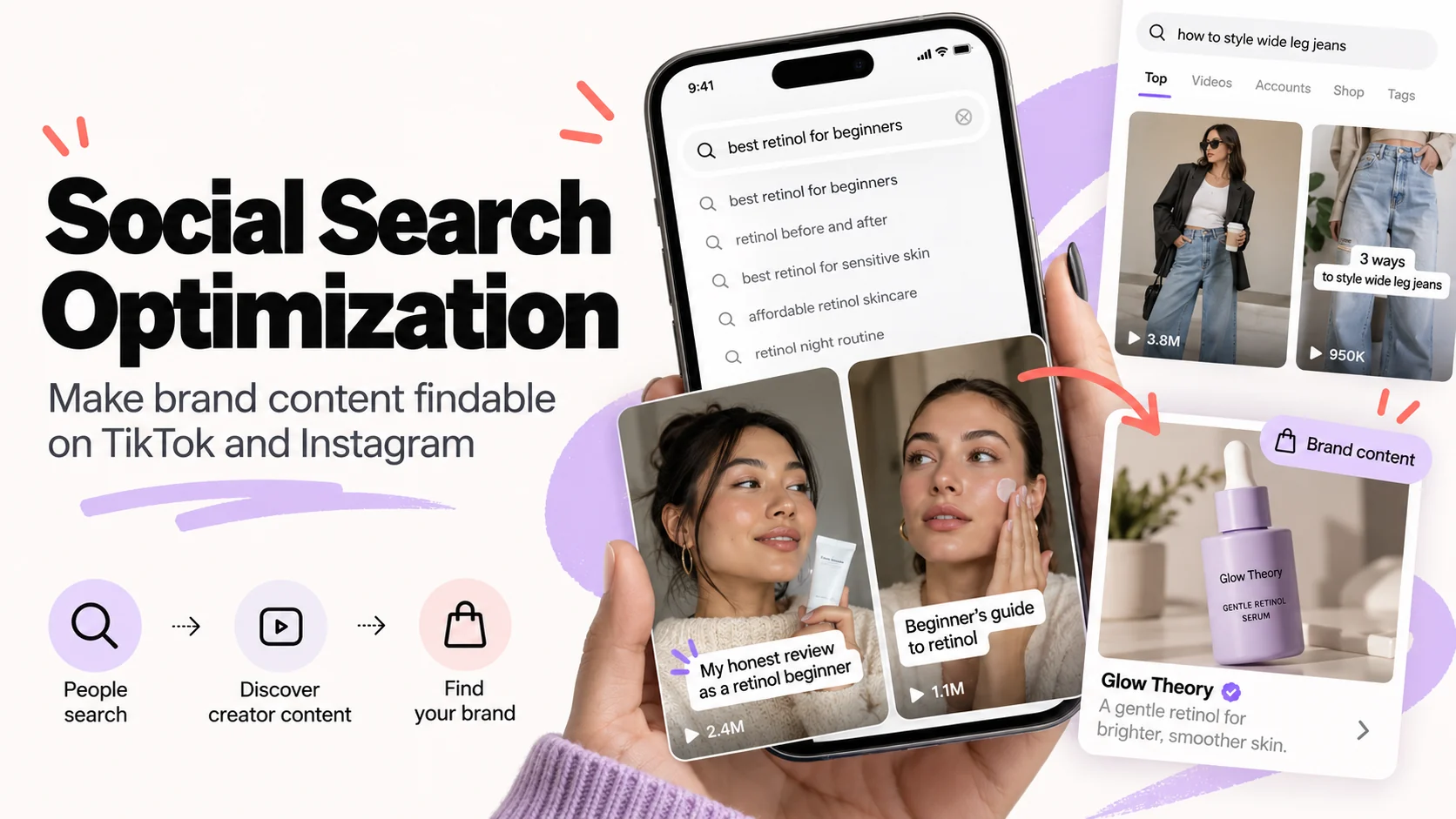
How Are Social Media Platforms Being Used as Search Engines?
People now use TikTok and Instagram search for the same jobs they once gave Google: picking a product, learning a technique, choosing a place. The intent is commercial or informational, and the phrasing is conversational.
What People Search for Inside TikTok and Instagram
Three kinds of query dominate in-app search, and each maps to a different video.
- Learn queries ask how to do something or how long a product takes to work.
- Compare queries pit options against each other, often for a specific skin type, body type or budget.
- Buy queries name a product or brand and ask whether it's worth it or what it looks like in real use.
The phrasing is spoken language typed out, so it keeps qualifiers web search drops: "for beginners", "when you're short", "that doesn't pill". Those qualifiers are the brief.
A brand that only publishes polished product content answers the buy query and leaves learn and compare to creators and competitors.
Why In-App Search Is Different From Feed Discovery
The feed finds the viewer; search is the viewer finding you.
In the feed, the platform guesses what someone might watch and reads their reaction afterwards, so performance decays within days and rewards novelty. In search, the viewer starts with a specific query, making relevance especially important. TikTok confirms that query matching plays a significant role in Search, although the effect of subsequent viewing behavior on a video's future position remains less clear.
That changes three things in production:
- The hook has to confirm the match immediately, because a searcher comparing results leaves a video that opens with anything other than their question.
- The words themselves matter in a way they never do in the feed, where a strong visual can carry a video with no category term anywhere.
- Search creates another opportunity for discovery after publication. A relevant video may continue attracting viewers through recurring queries, although the duration and volume of that traffic vary.
Social Search Optimization vs Google SEO: What Actually Changes
Social media SEO and Google SEO share a name and a goal, and almost nothing else about how the work gets done or who should own it.
Ranking Inputs: Backlinks and Crawlable Text vs Multimodal In-App Signals
Google ranks pages largely on crawlable text and the authority a domain accumulates through links.
TikTok and Instagram search appear to rank individual videos on what the video itself carries:
- the caption
- the words shown on screen
- the words spoken aloud
- how viewers behave after they tap
The next section goes through those signals in detail.
The implication for budget owners is that on TikTok authority appears to be earned per video, with no carryover from the domain, so a strong website gives no head start. Instagram also reads account-level text and popularity signals, so there the profile counts too.
Time Horizon: Editable Web Pages vs Published Videos
A well-maintained web page can be updated as search intent changes. Published videos offer less flexibility because their spoken content and visuals generally require a new upload to change.
Search visibility on TikTok and Instagram can fluctuate over time, and neither platform documents a universal period after which a video's position becomes fixed. That makes pre-publish quality checks important, while ongoing performance reviews help determine whether a video continues attracting search traffic.
Measurement: Search Console vs Platform Insights
Search Console gives query-level impressions and clicks. Platform insights give a coarser traffic-source split, with search listed alongside the feed and profile.
The measurement section covers what that split omits.
| Dimension | Google SEO | TikTok / Instagram search | Implication for your team |
|---|---|---|---|
| Ranking inputs | Crawlable text, links, site authority | Caption, on-screen text, speech, post-click watch behavior | Signals must be produced during the shoot, not added by an SEO after |
| Content unit | Page on a domain | Individual video on an account | Authority sits mostly at video level; on Instagram the profile counts too |
| Refresh cadence | Edit and republish anytime | Audio and overlay are fixed at publish, the caption can be edited later; iterate with the next video | Pre-publish QA matters more than post-publish tweaks |
| Keyword research | Web volume tools, Search Console | In-app autocomplete, suggested searches, comments | Web search tools cannot measure in-app demand |
| Measurement surface | Search Console | Platform insights traffic-source split | Coarser data; design tests instead of reading dashboards |
| Who owns it | SEO team | Social and creative production team | Assign one owner for in-app research and reporting |
A note on volume: the phrase "social search optimization" itself shows roughly 30 US Google searches a month in DataForSEO data, which tells you nothing about how many people type "best retinol" into TikTok. Web tools cannot see in-app demand, which is why the research step later in this guide happens inside the apps.
Our side of the comparison: if you're a consumer brand already producing video, social search optimization is cheaper to add than a new SEO program, because it changes briefs and builds no new assets.
It does not replace web search or PPC and Google Ads, which capture intent your social presence never sees.
Decide this week whether your social team or your SEO team runs in-app keyword research and reporting. Split ownership is how it ends up owned by nobody.
How TikTok and Instagram Search Algorithms Rank Content
TikTok and Instagram both use relevance signals to organize search results, but they evaluate content differently.
TikTok identifies query relevance, user interactions, and account settings among its search signals. Instagram emphasizes search text, user activity, and result popularity.
Neither platform publishes a complete ranking formula for individual videos, so the practical recommendations below distinguish documented signals from techniques worth testing.
Which Signals Does TikTok Search Use?
TikTok's official guidance identifies three groups of signals that can influence search results:
- Content information: How closely a video matches the search query, including relevant hashtags and sounds.
- User interactions: Previous searches and content a person has watched, skipped, liked, shared, or commented on.
- User information: Factors such as language preferences and location.
TikTok says content information, particularly relevance to the entered query, generally carries more weight in Search. However, the platform does not disclose how much individual elements such as spoken keywords or on-screen text contribute to ranking.
For brands, a practical approach is to make the video's subject immediately recognizable through its opening line, visible text, and caption. Whether these choices improve search placement should be tested against actual search-driven performance.
Which Signals Does Instagram Search Use?
For Instagram SEO, the one documented source is Instagram's own explanation of how Search ranks results, published in 2021. It says:
- the typed text is matched against usernames, bios, captions, hashtags and places
- for a post to be found in Search, keywords and hashtags go in the caption
- popularity signals such as clicks, likes, shares and follows also count
Instagram's published search guidance does not establish spoken keywords in Reels as a ranking factor. Their potential contribution to search visibility remains unverified, so treat them as a creative technique worth testing rather than a confirmed ranking requirement.
Account-level fields matter more here than on TikTok: handle, display name and bio decide whether the profile itself surfaces for a query like "clean skincare".
What Both Platforms Appear to Weigh and What Remains Undocumented
Both platforms consider search relevance and user-related signals, although their documented ranking inputs differ. TikTok emphasizes how closely content matches a query, while Instagram also considers searcher activity and result popularity.
The exact influence of spoken phrases, text overlays, and post-click viewing behavior on individual video rankings remains unclear.
What stays undocumented:
- the relative weight of each input
- how long the engagement window runs
- how speech-to-text handles accents and background music
- whether paid promotion touches organic search ranking at all
Nothing in this article or any other blog settles those questions. Treat them as hypotheses.
The practical move is an audit. Pull your last 20 posts and mark, per video, which of the signals it carried:
- spoken category phrase
- on-screen phrase
- caption lead
- relevant hashtags
- profile keyword
Most brand accounts find the caption column full and the speech and overlay columns nearly empty. That gap is where the next two sections do their work.
Pro tip: Review the auto-generated transcript to check whether the creator's key phrases are captured accurately. Clear spoken language can reinforce the video's topic for viewers, while the caption provides another source of relevant text. Treat the ranking benefit of spoken keywords as a hypothesis rather than a confirmed requirement.
How to Do Keyword Research Inside TikTok and Instagram
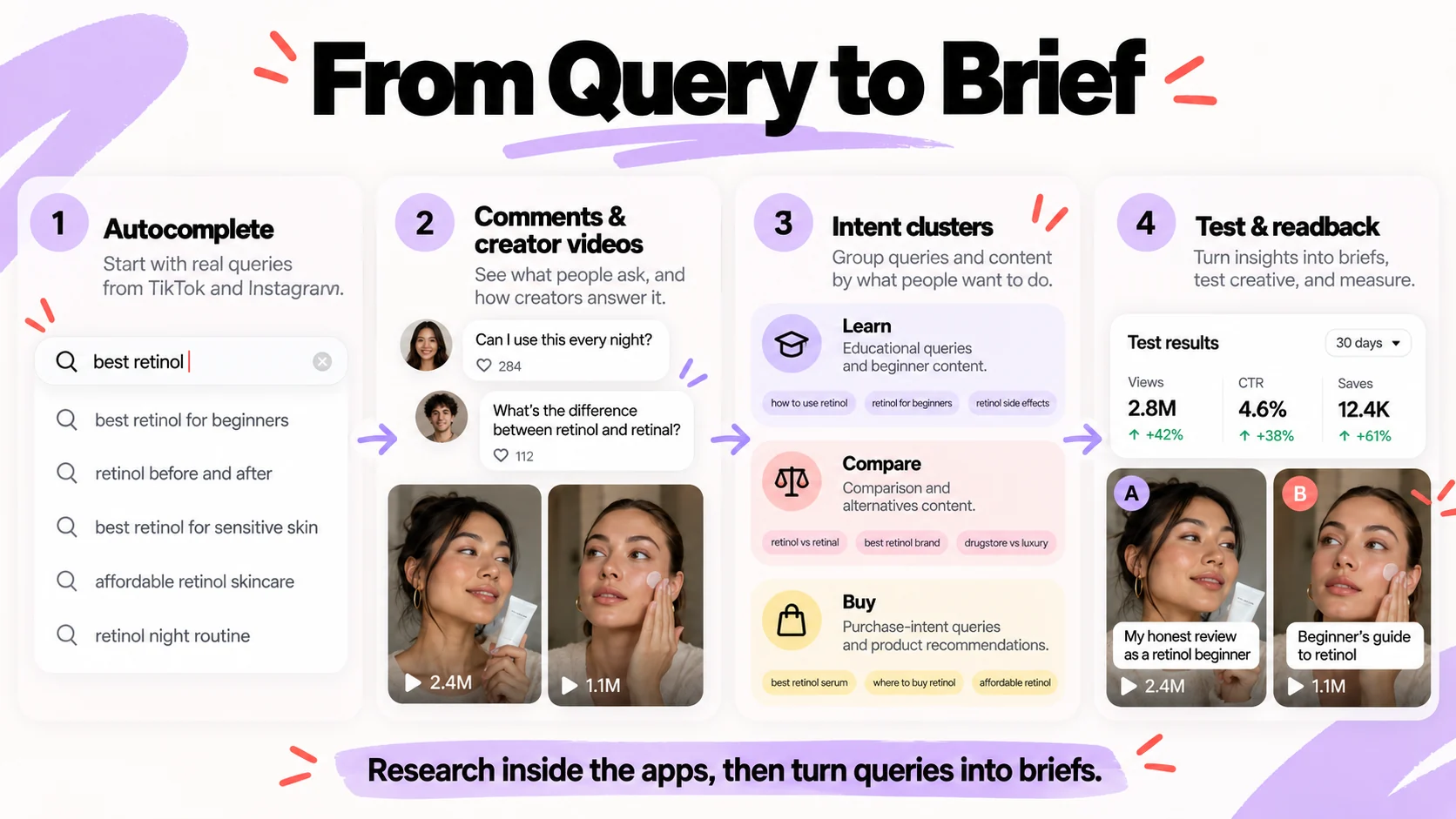
Social search keyword research happens inside the apps, because autocomplete, comments and creator videos are where in-app demand is visible. The process below runs from seed terms to a query map in three steps and should take a content lead an afternoon per product line.
Step 1: Pull Autocomplete and Suggested Searches for Seed Category Terms
- Type each seed category term into TikTok search and record every autocomplete suggestion, then do the same in Instagram.
- Open the results tab for each seed and record the "others searched for" or related-search chips that appear.
- Repeat for each suggestion that looks like a buying or how-to question, one level deep. Stop when suggestions start repeating.
A conceptual example: a skincare brand seeds "retinol" and harvests variants such as:
- "retinol for beginners"
- "retinol purge how long"
- "retinol vs retinal"
- "retinol at night routine"
Each query can inform a video brief, but web search volume cannot tell you how often people search for it inside TikTok or Instagram.
On TikTok, Creator Search Insights adds a list of topics people search for often, with a filter for topics few videos cover; TikTok says it is available in select regions.
Step 2: Mine Comments and Creator Videos for the Phrases Buyers Actually Use
- Open the top ten results for each seed and read the comments. Copy any question that appears more than twice, in the commenter's words.
- Watch the top results and note the phrases creators say in the first five seconds and show on screen. Those are the phrases already winning the query.
- Compare both lists with your brand vocabulary and replace internal terms with the buyer's. People search "does retinol make skin peel", not "retinoid adjustment period".
Comment language beats brand language because searches are typed the way questions are asked out loud. Your product team's name for a feature almost never matches.
Step 3: Cluster Queries by Intent and Assign Each a Content Format
- Tag every query as learn (how-to, explainer), compare (vs, best for) or buy (product name, where to get, worth it).
- Assign a format that fits the intent stage: demo or tutorial for learn, side-by-side for compare, product-led unboxing or results walkthrough for buy.
- Match each query to the persona or creator type whose credibility fits the question, and set a status.
Do not skip the buy cluster. Some queries are transactional, and they need a product-led format where another explainer would miss the buyer.
| Query | Intent stage | Content format | Persona or creator match | Status |
|---|---|---|---|---|
| retinol for beginners | Learn | Tutorial, first-week routine | Esthetician or sensitive-skin creator | Briefed |
| retinol purge how long | Learn | Explainer with timeline | Creator documenting own purge | In production |
| retinol vs retinal | Compare | Side-by-side with results | Ingredient-literate skincare creator | Backlog |
| best retinol for sensitive skin | Compare | Short ranked review | Sensitive-skin creator | Backlog |
| [brand] retinol worth it | Buy | Results walkthrough, 30 days | Existing customer creator | Published |
The table is a hypothetical map for one product line, shown to illustrate the structure. Build your own 30-query version this week using autocomplete and comment mining before anyone writes a brief.
Tool recommendations stay generic here on purpose: the apps' own search surfaces are the primary tool, and no third-party tool has been evaluated for this guide.
How to Optimize TikTok and Instagram Videos for Search: Spoken Phrases, On-Screen Text and Captions
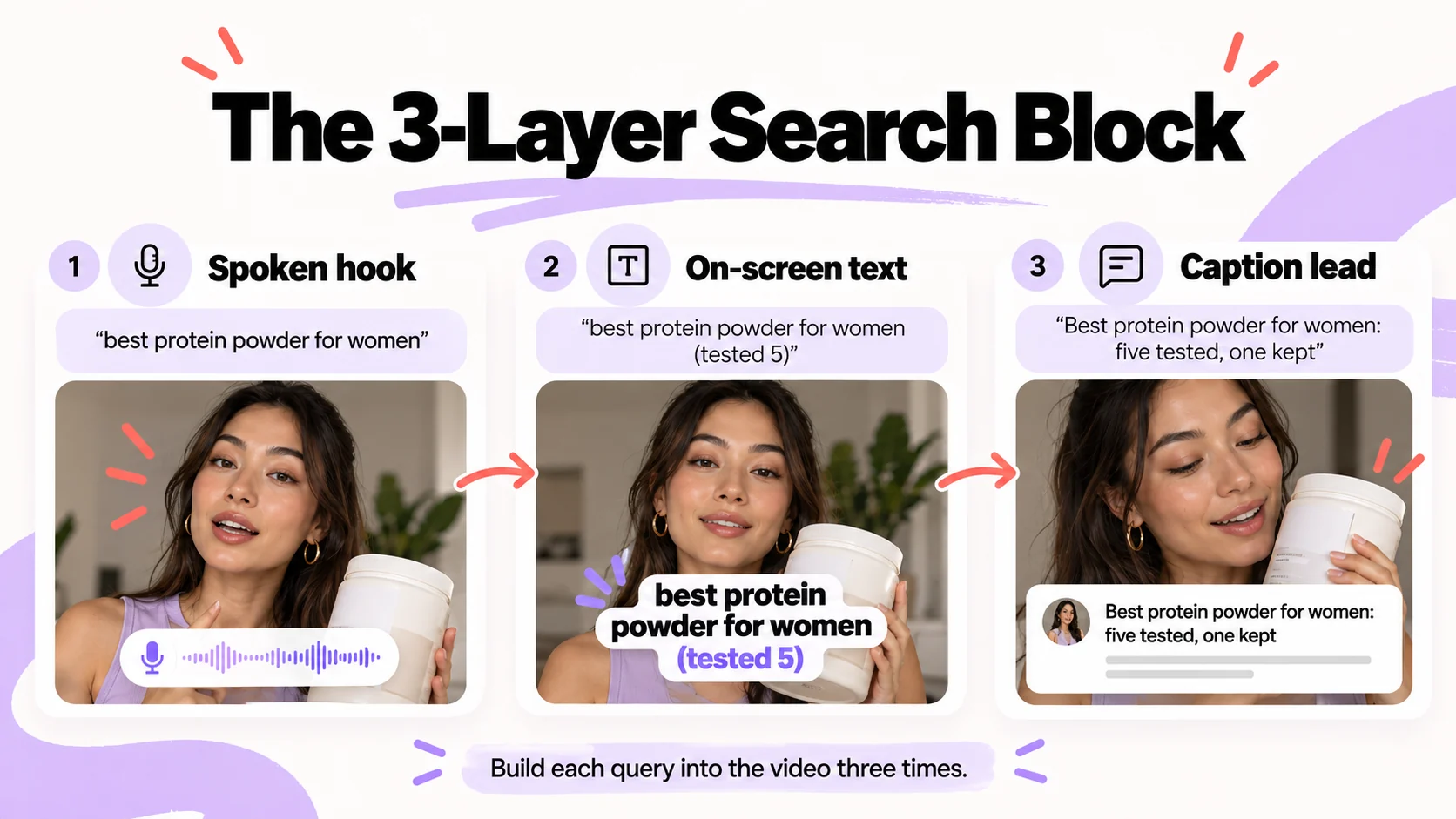
Build each target query into the video three times, in three different places:
- spoken in the hook
- shown as on-screen text
- leading the caption
That redundancy is the whole technique. Each signal below opens with the instruction, then the detail.
Say the Query Out Loud in the First Five Seconds
Script the exact query, or its closest natural variant, into the first line the creator speaks.
Auto-generated captions can capture spoken phrases, making the transcript a useful quality check. Although neither platform confirms a specific ranking advantage for keywords spoken in the opening seconds, mentioning the search topic early helps viewers recognize that the video answers their question. That makes a clear, relevant hook valuable regardless of its direct ranking effect.
Two production rules make this work:
- Keep auto-captions on and review the generated transcript, because a mumbled phrase over music becomes gibberish that matches nothing.
- Let the creator rephrase the query into their own cadence as long as the key nouns survive. "Best protein powder for women" can become "if you're a woman looking for the best protein powder, here's what I'd pick" without losing retrievability.
A conceptual before and after:
| Version | Opening line | What search gets |
|---|---|---|
| Before | "okay so this one is interesting" | The category is never said |
| After | "best protein powder for women, I tested five, this is the one I kept" | Something to find |
Same product, creator and footage from second ten onward. Only the first sentence changed.
Put the Query in On-Screen Text as Well as the Caption
Show the target query as on-screen text during the opening seconds, positioned where platform interface elements won't obscure it. The text can be added in the platform's editor or embedded during video production.
Its immediate value is clarity: viewers can recognize the video's subject even when watching without sound. Whether TikTok or Instagram treats native overlays differently from text embedded in uploaded videos for search ranking remains undocumented, so prioritize readability rather than the editing method.
Placement matters as much as presence:
- Keep the overlay in the upper two-thirds of the frame and away from the right edge where buttons sit.
- Hold it long enough to be read at a glance.
- In the protein powder example, the overlay reads "best protein powder for women (tested 5)" over the first three seconds, then clears for the demo.
- Use one clear, readable phrase rather than cluttering the opening with multiple overlapping text elements.
The overlay also does a job the transcript cannot. Viewers scrolling with sound off still see the phrase that matches their search, which is a relevance confirmation in the first half second and a reason to stay.
Write Captions and Hashtags as a Retrieval Layer
Caption: Lead the caption with the query, then write the rest as you would for the feed. The first line is the one most likely to be read as the post's subject, by viewers and by the index. In the example, the caption opens "Best protein powder for women: five tested, one kept" and then gets into flavor and mixability.
Hashtags: Cap hashtags at a handful of relevant ones. Three to five that name the category and the format can help communicate the video's subject. Avoid repeated phrases and unrelated trending tags that add little context.
| Signal | Where it lives | Who owns it | What to avoid |
|---|---|---|---|
| Spoken hook | First five seconds of audio, verified in the auto-transcript | Creator, from the brief | Phrase buried mid-video; music drowning the words |
| On-screen phrase | Opening seconds of the video, inside the safe zone | Editor or creator | Text obscured by UI elements, poor readability, or overlays that disappear too quickly |
| Caption lead | First line of the caption | Social manager | Leading with an emoji or a joke and naming the category last |
| Hashtags | End of caption | Social manager | Twenty tags, repeated phrases, unrelated trending tags |
| Profile metadata | Handle, display name, bio | Brand or account owner | Display name with no category term |
One reconciliation remains. Search structure and native feel only conflict when the structure is imposed as copy to be read.
Written as a question the creator genuinely answers, the query becomes a natural opening: a buyer who typed "best protein powder for women" hears their own question answered by a person they chose to watch, which protects the likability you paid for. Briefing for that delivery is its own skill, covered in our piece on why expensive creator content still reads like an ad.
These production requirements belong in the creator brief, where the team can check them before filming and publishing.
The next section turns them into a practical template that creators, editors, and social managers can use together.
Social Search Optimization Examples: A Field-by-Field Video Brief Template
The template below turns the previous section into fields a creator, editor and social manager can fill in without re-reading the mechanics. Copy it into your brief tool as-is.
Template Fields and What Goes in Each
| Field | What to enter | Why it matters for search | Check before publishing |
|---|---|---|---|
| Target query | One query from the map, exact buyer phrasing | Everything else is written against it | Matches a row in the query map |
| Intent stage | Learn, compare or buy | Sets the format and the CTA | Format matches stage |
| Persona | Who the video speaks to and who delivers it | The persona in the creative does the audience selection | Creator fits the persona |
| Spoken hook (key terms) | A natural opening that includes the target query's essential terms and allows the creator to adapt the phrasing. | Helps establish the video's topic and allows transcript-based quality checks | Query nouns appear in the auto-transcript |
| On-screen phrase | Exact overlay text and seconds on screen | Helps viewers immediately recognize that the video addresses their search topic. | Visible in platform preview, inside safe zone |
| Caption first line | The query, then a colon or dash to the rest | Likely read as the post's subject | First line contains the query |
| Hashtags | Three to five category and format tags | Light relevance layer | No repeats, no unrelated tags |
| CTA | What the viewer does next, matched to intent stage | Converts search traffic | CTA does not interrupt the hook |
| Measurement tag | Code linking the post to its query and test group | Enables matched-pair readback | Logged in the tracking sheet before posting |
Treat the brief as a production guide rather than a word-for-word script. Creators can adapt the opening to their natural delivery as long as the essential query terms remain clear.
The next step is checking whether those requirements made it into the finished video.
How to Evaluate a Finished Video Against the Brief
- Read the auto-generated transcript and confirm the query nouns appear in the first lines.
- Open the post in the platform preview and confirm the overlay is legible, inside the safe zone and held for the specified seconds.
- Confirm the caption's first line contains the target query.
- Check hashtags for repeats or unrelated tags.
- Log the measurement tag and the test group in the tracking sheet, then publish.
A worked example, entirely hypothetical, with no results attached:
| Field | Entry |
|---|---|
| Target query | how to style wide leg jeans |
| Intent stage | Learn |
| Persona | a petite creator in her late twenties whose audience asks fit questions |
| Spoken hook | "You keep asking how to style wide leg jeans when you're short, so here are three outfits." |
| On-screen phrase | "how to style wide leg jeans (petite)", seconds 0 to 4 |
| Caption first line | "How to style wide leg jeans if you're petite: three outfits, one pair." |
| Hashtags | #widelegjeans #petitestyle #outfitideas #howtostyle |
| CTA | "Save this for your next fitting room trip." |
| Measurement tag | WLJ-01-A |
The field that comes back blank most often across your next five videos is the one the brief needs to spell out.
How to Measure Social Search Performance and Test Incremental Reach
Social search performance starts with a simple question: are optimized videos attracting more viewers through search than comparable content? Platform analytics can provide an initial answer, although search traffic is easier to assess on TikTok than Instagram.
A matched-pair test helps identify whether the changes to your creative brief are associated with additional search-driven views. Connecting those views to revenue requires separate conversion tracking.
What Platform Analytics Can Tell You About Search Traffic
| Metric | Where to check | What it shows | Main limitation |
|---|---|---|---|
| Search traffic share | TikTok post analytics, where available | The percentage of video views attributed to search | A higher share can result from fewer feed views rather than more search traffic |
| Estimated search-driven views | Calculated from total views and search traffic share in TikTok analytics, where available | Approximate volume of views coming from search | Depends on available traffic-source data and may be affected by rounding |
| Reel views and reach | Instagram Insights | Overall content distribution and audience exposure | Search traffic may be grouped with other discovery sources |
| Profile visits, saves and shares | Native post analytics | Audience interest and engagement after viewing | Cannot reliably isolate actions taken by search visitors |
| Website clicks and conversions | Tagged links and website analytics | Trackable actions associated with the content | Attribution alone does not prove that the content generated incremental sales |
The metrics listed are those the platforms expose in their native analytics; their exact definitions change, so confirm labels in your own account.
Read search traffic share alongside total views rather than treating the percentage as a standalone result.
A rising search share can reflect stronger search discovery, weaker feed distribution, or both. Where traffic-source data is available, compare estimated search-driven views over a consistent period.
Use profile visits, saves, and website actions as supporting indicators of audience interest. On Instagram, where search attribution may be unavailable, report broader content performance separately rather than assigning unverified views to search.
How to Run a Matched-Pair Test for Search Performance
- Select ten upcoming videos. Create five pairs with comparable products, target queries, creator types, and content formats. Assign one video in each pair to the search-optimized brief and the other to your existing process.
- Keep production conditions comparable. Use similar posting windows, video lengths, and promotional support. Ideally, exclude paid promotion from both groups to reduce differences unrelated to the creative brief.
- Set the measurement window in advance. Record total views, search traffic share, and estimated search-driven views where available. Track saves, profile visits, and website actions as secondary indicators.
- Compare results within each pair. Look at absolute search-driven views alongside search share. Then examine whether optimized videos consistently outperform their counterparts across the five pairs.
- Treat the outcome as an initial signal. Five pairs can reveal promising patterns but cannot establish a reliable causal effect. If results favor the optimized approach, repeat the test across more videos before making it a standard production requirement.
The goal is to determine whether search-focused creative changes are associated with additional discovery, then test whether that pattern holds at a larger scale.
Can Social Search Extend a Video's Organic Reach?
Paid distribution depends on continued investment, while organic videos can keep attracting viewers after their initial release. Search offers one possible source of that later discovery, particularly when a video answers a question people repeatedly ask.
However, neither TikTok nor Instagram guarantees sustained search placement, and the size of any long-term effect remains uncertain. Track search-driven views over consistent reporting periods where the data is available.
Remember: If relevant videos continue attracting search traffic weeks after publication, that provides a reason to investigate the opportunity further.
Report social search performance in two layers: discovery and business outcomes. Track search-driven views where available, then compare website visits, attributable conversions, and production costs.
If revenue attribution is reliable enough, use those figures to estimate financial returns while acknowledging their limitations. Until then, treat search optimization as a tested source of organic discovery rather than a proven revenue channel.
What Are the Risks of Social Search Optimization?
Social search optimization fails in three predictable ways: keyword stuffing, a poor fit for some B2B categories, and platform changes that shift ranking without notice. Address all three before you roll the brief out.
Does Keyword Stuffing Hurt Social Search Performance?
Yes, in two ways. Viewers read it as spam, and Instagram's own search post says accounts that post spam may appear lower in results.
Stuffing usually looks like one of these:
- a caption that opens with the query and then lists every variant
- an overlay packed with synonyms
- a wall of hashtags that name nothing
Keep each field to one natural statement of the query. Put regional or synonym variants in separate videos, as the FAQ below explains.
Does Social Search Optimization Work for B2B Brands?
It can, but treat it as a test. Nothing in this guide was measured on B2B categories, and no source cited here reports B2B search volume inside the apps.
The mechanism carries over: a buyer who types "how to reduce churn" into an app is still matched on spoken words, overlay and caption. What changes is where you check first:
- Run the autocomplete and comment-mining steps from the keyword research section before you brief anything.
- If the seed terms return few suggestions and few comments, your buyers are probably searching on other platforms, and this guide does not cover them.
- If they return a usable query map, run the same matched-pair test as any consumer brand.
How Often TikTok and Instagram Search Changes and What Stays Stable
Both platforms keep building search, and neither publishes a change log for ranking. Two signals from their own announcements:
- Instagram said in its 2021 search post that the keywords you can search for were expanding, starting with English.
- TikTok launched Creator Search Insights in March 2024 and said search value will factor into its Creator Rewards Program.
Platform updates may change how content is discovered, making periodic checks more useful than relying on a fixed optimization formula. Revisit your query map, review search-related performance where data is available, and repeat controlled tests when you introduce new formats or enter new markets.
How inBeat Builds Search-Ready Creator and Brand Content
At inBeat, we approach social search as part of creator production rather than a separate optimization task. That means connecting audience research with creator selection, creative direction, and performance testing, so each video has a clear purpose from the first brief.
We have no proprietary search-reach results to report here, so the approach outlined in this guide draws on platform documentation and a proposed testing framework. The same query research can also inform paid creative experiments, giving brands a consistent starting point for evaluating different messages and creators.
What we offer for teams that want search built in:
- Brief design with the three-line search block on every video
- Creator matching by persona so the right messenger says the query
- Creative testing through media buying so you learn which message and messenger earned the next batch
Book a strategy call with inBeat to scope a search-ready creator and performance creative program.
FAQs
Should we re-edit existing top-performing videos to add spoken queries, on-screen text and caption leads, or apply the brief only to new production?
Apply the brief to new production and leave published winners alone. You can edit a caption after posting, which is worth doing for any video that already ranks near a category query, but you cannot change the audio or overlay without reposting, and a repost resets whatever engagement history the original earned.
Re-shooting a proven concept with the search block in place is a better use of the footage than editing the original.
Do whitelisted or creator-posted videos carry search signals for the brand's category queries, and does paid promotion change how they rank in search?
A video posted on the creator's account carries its own signals and ranks under the creator's profile, so a search for the category can surface it, but a search for your brand will depend on whether the brand name is spoken, shown or captioned.
Whether paid promotion influences organic search ranking is undocumented by either platform. Assume it doesn't, keep paid off your matched-pair test videos, and let the result tell you.
When the search-optimized hook conflicts with the creator's natural delivery, which should win and how do you reconcile them?
The creator's delivery wins. Check the transcript for the key nouns; if one is missing, ask for one more take. If the creator still will not say it, carry that noun in the overlay and the caption lead and accept weaker spoken retrieval for that video.
How do we handle regional phrasing or multiple languages when the same product gets searched with different words?
Run the autocomplete step per market and per language, because suggestions differ by locale. Then brief one video per phrasing and keep variants out of any single caption. A single video trying to carry "sneakers" and "trainers" in every field reads as stuffed to both audiences.
How should we set a judgment window for whether a video is ranking in search before we decide to rebrief it?
Set the window before you post and apply it to every video in the test. There is no evidenced standard duration; pick a period long enough for search-sourced views to show in analytics for your account's typical post, and treat a video that shows no search share by the end as a rebrief candidate; the approach itself is not disproved by one video.
Can the same query map feed both organic social search content and paid social creative testing?
Yes, and it should. Each query is a message hypothesis, and each persona match is a messenger hypothesis.
Organic post metrics provide an initial indication of content performance, while paid creative tests help evaluate how different messages and creators perform with targeted audiences. Read both results into the next batch of briefs, and the map becomes the shared backlog for social, creative and performance.


